





Question: The Basic Assignment For the basic part of the assignment, improve the file client and server codes as follows: Make the client write the received
 The Basic Assignment For the basic part of the assignment, improve

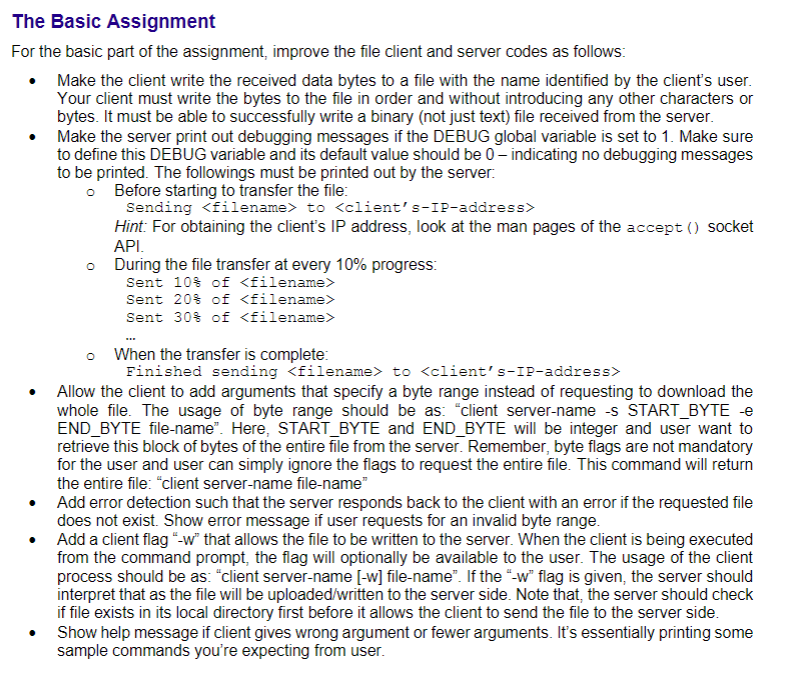
The Basic Assignment For the basic part of the assignment, improve the file client and server codes as follows: Make the client write the received data bytes to a file with the name identified by the client's user. Your client must write the bytes to the file in order and without introducing any other characters or bytes. It must be able to successfully write a binary (not just text) file received from the server. Make the server print out debugging messages if the DEBUG global variable is set to 1. Make sure to define this DEBUG variable and its default value should be 0 - indicating no debugging messages to be printed. The followings must be printed out by the server o Before starting to transfer the file: Sending to Hint: For obtaining the client's IP address, look at the man pages of the accept() socket API. During the file transfer at every 10% progress: Sent 10% of Sent 20% of Sent 30$ of o When the transfer is complete Finished sending to Allow the client to add arguments that specify a byte range instead of requesting to download the whole file. The usage of byte range should be as "client server-name -S START_BYTE - END_BYTE file-name". Here, START_BYTE and END_BYTE will be integer and user want to retrieve this block of bytes of the entire file from the server. Remember, byte flags are not mandatory for the user and user can simply ignore the flags to request the entire file. This command will return the entire file: "client server-name file-name" Add error detection such that the server responds back to the client with an error if the requested file does not exist. Show error message if user requests for an invalid byte range. Add a client flag"-w that allows the file to be written to the server. When the client is being executed from the command prompt, the flag will optionally be available to the user. The usage of the client process should be as: "client server-name (-w] file-name". If the "-w" flag is given the server should interpret that as the file will be uploaded/written to the server side. Note that, the server should check if file exists in its local directory first before it allows the client to send the file to the server side. Show help message if client gives wrong argument or fewer arguments. It's essentially printing some sample commands you're expecting from user. The Basic Assignment For the basic part of the assignment, improve the file client and server codes as follows: Make the client write the received data bytes to a file with the name identified by the client's user. Your client must write the bytes to the file in order and without introducing any other characters or bytes. It must be able to successfully write a binary (not just text) file received from the server. Make the server print out debugging messages if the DEBUG global variable is set to 1. Make sure to define this DEBUG variable and its default value should be 0 - indicating no debugging messages to be printed. The followings must be printed out by the server o Before starting to transfer the file: Sending to Hint: For obtaining the client's IP address, look at the man pages of the accept() socket API. During the file transfer at every 10% progress: Sent 10% of Sent 20% of Sent 30$ of o When the transfer is complete Finished sending to Allow the client to add arguments that specify a byte range instead of requesting to download the whole file. The usage of byte range should be as "client server-name -S START_BYTE - END_BYTE file-name". Here, START_BYTE and END_BYTE will be integer and user want to retrieve this block of bytes of the entire file from the server. Remember, byte flags are not mandatory for the user and user can simply ignore the flags to request the entire file. This command will return the entire file: "client server-name file-name" Add error detection such that the server responds back to the client with an error if the requested file does not exist. Show error message if user requests for an invalid byte range. Add a client flag"-w that allows the file to be written to the server. When the client is being executed from the command prompt, the flag will optionally be available to the user. The usage of the client process should be as: "client server-name (-w] file-name". If the "-w" flag is given the server should interpret that as the file will be uploaded/written to the server side. Note that, the server should check if file exists in its local directory first before it allows the client to send the file to the server side. Show help message if client gives wrong argument or fewer arguments. It's essentially printing some sample commands you're expecting from user

Step by Step Solution

There are 3 Steps involved in it

1 Expert Approved Answer
Step: 1 Unlock blur-text-image
Question Has Been Solved by an Expert!

Get step-by-step solutions from verified subject matter experts

Step: 2 Unlock
Step: 3 Unlock

Students Have Also Explored These Related Databases Questions!