







Question: The code I have is like this: #include #include #include #include using namespace std; int main() { int i = 0; const int NUM_VALS =
The code I have is like this:
#include
int main() { int i = 0; const int NUM_VALS = 7; vector -------------------------- The results are all good except for this one: 2. Compare output: John Doe Steve Smith Smith Smith Steve
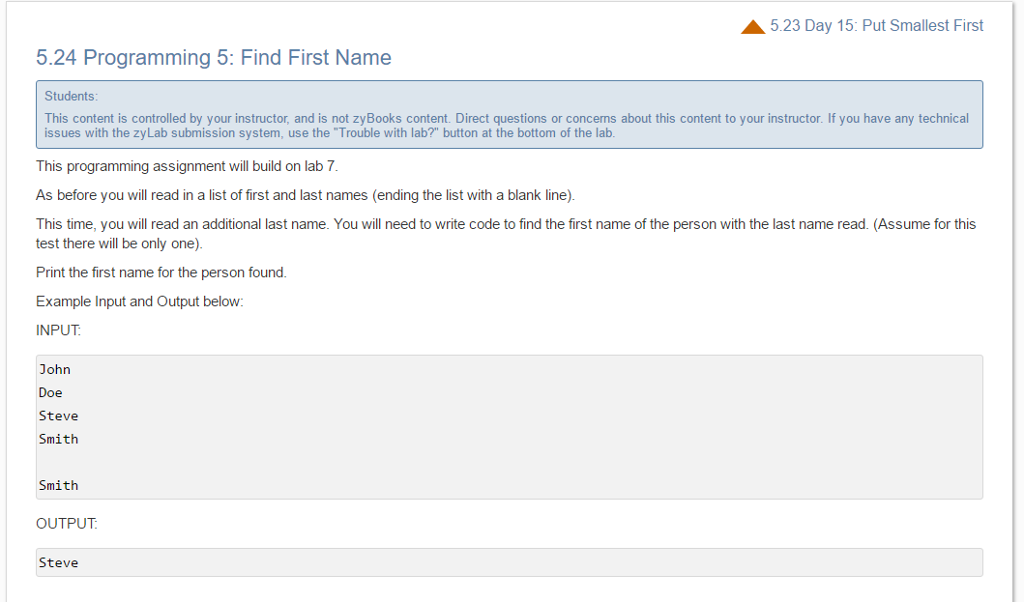
5.23 Day 15: Put Smallest First 5.24 Programming 5: Find First Name Students This content is controlled by your instructor, and is not zyBooks content. Direct questions or concerns about this content to your instructor. If you have any technical issues with the zyLab submission system, use the "Trouble with lab?" button at the bottom of the lab. This programming assignment will build on lab 7 As before you wi read in a list of first and last names (ending the list with a blank line This time, you wi read an additional last name. You wi need to write code to find the first name of the person with the last name read. (Assume for this test there will be only one). Print the first name for the person found. Example input and Output below: INPUT John Doe Steve Smith Smith OUTPUT Steve Input: Your output: Expected output:
Step by Step Solution
There are 3 Steps involved in it

Get step-by-step solutions from verified subject matter experts
 Study Help