







Question: the code must be a fortan code. working GS code with correct results Modify the Gauss-Seidel (GS) code given below to solve for x in
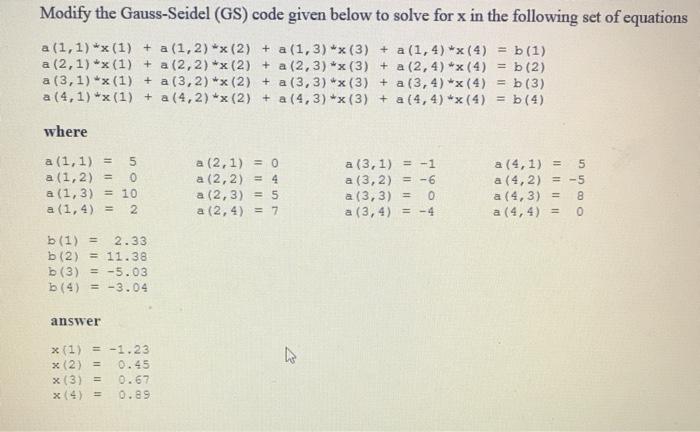
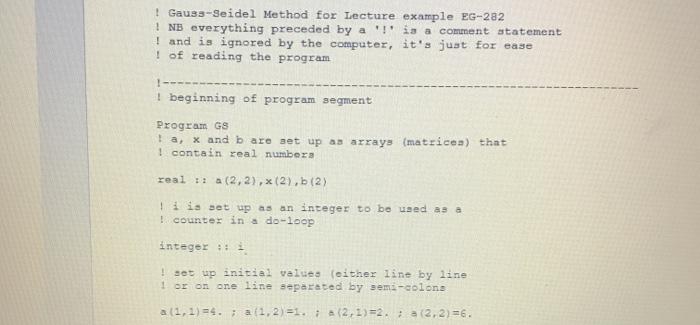
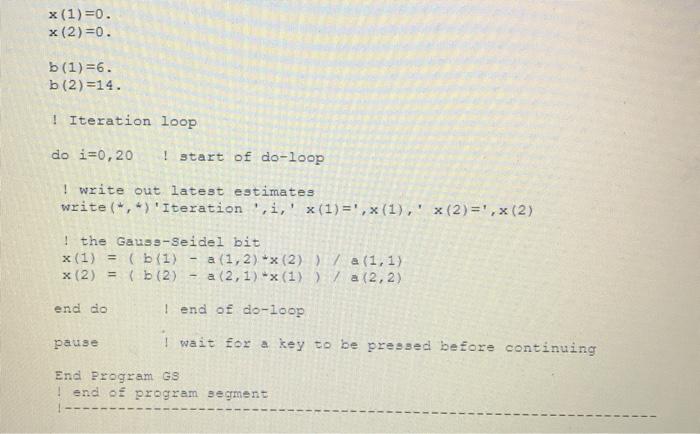
Modify the Gauss-Seidel (GS) code given below to solve for x in the following set of equations a(1,1) *x(1) + a (1,2) *x (2) + a (1,3)*x(3) + a(1,4) ** (4) = 5(1) a (2,1) *x(1) + a (2,2) *x(2) + a (2,3) ** (3) + a (2, 4) *x (4) = b (2) a (3,1) *x(1) + a (3,2) *x(2) + a (3,3) *x(3) + a (3, 4) *x(4) = b (3) a (4,1) *x (1) + a (4,2) *x (2) + a (4,3) *x(3) + a (4,4) ** (4) = b (4) where a (1, 1) = 5 a (1, 2) = a (1, 3) = 10 a (1,4) = 2 a (2, 1) = 0 a (2,2) = 4 a (2,3) = 5 a (2, 4) = 7 a (3, 1) = -1 a (3, 2) = -6 a (3, 3) = 0 a (3, 4) -4 a (4,1) = 5 a (4,2) = -5 a (4,3) = 8 a (4,4) = 0 b(1) = 2.33 b (2) = 11.38 b (3) = -5.03 b (4) = -3.04 answer x(1) = -1.23 x (2) = 0.45 x(3) = 0.67 0.89 | Gauss-Seidel Method for Lecture example EG-282 ! NB everything preceded by a '!' is a comment statement ! and is ignored by the computer, it's just for ease I of reading the program I- | beginning of program segment Program GS I a, x and b are set up as arrays (matrices) that 1 contain real numbers real !a (2, 2), (2), (2) ! iis set up as an integer to be used as a ! counter in a do-loop integer :: ! set up initial values (either line by line 1 or on one line separated by semi-colons al1,1)=4. (1,2)=1. (2,1)=2. (2,2)=6. x (1)=0. x (2)=0. b(1)=6. b(2)=14. | Iteration loop do i=0,20 ! start of do-loop ! write out latest estimates write(",) 'Iteration',i,' x(1) =',x(1),' x(2)=', (2) ! the Gauss-Seidel bit x (1) = (b (1) a (1,2) *x (2) ) a (1,1) x(2) = (b (2) - a (2, 1) *x (1))/ a (2,2) end do I end of do-loop pause I wait for a key to be pressed before continuing End Program GS end of program segment
Step by Step Solution
There are 3 Steps involved in it

Get step-by-step solutions from verified subject matter experts
 Study Help