







Question: in c++ here is the code i have for controllers.cpp here is the code i have for image_menu.h Create Image.h talis file must include the
in c++
 here is the code i have for controllers.cpp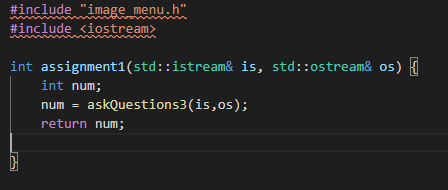
here is the code i have for image_menu.h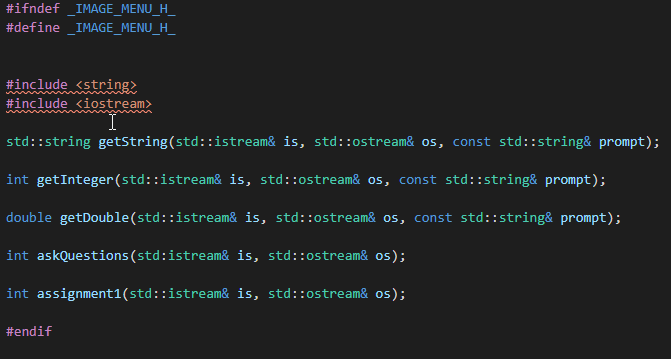
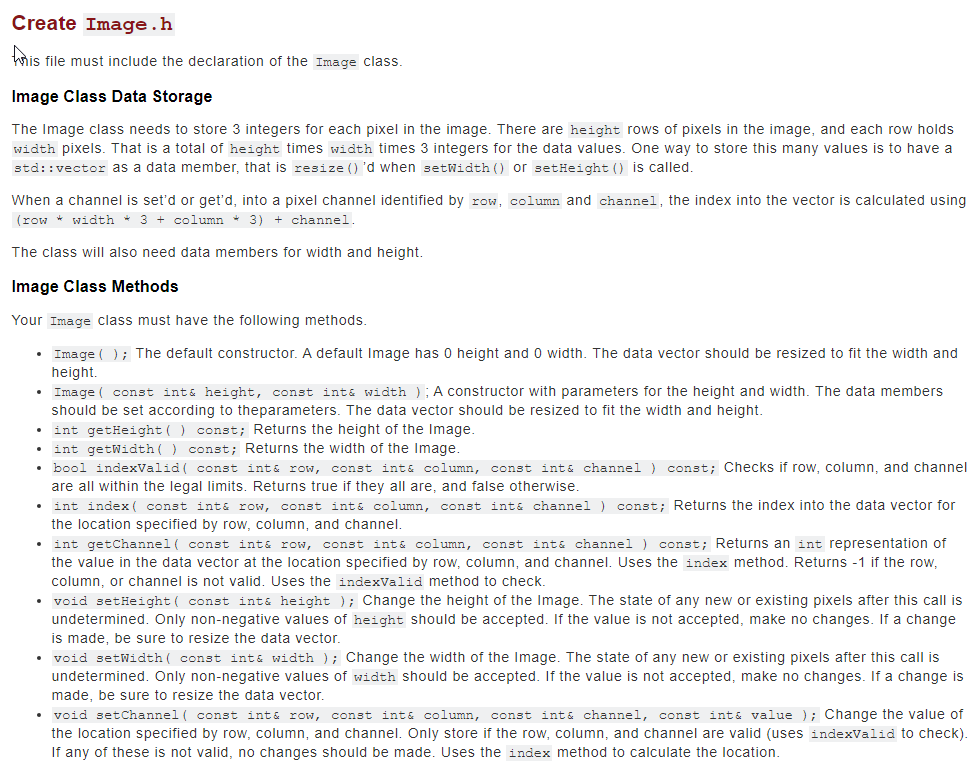
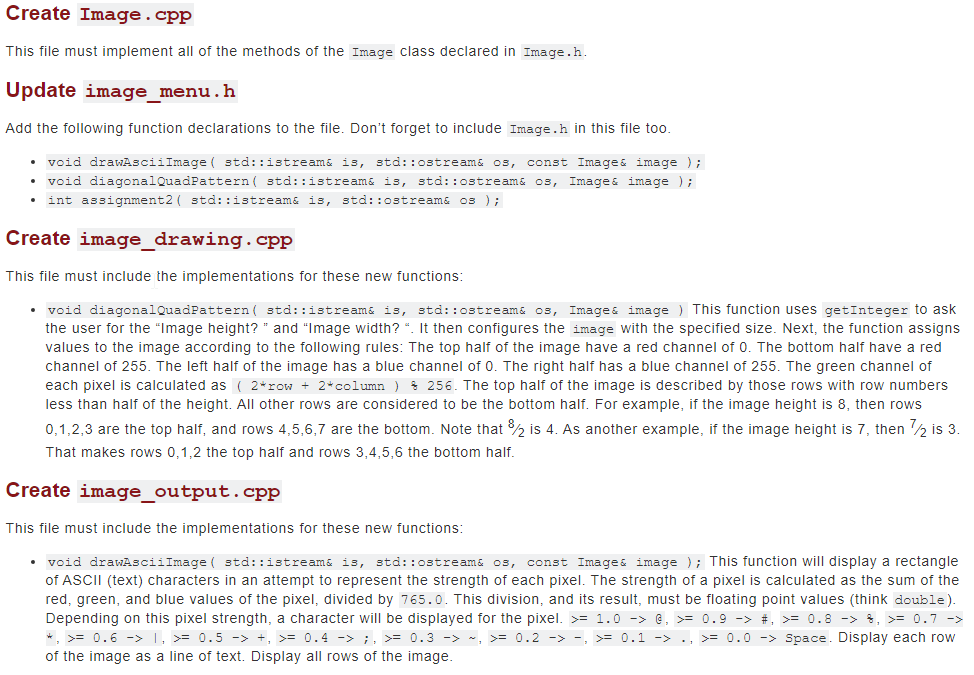
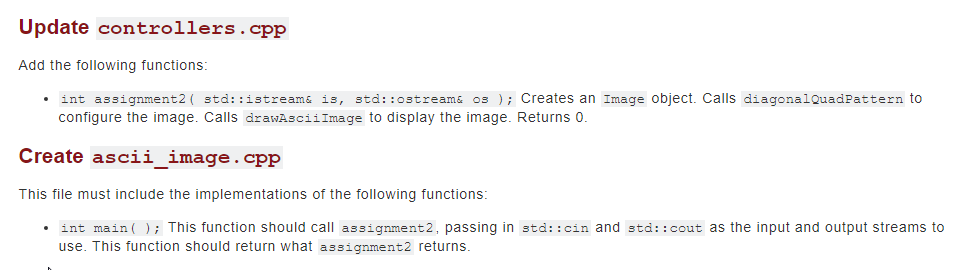
Create Image.h talis file must include the declaration of the Image class. Image Class Data Storage The Image class needs to store 3 integers for each pixel in the image. There are height rows of pixels in the image, and each row holds width pixels. That is a total of height times width times 3 integers for the data values. One way to store this many values is to have a std::vector as a data member, that is resize()'d when setWidth() or setHeight() is called. When a channel is set'd or get'd, into a pixel channel identified by row, column and channel, the index into the vector is calculated using (row * width * 3 + column + 3) + channel. The class will also need data members for width and height. Image Class Methods Your Image class must have the following methods. Image ( ); The default constructor. A default Image has 0 height and 0 width. The data vector should be resized to fit the width and height Image { const int& height, const inte width ); A constructor with parameters for the height and width. The data members should be set according to theparameters. The data vector should be resized to fit the width and height. int getHeight() const; Returns the height of the image. int getWidth() const; Returns the width of the image. bool indexValid( const int& row, const inte column, const int& channel ) const; Checks if row, column, and channel are all within the legal limits. Returns true if they all are, and false otherwise. int index( const inte row, const int& column, const inte channel ) const; Returns the index into the data vector for the location specified by row, column, and channel. int getChannel( const inte row, const int& column, const int& channel ) const; Returns an int representation of the value in the data vector at the location specified by row, column, and channel. Uses the index method. Returns - 1 if the row, column, or channel is not valid. Uses the indexvalid method to check. void setHeight( const inte height ); Change the height of the Image. The state of any new or existing pixels after this call is undetermined. Only non-negative values of height should be accepted. If the value is not accepted, make no changes. If a change is made, be sure to resize the data vector. void setWidth( const int& width ); Change the width of the image. The state of any new or existing pixels after this call is undetermined. Only non-negative values of width should be accepted. If the value is not accepted, make no changes. If a change is made, be sure to resize the data vector. void setChannel ( const int& row, const inte column, const int& channel, const int & value ); Change the value of the location specified by row, column, and channel. Only store if the row, column, and channel are valid (uses indexValid to check). If any of these is not valid, no changes should be made. Uses the index method to calculate the location. Create Image.cpp This file must implement all of the methods of the Image class declared in Image.h. Update image_menu.h Add the following function declarations to the file. Don't forget to include Image.h in this file too. void drawAsciiImage { std::istream& is, std::ostream& os, const Image image ); void diagonalQuadPattern( std::istream& is, std::ostream& os, Image image ); int assignment2( std::istream& is, std::ostream& os ); Create image_drawing.cpp This file must include the implementations for these new functions: void diagonalQuadPattern( std::istream& is, std::ostream& os, Images image ) This function uses getInteger to ask the user for the "Image height?" and "Image width?". It then configures the image with the specified size. Next, the function assigns values to the image according to the following rules: The top half of the image have a red channel of 0. The bottom half have a red channel of 255. The left half of the image has a blue channel of 0. The right half has a blue channel of 255. The green channel of each pixel is calculated as ( 2*row + 2 column ) 256. The top half of the image is described by those rows with row numbers less than half of the height. All other rows are considered to be the bottom half. For example, if the image height is 8, then rows 0,1,2,3 are the top half, and rows 4,5,6,7 are the bottom. Note that 8/2 is 4. As another example, if the image height is 7, then 2 is 3. That makes rows 0,1,2 the top half and rows 3,4,5,6 the bottom half. Create image_output.cpp This file must include the implementations for these new functions: void drawAsciiImage { std::istream& is, std::ostream& os, const Images image ); This function will display a rectangle of ASCII (text) characters in an attempt to represent the strength of each pixel. The strength of a pixel is calculated as the sum of the red, green, and blue values of the pixel, divided by 765.0. This division, and its result, must be floating point values (think double). Depending on this pixel strength, a character will be displayed for the pixel. >= 1.0 -> C, >= 0.9 -> #, >= 0.8 -> , >= 0.7 -> *, >= 0.6 -> 1, >= 0.5 -> +, >= 0.4 -> ;, >= 0.3 -> - >= 0.2 -> -, >= 0.1 -> ., >= 0.0 -> Space. Display each row of the image as a line of text. Display all rows of the image. Update controllers.cpp Add the following functions: int assignment2( std::istream& is, std::ostream& os); Creates an Image object. Calls diagonalQuadPattern to configure the image. Calls drawAsciiImage to display the image. Returns 0 Create ascii_image.cpp This file must include the implementations of the following functions: int main(); This function should call assignment2, passing in std::cin and std::cout as the input and output streams to use. This function should return what assignment2 returns. #include "image_menu.h" #include
Step by Step Solution
There are 3 Steps involved in it

Get step-by-step solutions from verified subject matter experts
 Study Help