







Question: the code will be a method called upper with equates and trace tags upper takes one parameter ( a lowercase character ) prints it followed
the code will be a method called upper with equates and trace tags
upper takes one parameter a lowercase character prints it followed by a space and then followed by the uppercase equivalent.
So if the parameter is h the output from the method will be:
h H
Main first inputs different characters all lowercase and then calls the method upper five separate meaning different times.
Suppose the input characters are called ch ch ch ch ch
Main then does this:
System.out.println "The fifth character" ch;
upperch;
System.out.println "The fourth character" ch;
upperch;
System.out.println "The third character" ch;
upperch;
System.out.println "The second character" ch;
upperch;
System.out.println "The first character" ch;
upperch;
REMEMBER that the method cannot access the local variables in main, and that main must put parameters on the stack each time immediately before calling the method. This is exactly what your java programs do
HINT: get it working for just one character first. DO NOT try to call the method times until you know it works. Also, remember to put trace tags, and to help you debug watch in debug mode and also watch the memory to verify that your stack is built correctly. If you come for help, bring a diagram showing what you want to put on the stack
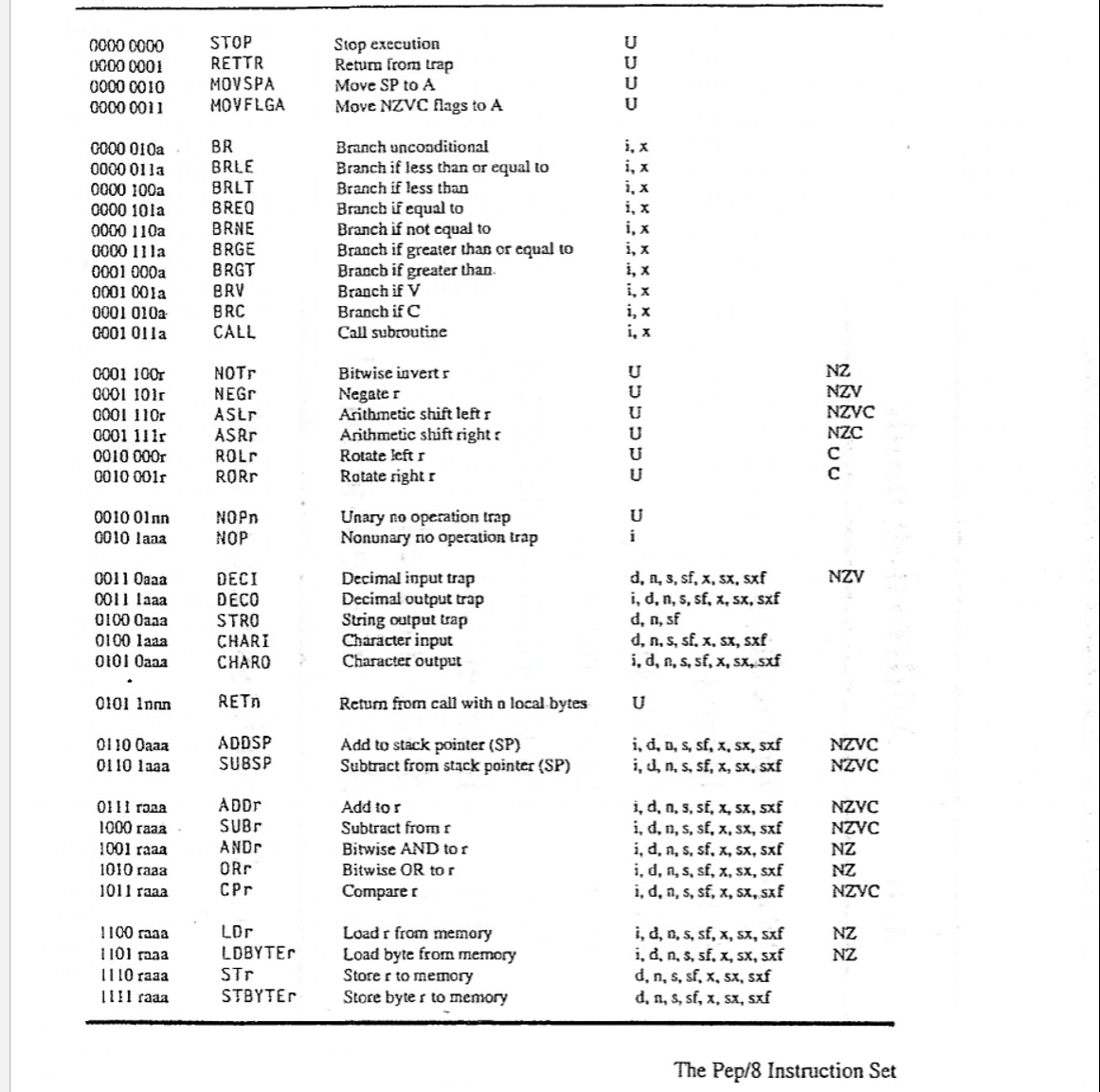
Please use these codes in the photo and here's example code of how it should look:
BR main
Count: EQUATE ; #d
input: EQUATE ; #c
msg: ASCII "There are x
main: SUBSP i ; Allocate #input #Count
lda i
sta Count, s
loop: CHARI input, s ; Read a character from input
ldbytea input, s
CPA # i ; Check if it's a newline character
BREQ endIn ; If it is exit the loop
CPA i ; Compare input with
BRNE loop ; If not continue reading input
LDA Count, s ; Load digitCount
ADDA i ; Increment digitCount
STA Count, s ; Store updated digitCount
BR loop ; Continue reading input
endIn: STRO msg d ; Output count message
DECO Count, s ; Output the count
ADDSP i ; Deallocate space #Count #input
STOP
end
Step by Step Solution
There are 3 Steps involved in it
1 Expert Approved Answer
Step: 1 Unlock

Question Has Been Solved by an Expert!
Get step-by-step solutions from verified subject matter experts
Step: 2 Unlock
Step: 3 Unlock
 Study Help