





Question: The following COUNTIFS function was entered into a cell on the Summary worksheet in an Excel workbook: =COUNTIFS(DetailF6: F18, SummarylA7, DetaillH6:H18, > >5 ) Which
The following COUNTIFS function was entered into
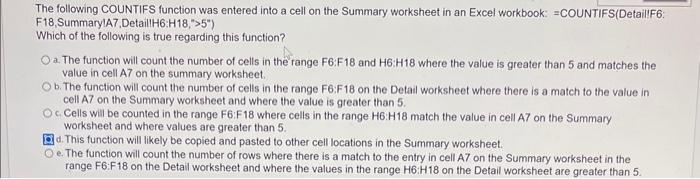
The following COUNTIFS function was entered into a cell on the Summary worksheet in an Excel workbook: =COUNTIFS(DetailF6: F18, SummarylA7, DetaillH6:H18, > >5 ) Which of the following is true regarding this function? a. The function will count the number of cells in the range F6:F18 and H6:H18 where the value is greater than 5 and matches the value in cell A7 on the summary worksheet. b. The function will count the number of cells in the range F6:F18 on the Detail worksheet where there is a match to the value in cell A7 on the Summary worksheet and where the value is greater than 5 . c. Cells will be counted in the range F6:F18 where cells in the range H6: H18 match the value in cell A7 on the Summary worksheet and where values are greater than 5 . d. This function will likely be copied and pasted to other cell locations in the Summary worksheet. e. The function will count the number of rows where there is a match to the entry in cell A7 on the Summary worksheet in the range F6:F18 on the Detail worksheet and where the values in the range H6:H18 on the Detail worksheet are greater than 5

Step by Step Solution

There are 3 Steps involved in it

1 Expert Approved Answer
Step: 1 Unlock blur-text-image

Question Has Been Solved by an Expert!

Get step-by-step solutions from verified subject matter experts

Step: 2 Unlock
Step: 3 Unlock

Students Have Also Explored These Related General Management Questions!