







Question: the following diagram in As mentioned in class, construct your GNS3.0 and build access lists in each router and check if you can ping from
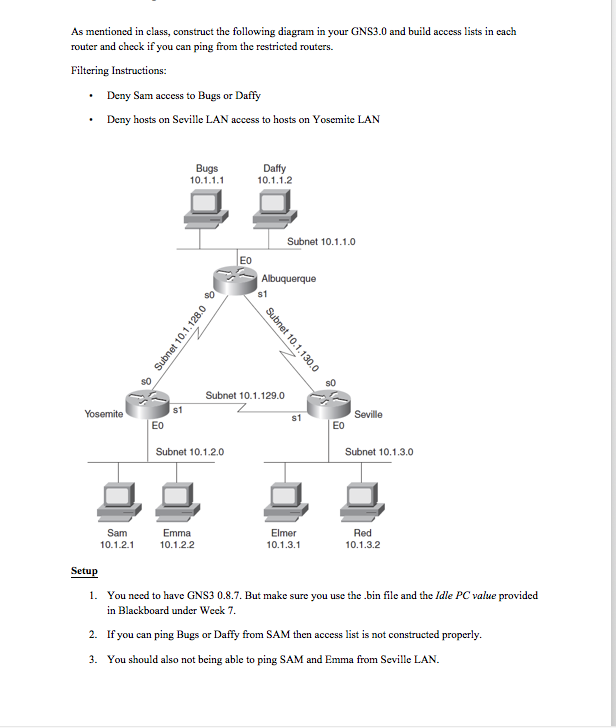
the following diagram in As mentioned in class, construct your GNS3.0 and build access lists in each router and check if you can ping from the restricted routers. Filtering Instructions: Deny Sam access to Bugs or Daffy .Deny hosts on Seville LAN access to hosts on Yosemite LAN Bugs Daffy Subnet 10.1.1.0 Eo s1 s0 Subnet 10.1.129.0 S1 Eo EO Subnet 10.1.2.0 Subnet 10.1.3.0 Red 10.1.3.2 10.1.2.1 0.1.2.2 10.1.3.1 Setu 1. You need to have GNS3 0.8.7. But make sure you use the .bin file and the Idle PC value provided in Blackboard under Weck7 If you can ping Bugs or Daffy from SAM then access list is not constructed properly. You should also not being able to ping SAM and Emma from Seville LAN. 2. 3. the following diagram in As mentioned in class, construct your GNS3.0 and build access lists in each router and check if you can ping from the restricted routers. Filtering Instructions: Deny Sam access to Bugs or Daffy .Deny hosts on Seville LAN access to hosts on Yosemite LAN Bugs Daffy Subnet 10.1.1.0 Eo s1 s0 Subnet 10.1.129.0 S1 Eo EO Subnet 10.1.2.0 Subnet 10.1.3.0 Red 10.1.3.2 10.1.2.1 0.1.2.2 10.1.3.1 Setu 1. You need to have GNS3 0.8.7. But make sure you use the .bin file and the Idle PC value provided in Blackboard under Weck7 If you can ping Bugs or Daffy from SAM then access list is not constructed properly. You should also not being able to ping SAM and Emma from Seville LAN. 2. 3
Step by Step Solution
There are 3 Steps involved in it

Get step-by-step solutions from verified subject matter experts
 Study Help