







Question: The following Excel image has a VBA program (see below). What will be the result after the program is executed? Any cells not displayed are
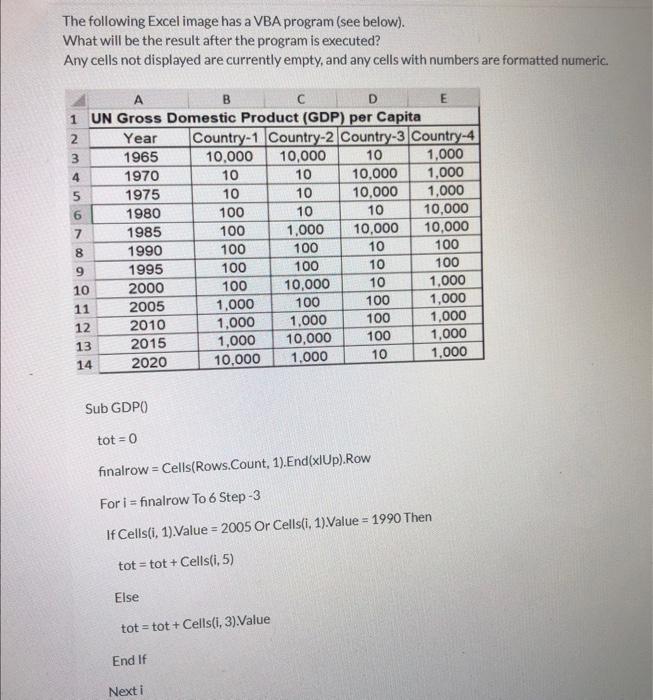
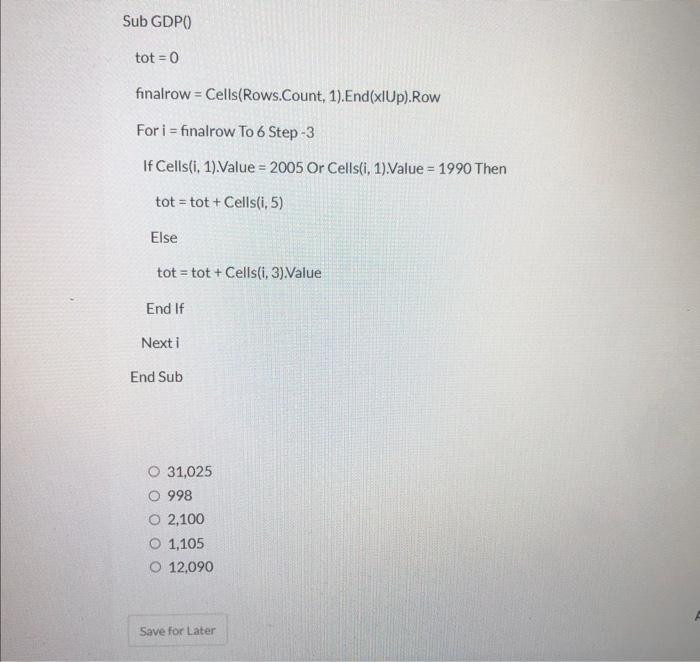
The following Excel image has a VBA program (see below). What will be the result after the program is executed? Any cells not displayed are currently empty, and any cells with numbers are formatted numeric. Sub GDP() tot=0 finalrow = Cells(Rows.Count, 1). End(x|Up).Row For i= finalrow To 6 Step 3 If Cells (i,1) Value =2005 Or Cells (i,1) Value =1990 Then tot = tot + Cells (i,5) Else tot = tot + Cells (i,3). Value Sub GDP() tot =0 finalrow = Cells(Rows.Count, 1).End(xlUp).Row For i= finalrow To 6 Step 3 If Cells(i, 1).Value =2005 Or Cells(i, 1).Value =1990 Then tot = tot + Cells (i,5) Else tot = tot + Cells(i, 3) Value End If Nexti End Sub 31,025 998 2,100 1,105
Step by Step Solution
There are 3 Steps involved in it

Get step-by-step solutions from verified subject matter experts
 Study Help