







Question: The following Excel image has a VBA program (see below). What will be the result after the program is executed? Any cells not displayed are
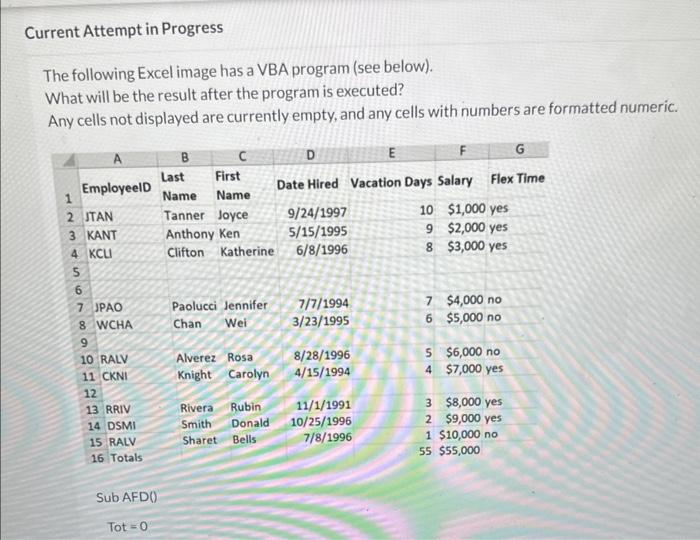
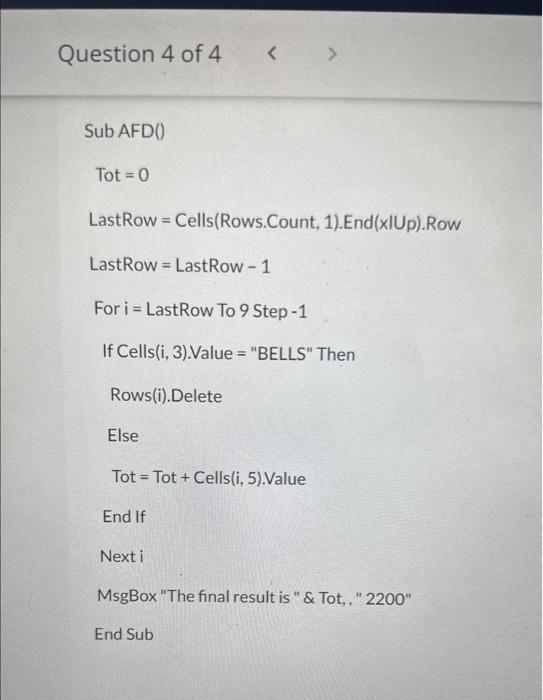
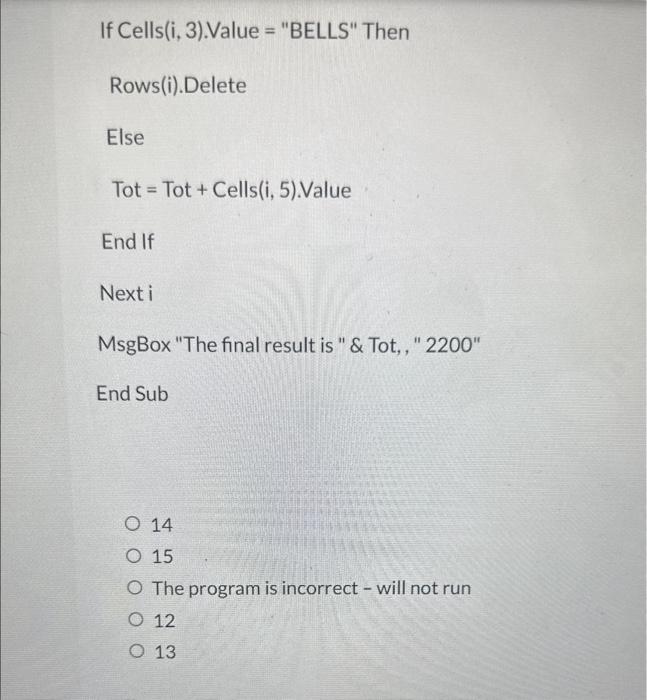
The following Excel image has a VBA program (see below). What will be the result after the program is executed? Any cells not displayed are currently empty, and any cells with numbers are formatted numeric. Question 4 of 4 Sub AFD() Tot=0 LastRow = Cells(Rows.Count, 1).End(xIUp).Row LastRow=LastRow1 For i = LastRow To 9 Step 1 If Cells(i, 3).Value = "BELLS" Then Rows(i).Delete Else Tot = Tot + Cells(i, 5).Value End If Next i MsgBox "The final result is " \& Tot, , "2200" End Sub If Cells(i, 3).Value = "BELLS" Then Rows(i).Delete Else Tot=Tot+Cells(i,5).Value End If Next i MsgBox "The final result is " \& Tot,, " 2200" End Sub 14 15 The program is incorrect - will not run 12 13
Step by Step Solution
There are 3 Steps involved in it

Get step-by-step solutions from verified subject matter experts
 Study Help