







Question: The following Java program calculates the number of days between two dates. It works well with the dates of two different years. Correct the code,
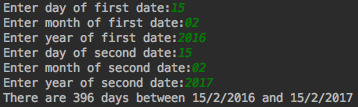
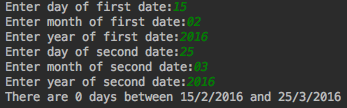
The following Java program calculates the number of days between two dates. It works well with the dates of two different years. Correct the code, so it can work with two dates of the same year. Notice, that this program has class and client files. Do not change the code completely, just make some adjustments so it works perfectly within the same year.
Date.java
import java.io.*; public class Date {
// Declaring instance variables
private int day;
private int month;
private int year;
// Parameterized constructor
public Date(int day, int month, int year) {
this.day = day;
this.month = month;
this.year = year;
}
// getters and setters
public int getDay() {
return day;
}
public void setDay(int day) {
this.day = day;
}
public int getMonth() {
return month;
}
public void setMonth(int month) {
this.month = month;
}
public int getYear() {
return year;
}
public void setYear(int year) {
this.year = year;
}
// This method will calculate the difference between two dates
public int daysTo(Date d) {
int months[] = { 31, 28, 31, 30, 31, 30, 31, 31, 30, 31, 30, 31 }; int m1=0,m2=0; int nod1 = getYear(); //copy year into nod1 int y1=nod1*365; //get all days of all years int nod2 =getMonth(); for(int i=0;i int nod4 =d.getYear(); int y2=nod4*365; //get all days of all years int nod5 = d.getMonth(); for(int i=0;i return leapy+diff; // returns total diff days + total leap year days (which is 29th-Feb) } // This method will check how many leap years public int leapYears(int n1,int n2) // this method return number of leap years between two dates // year values from two dates passed as parameter { int a=n2; int b=n1; int n=0; if(a>b) { while(a>b) // checking one by one leap year // if first year value is greater than other then condition checked as..... { if ((a % 100 == 0 && a % 400 == 0) || (a % 100 != 0 && a % 4 == 0)) n++; // counting leap years a--; } }else { while(b>a) // if first year value is greater than other then condition checked as..... if ((b % 100 == 0 && b % 400 == 0)|| (b % 100 != 0 && b % 4 == 0)) n++; b--; } return n; } // toString() method is used to display the contents of an object @Override public String toString() { return day + "/" + month + "/" + year; } } Test.java import java.util.*; public class Test { public static void main(String[] args) { //Declaring variables int month1,day1,year1,month2,day2,year2; /* * Creating an Scanner class object which is used to get the inputs * entered by the user */ Scanner sc = new Scanner(System.in); //Getting the input entered by the user System.out.print("Enter day of first date:"); day1=sc.nextInt(); System.out.print("Enter month of first date:"); month1=sc.nextInt(); System.out.print("Enter year of first date:"); year1=sc.nextInt(); //Creating an Instance of Date class Date d1=new Date(day1, month1, year1); //Getting the input entered by the user System.out.print("Enter day of second date:"); day2=sc.nextInt(); System.out.print("Enter month of second date:"); month2=sc.nextInt(); System.out.print("Enter year of second date:"); year2=sc.nextInt(); //Creating an Instance of Date class Date d2=new Date(day2, month2, year2); //Displaying the difference between two dates System.out.println("There are "+d1.daysTo(d2)+" days between "+d1.toString()+" and "+d2.toString()); } }
Step by Step Solution
There are 3 Steps involved in it

Get step-by-step solutions from verified subject matter experts
 Study Help