



Question: the following pic is the question I do the Gui part but I need to check if file is binary + if it's student file
the following pic is the question
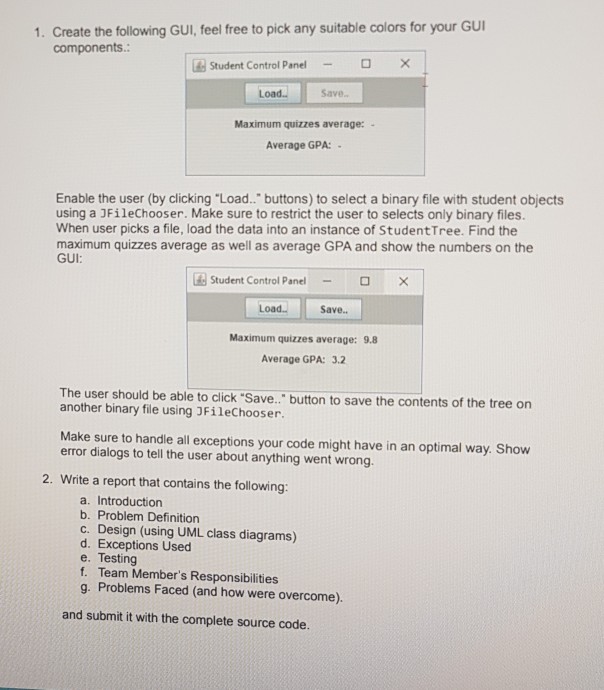
I do the Gui part but I need to check if file is binary + if it's student file or something else and give exception is not student binary file and you know the rest from the pic pls help ??
(class Student )
import java.io.Serializable;
import java.util.ArrayList; import java.util.Iterator;
class WrongQuizGradeException extends Exception { WrongQuizGradeException(){ System.err.println("Quizz Grade Must Be Between 0 and 10!!!!"); } }
public class Student implements Comparable
Student (String name, Integer ID, Double GPA){ this.name=name; this.ID=ID; this.GPA=GPA; }
public void SetName(String n) {name=n;} public void SetID(Integer id) {ID=id;} public void SetGPA(Double GPA) { this.GPA=GPA; }
public String getName() {return name;} public Integer getID() {return ID;} public Double getGPA() { return GPA; }
public void addQuiz (double grade) throws WrongQuizGradeException { if (grade10) { throw new WrongQuizGradeException(); } GradesList.add(grade); }
public double quizzesAvg() { Iterator
public void Print() { System.out.println("Name: "+name+" ID: "+ID+" GPA: "+GPA); System.out.println("The Quizes Grades:"); Iterator
public int compareTo(Student s) { return this.ID - s.ID; }
}
============
(class StudentTree )
import java.io.File; import java.io.FileNotFoundException; import java.io.FileOutputStream; import java.io.IOException; import java.io.ObjectOutputStream; import java.util.Formatter; import java.util.FormatterClosedException;
class StudentTree > { private static final String Student = null; private Node root;
//constructor initializes an empty Tree of integers public StudentTree() { root = null; } // end Tree no-argument constructor
//insert a new node in the binary search tree public void insertNode( T insertValue ) { if ( root == null ) root = new Node( insertValue ); // create root node else root.insert( insertValue ); // call the insert method } // end method insertNode
//begin inorder traversal public void inorderTraversal() { inorderHelper( root ); } // end method inorderTraversal
//recursive method to perform inorder traversal private void inorderHelper( Node node ) { if ( node == null ) return;
inorderHelper( node.leftNode ); // traverse left subtree ((Student)(node.data)).Print(); // output node data inorderHelper( node.rightNode ); // traverse right subtree } // end method inorderHelper
public boolean search(T X) { return searchHelper( root , X ); }
private boolean searchHelper( Node node, T X ) { if ( node == null ) return false; else if (node.data==X) return true; return (searchHelper( node.leftNode, X) || searchHelper( node.rightNode, X)); } public double MaxQuizzAvg(){ return MaxQAvgHelper( root ); } double MAX=0; private double MaxQAvgHelper(Node node) { if (node==null) return 0; double X=((Student)(node.data)).quizzesAvg(); if ( X > MAX ) MAX = X; MaxQAvgHelper( node.leftNode ); MaxQAvgHelper( node.rightNode ); return MAX; }
public void QuizAvg(){ QuizAvgHelper( root ); } private void QuizAvgHelper(Node node) { if (node==null) return; double X=((Student)(node.data)).quizzesAvg(); System.out.println(X); QuizAvgHelper( node.leftNode ); QuizAvgHelper( node.rightNode); }
public void ChangeGPA(int ID, double GPA){ ChangeGPAHelper( root ,ID, GPA); } private void ChangeGPAHelper(Node node, int ID, double GPA) { if (node==null) return; int X=((Student)(node.data)).getID(); if( ID == X ){ ((Student)(node.data)).SetGPA(GPA); } ChangeGPAHelper( node.leftNode ,ID, GPA); ChangeGPAHelper( node.rightNode ,ID ,GPA); } public double gpaAvg(){ return gpaSum( root) / NumOfStudent(root ); }
private double gpaSum(Node node) { if (node==null) return 0; double GPASum= ((Student)node.data).getGPA() +gpaSum( node.leftNode) + gpaSum( node.rightNode ); return GPASum; } private int NumOfStudent(Node node) { if (node==null) return 0; return 1+NumOfStudent( node.leftNode) + NumOfStudent( node.rightNode ); } public void SaveTree(String FileName) { FileOutputStream F=null; ObjectOutputStream Out=null; try { F=new FileOutputStream(FileName); Out=new ObjectOutputStream( F ); }catch( IOException e1 ) { System.err.println("Error opening or creating file."); } SaveTreeHelper( root , Out ); } private void SaveTreeHelper( Node
======== (class Node)
class Node > { //package access members Node leftNode; // left node T data; // node value Node rightNode; // right node
//constructor initializes data and makes this a leaf node public Node( T nodeData ) { data = nodeData; leftNode = rightNode = null; // node has no children } // end TreeNode constructor
//locate insertion point and insert new node; ignore duplicate values public void insert( T insertValue ) { // insert in left subtree if ( insertValue.compareTo( data ) ( insertValue ); else // continue traversing left subtree recursively leftNode.insert( insertValue ); } // end if // insert in right subtree else if ( insertValue.compareTo( data ) > 0 ) { // insert new TreeNode if ( rightNode == null ) rightNode = new Node( insertValue ); else // continue traversing right subtree recursively rightNode.insert( insertValue ); } // end else if } // end method insert } // end class TreeNode
============
(Gui test)
import java.awt.BorderLayout; import java.awt.Color; import java.awt.event.ActionEvent; import java.awt.event.ActionListener; import java.io.EOFException; import java.io.File; import java.io.FileInputStream; import java.io.IOException; import java.io.ObjectInputStream;
import javax.swing.JButton; import javax.swing.JFileChooser; import javax.swing.JFrame; import javax.swing.JLabel; import javax.swing.JOptionPane; import javax.swing.JPanel; import javax.swing.JTextField;
class GUI extends JPanel implements ActionListener { static void printFile(String f1) { FileInputStream File=null; ObjectInputStream In=null; try { File=new FileInputStream(f1); In=new ObjectInputStream(File); while( true ) { Student S = (Student) In.readObject(); S.Print(); } } catch (EOFException e1) { System.out.println("The end of file was reached.."); } catch ( IOException ioException ) { System.err.println("Error opening file."); } catch ( ClassNotFoundException e2 ) { System.err.println("class 'Student not found!'"); } } //In.close(); static StudentTree
@Override public void actionPerformed(ActionEvent e) { if(e.getSource() == load) { JFileChooser jfc = new JFileChooser(); int returnValue = jfc.showOpenDialog(null);
if (returnValue == JFileChooser.APPROVE_OPTION) { File selectedFile = jfc.getSelectedFile(); System.out.println(selectedFile.getAbsolutePath()); String n=selectedFile.getName(); if (n.endsWith(".ser")||n.endsWith("bin")) { System.out.println(n);
//________________________________________________ StudentTree
double Max=ST.MaxQuizzAvg(); double AvgGPA=ST.gpaAvg(); r1.setText(Max+""); r2.setText(AvgGPA+"");} else JOptionPane.showMessageDialog(null,"You Have To Chose a Binary File", "Wrong File", JOptionPane.ERROR_MESSAGE);
} } if(e.getSource() == save) { JFrame parentFrame = new JFrame(); JFileChooser fileChooser = new JFileChooser(); fileChooser.setDialogTitle("Specify a file to save"); int userSelection = fileChooser.showSaveDialog(parentFrame); if (userSelection == JFileChooser.APPROVE_OPTION) { File fileToSave = fileChooser.getSelectedFile(); System.out.println("Save as file: " + fileToSave.getAbsolutePath()); } } }
}
public class GUITest { public static void main(String[] args) { JFrame frame1 = new JFrame("Student Control Panel "); frame1.add(new GUI()); frame1.setDefaultCloseOperation(JFrame.EXIT_ON_CLOSE); frame1.setSize(310, 200); frame1.setVisible(true); }
}
(in java programming language)
1. Create the following GUI, feel free to pick any suitable colors for your GUI components. Student Control PanelOX Load.. S Save Maximum quizzes average: Average GPA: Enable the user (by clicking Load.." buttons) to select a binary file with student objects using a JFileChooser. Make sure to restrict the user to selects only binary files. When user picks a file, load the data into an instance of StudentTree. Find the maximum quizzes average as well as average GPA and show the numbers on the GUI: lds Student Control Panel- Load Save. Maximum quizzes average: 9.8 Average GPA: 3.2 The user should be able to cick 'Save. " button to save the contents of the tree on another binary file using 3FileChooser. Make sure to handle all exceptions your code might have in an optimal way. Show error dialogs to tell the user about anything went wrong. 2. Write a report that contains the following: a. Introduction b. Problem Definition c. Design (using UML class diagrams) d. Exceptions Used e. Testing f. Team Member's Responsibilities g. Problems Faced (and how were overcome). and submit it with the complete source code
Step by Step Solution
There are 3 Steps involved in it

Get step-by-step solutions from verified subject matter experts