







Question: The following security controls should be applied to the application (check the NIST Security Controls Database for details, description, and guidance for each control:
The following security controls should be applied to the application (check the NIST Security Controls
Database for details, description, and guidance for each control:
- AC-7 - UNSUCCESSFUL LOGON ATTEMPTS
- AC-8 - SYSTEM USE NOTIFICATION
- AU-3 - CONTENT OF AUDIT RECORDS
- AU-8 - TIME STAMPS
- IA-2(1) IDENTIFICATION AND AUTHENTICATION (ORGANIZATIONAL USERS) | NETWORK
ACCESS TO PRIVILEGED ACCOUNTS (Note this is an enhancement of an existing low-impact
security control)
- Select one additional low-impact security control and implement it. This can be an
enhancement or a required low-impact security control. Selecting a control that provides
documentation as opposed to code changes is also acceptable and encouraged.
Hints:
a. Start with the baseline Login Application and add methods (or additional classes) as needed to
comply with each of the security controls.
b. You will need to make some decisions for the implementation of the security audit/log files
format.
c. For the multi-factor authentication, keep it simple. One approach is to send an email to the user
with a security code. Then, have them check their email and enter the code. If the code
matches, they are properly authenticated.
d. JavaMail
e. Pay attention to the details of the NIST database description and make sure all of the selected
security controls for this project are fully implemented.
Looking for some additional guidance on how to apply these NIST security controls to the application in the code above.
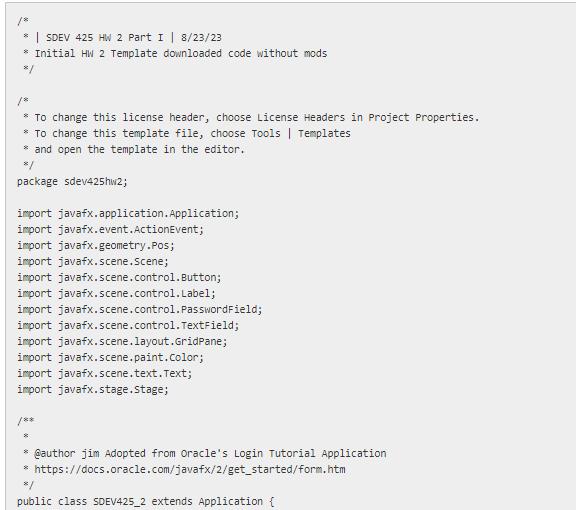
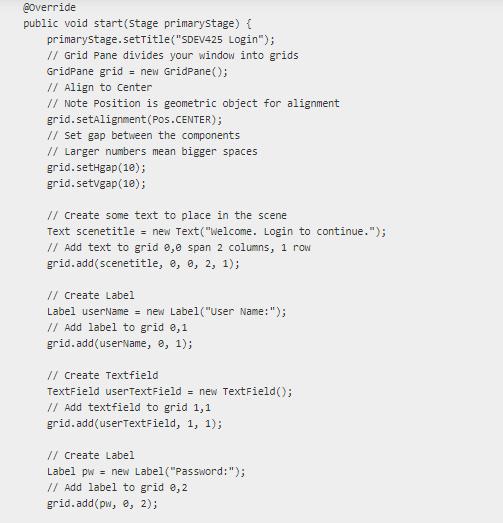
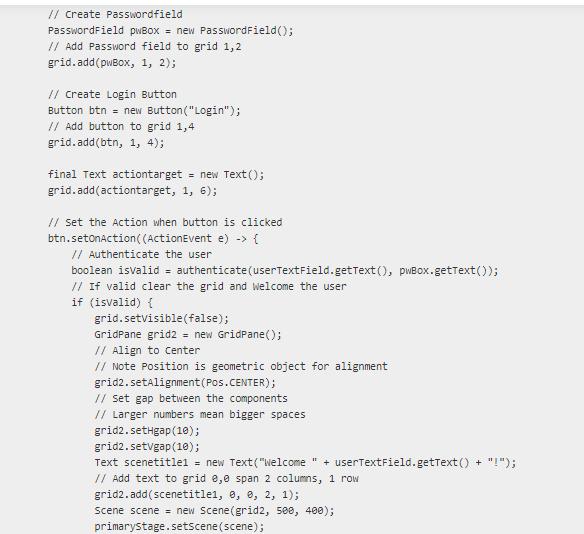
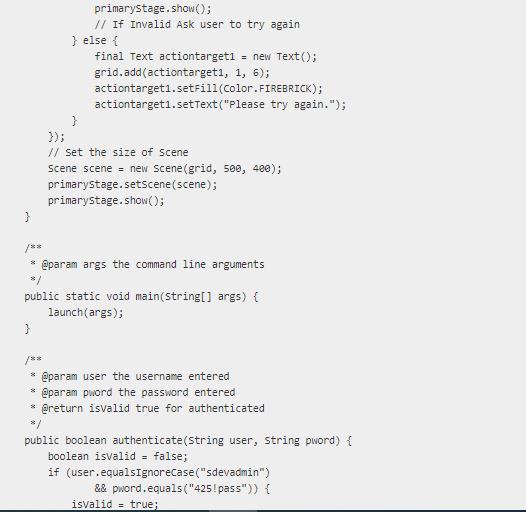

8 | SDEV 425 HW 2 Part I | 8/23/23 * Initial HW 2 Template downloaded code without mods 8/ * To change this license header, choose License Headers in Project Properties. * To change this template file, choose Tools | Templates * and open the template in the editor. 8/ package sdev425hw2; import javafx.application. Application; import javafx.event.ActionEvent; import javafx.geometry.Pos; import javafx.scene.Scene; import javafx.scene.control.Button; import javafx.scene.control.Label; import javafx.scene.control. PasswordField; import javafx.scene.control. TextField; import javafx.scene.layout.GridPane; import javafx.scene.paint.color; import javafx.scene.text.Text; import javafx.stage.Stage; /** *@author jim Adopted from Oracle's Login Tutorial Application * https://docs.oracle.com/javafx/2/get_started/form.htm 8/ public class SDEV425_2 extends Application {
Step by Step Solution
3.57 Rating (157 Votes )
There are 3 Steps involved in it
To apply the NIST security controls to the Java application provided we can follow these steps 1 AC7 UNSUCCESSFUL LOGON ATTEMPTS Implement a mechanism to track unsuccessful login attempts You can crea... View full answer

Get step-by-step solutions from verified subject matter experts
 Study Help