







Question: The following steps must be completed in visual basic Form Setup Your form should have 2 buttons, 1 label, and 1 textbox.
The following steps must be completed in visual basic
⦁ Form Setup
⦁ Your form should have 2 buttons, 1 label, and 1 textbox.
⦁ Name the initial form frmAssignment1 and put Assignment 1 in its title bar.
⦁ Set the backcolor of the form to a color of your choice in the properties menu.
⦁ Lock all controls on the form
⦁ Create access keys for the buttons for both buttons.
⦁ The tab order of the buttons should go from Verification to Quit. The form should open with the Verification button as the highlighted option.
⦁ PictureBox
⦁ Add a PictureBox control to your form and name the PictureBox picStudentImage
⦁ Import an image to the resources of the project (Make sure you save the image in the project folder before you inport it to the resources folder)
⦁ Use the stretch image property for the image

⦁ TextBox
⦁ Name the textbox txtVerse and enter "From the rising of the sun to its setting, the name of the LORD is to be praised. Psalm 113:3" as depicted below.
⦁ The font of the textbox should be something other than the default Microsoft Sans Serif.
⦁ The text should be center aligned.
⦁ The text box should be multi-line.
⦁ The backcolor and forecolor should be different from the default.
⦁ The user should not be able to tab to the text box.
⦁ Label
⦁ A label should be created called lblVerify.
⦁ The label should be created on the form but not show on the load.
⦁ The label should include your name and your teacher name and the date you finished your project.. **This is a main requirement and the assignment will not be accepted without this detail.
⦁ Verification Button
⦁ When the Verification button is pressed the lblVerify label is displayed. It is displayed updating the property.
⦁ Quit Button
⦁ The application will quit
⦁ Code
⦁ Create a comment section at the beginning of the code with the name of the assignment, purpose of the assignment, and your name. Comments must be throughout each sub of the application.
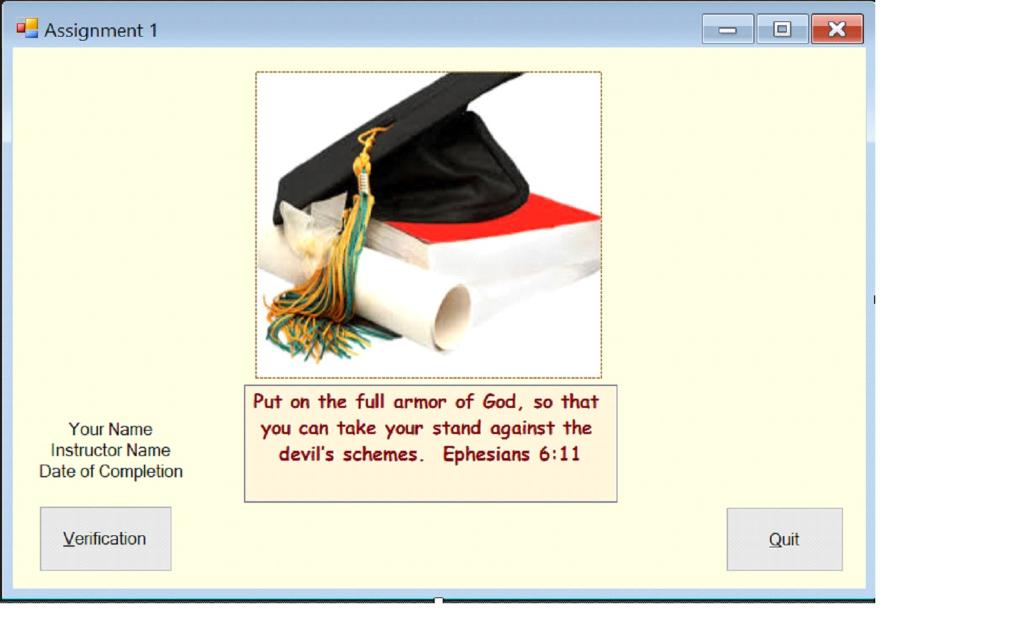
Assignment 1 Your Name Instructor Name Date of Completion Verification Put on the full armor of God, so that you can take your stand against the devil s schemes. Ephesians 6:11 - Quit X
Step by Step Solution
3.30 Rating (156 Votes )
There are 3 Steps involved in it
NOTE HERE Your Name Instructor Name and Date of Completion are given as imaginary to check the ... View full answer

Get step-by-step solutions from verified subject matter experts
 Study Help