







Question: The following two source code files - ClockPane.java and ClockPaneTest.java - are from the case study on pages 572-577 in the required textbook (Liang, 2015,
The following two source code files - ClockPane.java and ClockPaneTest.java - are
from the case study on pages 572-577 in the required textbook (Liang, 2015, 10e).
===========================================================
import java.util.Calendar;
import java.util.GregorianCalendar;
import javafx.scene.layout.Pane;
import javafx.scene.paint.Color;
import javafx.scene.shape.Circle;
import javafx.scene.shape.Line;
import javafx.scene.text.Text;
public class ClockPane extends Pane {
private int hour;
private int minute;
private int second;
// Clock pane's width and height
private double w = 250, h = 250;
/** Construct a default clock with the current time */
public ClockPane() {
setCurrentTime();
}
/** Construct a clock with specified hour, minute, and second */
public ClockPane(
int hour,
int minute,
int second) {
this.hour = hour;
this.minute = minute;
this.second = second;
paintClock();
}
/** Return hour */
public int getHour() {
return hour;
}
/** Set a new hour */
public void setHour(int hour) {
this.hour = hour;
paintClock();
}
/** Return minute */
public int getMinute() {
return minute;
}
/** Set a new minute */
public void setMinute(int minute) {
this.minute = minute;
paintClock();
}
/** Return second */
public int getSecond() {
return second;
}
/** Set a new second */
public void setSecond( int second) {
this.second = second;
paintClock();
}
/** Return clock pane's width */
public double getW() {
return w;
}
/** Set clock pane's width */
public void setW( double w) {
this.w = w;
paintClock();
}
/** Return clock pane's height */
public double getH() {
return h;
}
/** Set clock pane's height */
public void setH(double h) {
this.h = h;
paintClock();
}
/* Set the current time for the clock */
public void setCurrentTime() {
// Construct a calendar for the current date and time
Calendar calendar = new GregorianCalendar();
// Set current hour, minute and second
this.hour = calendar.get(Calendar.HOUR_OF_DAY);
this.minute = calendar.get(Calendar.MINUTE);
this.second = calendar.get(Calendar.SECOND);
paintClock(); // Repaint the clock
}
/** Paint the clock */
private void paintClock() {
// Initialize clock parameters
double clockRadius = Math.min(w, h) * 0.8 * 0.5;
double centerX = w / 2;
double centerY = h / 2;
// Draw circle
Circle circle = new Circle(centerX, centerY, clockRadius);
circle.setFill(Color.WHITE);
circle.setStroke(Color.BLACK);
Text t1 = new Text(centerX - 5, centerY - clockRadius + 12, "12");
Text t2 = new Text(centerX - clockRadius + 3, centerY + 5, "9");
Text t3 = newText(centerX + clockRadius - 10, centerY + 3, "3");
Text t4 = new Text(centerX - 3, centerY + clockRadius - 3, "6");
// Draw second hand
double sLength = clockRadius * 0.8;
double secondX = centerX + sLength * Math.sin(second * (2 * Math.PI/ 60));
double secondY = centerY - sLength * Math.cos(second * (2 * Math.PI/ 60));
Line sLine = new Line(centerX, centerY, secondX, secondY);
sLine.setStroke(Color.RED);
// Draw minute hand
double mLength = clockRadius * 0.65;
double xMinute = centerX + mLength * Math.sin(minute * (2 * Math.PI/ 60));
double minuteY = centerY - mLength * Math.cos(minute * (2 * Math.PI/ 60));
Line mLine = new Line(centerX, centerY, xMinute, minuteY);
mLine.setStroke(Color.BLUE);
// Draw hour hand
double
hLength = clockRadius * 0.5;
double hourX = centerX + hLength * Math.sin((hour % 12 + minute / 60.0) * (2 * Math.PI/ 12));
double hourY = centerY - hLength * Math.cos((hour % 12 + minute / 60.0) * (2 * Math.PI/ 12));
Line hLine = new Line(centerX, centerY, hourX, hourY);
hLine.setStroke(Color.GREEN);
getChildren().clear();
getChildren().addAll(circle, t1, t2, t3, t4, sLine, mLine, hLine);
}
}
====================================================
import javafx.application.Application;
import javafx.geometry.Pos;
import javafx.stage.Stage;
import javafx.scene.Scene;
import javafx.scene.control.Label;
import javafx.scene.layout.BorderPane;
public class ClockPaneTest extends Application {
@Override
// Override the start method in the Application class
public void start(Stage primaryStage)
{
// Create a clock and a label
ClockPane clock = new ClockPane();
String timeString = clock.getHour() + ":" + clock.getMinute() + ":" + clock.getSecond();
Label lblCurrentTime = new Label(timeString);
// Place clock and label in border pane
BorderPane pane = new BorderPane();
pane.setCenter(clock);
pane.setBottom(lblCurrentTime);
BorderPane.setAlignment(lblCurrentTime, Pos.TOP_CENTER);
// Create a scene and place it in the stage
Scene scene = new Scene(pane, 250, 250);
primaryStage.setTitle("ClockPaneTest");
// Set the stage title
primaryStage.setScene(scene);
// Place the scene in the stage
primaryStage.show();
// Display the stage
}
/**
* The main method is only needed for the IDE with limited JavaFX support.
* Not needed for running from the command line.
*/
public static void main(String[] args) {
Application.launch(args);
}
}
}
========================================================
The case study develops a class that displays a clock on a pane. If you run the code, it
will generate a clock similar to the following:
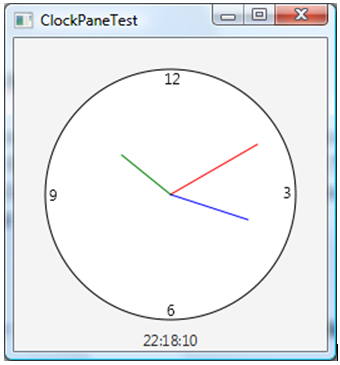
Create a DetailedClockPane class (DetailedClockPane.java) by modifying the above
ClockPane class. Also, create a DetailedClockPaneTest class
(DetailedClockPaneTest.java) by modifying the above ClockPaneTest class. If you run
the code, it will generate a clock with more details on the hours, minutes, and seconds, as
shown below:
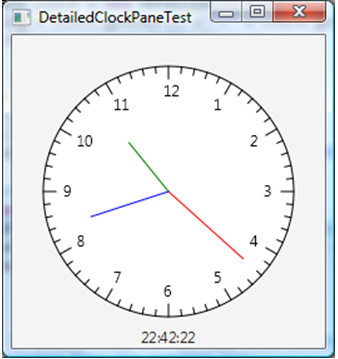
Submit the two source code files - DetailedClockPane.java
and DetailedClockPaneTest.java
ClockPaneTest 12 22:18:10
Step by Step Solution
There are 3 Steps involved in it

Get step-by-step solutions from verified subject matter experts
 Study Help