







Question: The HTML file: Join Email List Please join our email list Email Address: * Re-enter Email Address: * First Name * ------------------------------------------------------------------------------------------------------------ The JavaScript file:
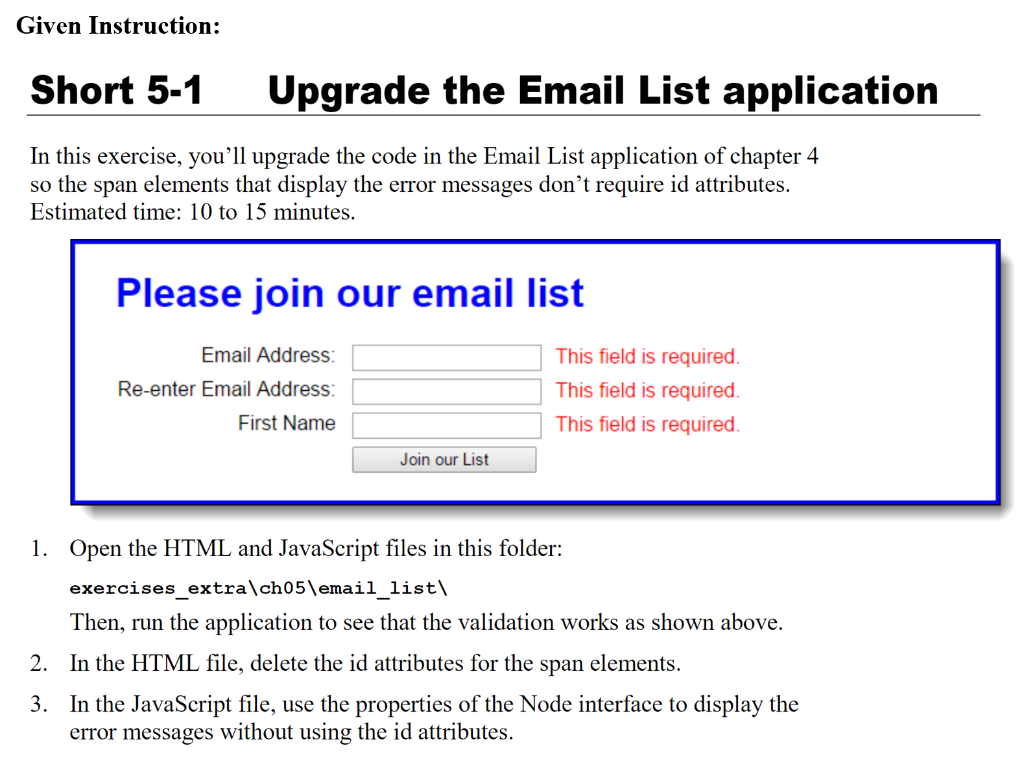
The HTML file:
Please join our email list
------------------------------------------------------------------------------------------------------------
The JavaScript file:
var $ = function(id) {
return document.getElementById(id);
};
var joinList = function() {
var emailAddress1 = $("email_address1").value;
var emailAddress2 = $("email_address2").value;
var isValid = true;
if (emailAddress1 === "") {
$("email_address1_error").firstChild.nodeValue = "This field is required.";
isValid = false;
} else { $("email_address1_error").firstChild.nodeValue = ""; }
if (emailAddress2=="") {
$("email_address2_error").firstChild.nodeValue = "This field is required.";
isValid = false;
} else if (emailAddress1 !== emailAddress2) {
$("email_address2_error").firstChild.nodeValue = "This entry must equal first entry.";
isValid = false;
} else { $("email_address2_error").firstChild.nodeValue = ""; }
if ($("first_name").value === "") {
$("first_name_error").firstChild.nodeValue = "This field is required.";
isValid = false;
} else { $("first_name_error").firstChild.nodeValue = ""; }
if (isValid) {
//$("email_form").submitt();
$("email_form").submit();
}
};
window.onload = function() {
$("join_list").onclick = joinList;
$("email_address1").focus();
};
----------------------------------------------------------------------
Modify the both files. Delete the id attributes that I have bolded in .html file and make changes in the .js file so that it can still display the error message the way it used to display before. Like shown in the image above. Thanks!
Step by Step Solution
There are 3 Steps involved in it

Get step-by-step solutions from verified subject matter experts
 Study Help