







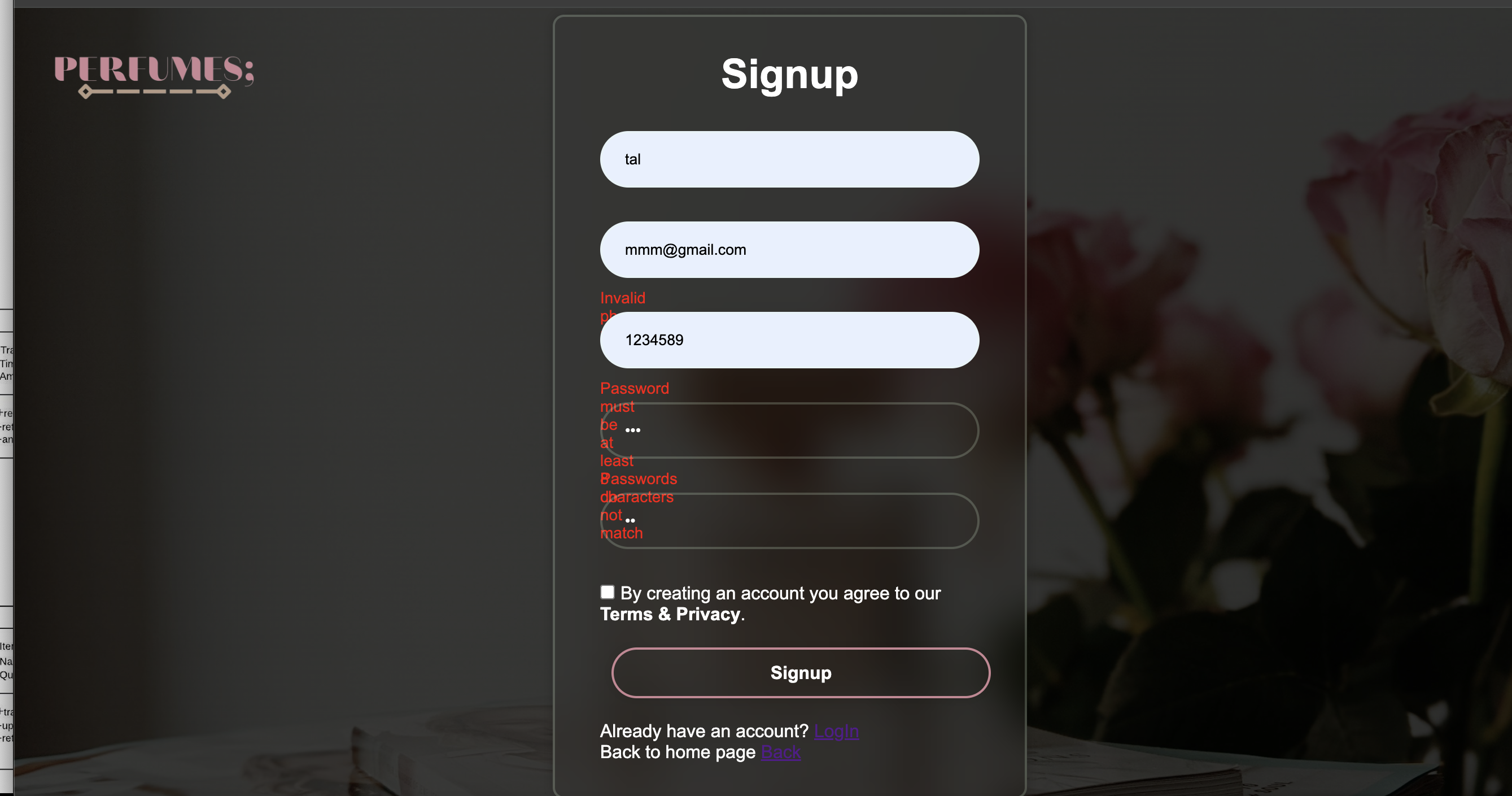
Question: the javascript vaildction seem to work the problem now is with CSS can someone please help with this i have to sumbit the project today
the javascript vaildction seem to work the problem now is with CSS can someone please help with this i have to sumbit the project today PIRIUMIS:
Signup
Already have an account?
Back to home page
margin: ;
padding: ;
boxsizing: borderbox;
fontfamily: Arial, sansserif; Using Arial as the fallback font
body
width: ;
height: vh;
backgroundimage: lineargradientrgbargbaurlimgwallpaper perfumes.jpg;
backgroundsize: cover;
backgroundposition: center;
display: flex;
justifycontent: center;
alignitems: center;
minheight: vh;
logo
position: absolute;
top: px;
left: px;
width: px;
height: auto;
banner
width: px; Adjust width as needed
background: transparent;
color: white;
border: px solid rgba;
borderradius: px;
padding: px px;
backdropfilter: blurpx;
boxshadow: px rgba;
margin: px auto; Adjust margin as needed
banner h
fontsize: px;
textalign: center;
marginbottom: px;
banner inputbox
width: ;
height: px;
margin: px ;
position: relative; Add this line
inputbox input
width: ;
height: ;
background: transparent;
border: none;
outline: none;
border: px solid rgba;
borderradius: px;
color: white;
padding: px px px px;
inputbox input::placeholder
color: white;
error
position: absolute;
top: px;
left: ;
color: red;
fontsize: px;
banner button
width:;
height: px;
background: transparent;
border: px solid #C;
borderradius:px;
boxshadow: px rgba;
cursor: pointer;
fontsize: px;
color:#fff;
fontweight:;
textalign:center;
margin:px px; Adjust margin as needed
position: relative;
overflow: hidden;
margintop: px;
span
background: #C;
height: ;
width: ;
borderradius: px;
position: absolute;
left: ;
bottom: ;
zindex: ;
transition: s;
button:hover span
width: ;
banner registerlink
fontsize: px;
textalign: center;
margin: px px;
registerlink p a
color: #fff;
textdecoration: none;
fontweight: ;
registerlink p a:hover
textdecoration: underline;
banner Privacy a
color: #fff;
textdecoration: none;
fontweight: ;
textdecoration: underline;
display:contents;
Privacy input
accentcolor: #fff;
marginright: px;
Step by Step Solution
There are 3 Steps involved in it
1 Expert Approved Answer
Step: 1 Unlock

Question Has Been Solved by an Expert!
Get step-by-step solutions from verified subject matter experts
Step: 2 Unlock
Step: 3 Unlock
 Study Help