







Question: The language required is visual basic. Winter 2021 Project 3 - Accumulate Test Score Data with a List : Due: March 14, 2021 11:59pm Read
The language required is visual basic.
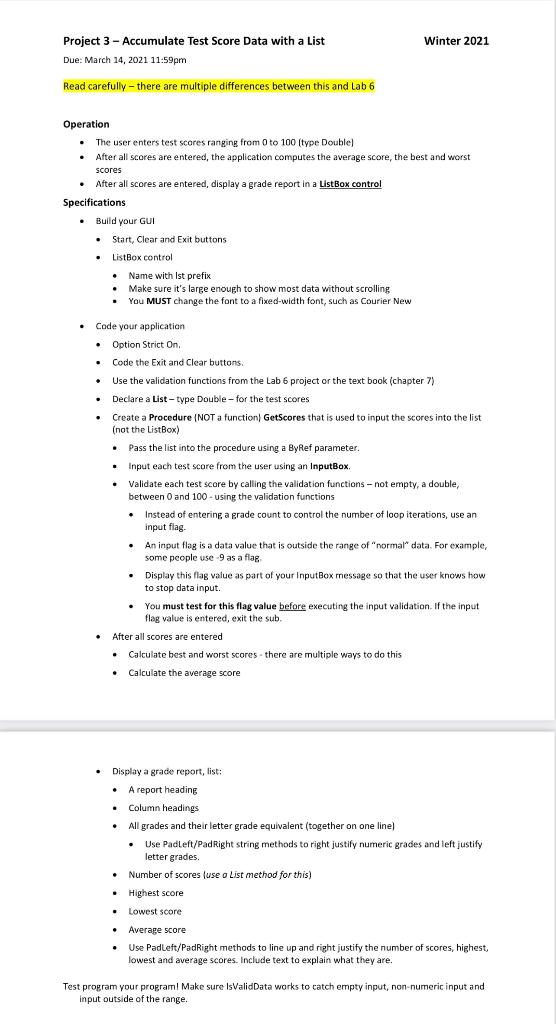
Winter 2021 Project 3 - Accumulate Test Score Data with a List : Due: March 14, 2021 11:59pm Read carefully - there are multiple differences between this and Lab 6 Operation The user enters test scores ranging from 0 to 100 (type Double) After all scores are entered, the application computes the average score, the best and worst scores After all scores are entered, display a grade report in a ListBox control Specifications Build your GUI Start, Clear and Exit buttons ListBox control Name with Ist prefix Make sure it's large enough to show most data without scrolling You MUST change the font to a fixed-width font, such as Courier New a -, . Code your application Option Strict On Code the Exit and Clear buttons. Use the validation functions from the Lab 6 project or the text book (chapter 7) Declare a List -type Double-for the test scores Create a Procedure (NOT a function) GetScores that is used to input the scores into the list (not the ListBox) Pass the list into the procedure using a ByRef parameter. Input each test score from the user using an InputBox, Validate each test score by calling the validation functions - not empty, a double, between 0 and 100 - using the validation functions Instead of entering a grade count to control the number of loop iterations, use an input flag. An input flag is a data value that is outside the range of "normal" data. For example, some people use 9 as a flag Display this flag value as part of your InputBox message so that the user knows how to stop data input. You must test for this flag value before executing the input validation. If the input flag value is entered, exit the sub. . After all scores are entered Calculate best and worst scores there are multiple ways to do this Calculate the average score . . Display a grade report, list: A report heading Column headings All grades and their letter grade equivalent (together on one line) Use Padleft/PadRight string methods to right justify numeric grades and left justify letter grades. Number of scores (use o List method for this) Highest score Lowest score Average score Use Padleft/PadRight methods to line up and right justify the number of scores, highest lowest and average scores. Include text to explain what they are. Test program your programl Make sure IsValid Data works to catch empty input, non-numeric input and input outside of the range. Winter 2021 Project 3 - Accumulate Test Score Data with a List : Due: March 14, 2021 11:59pm Read carefully - there are multiple differences between this and Lab 6 Operation The user enters test scores ranging from 0 to 100 (type Double) After all scores are entered, the application computes the average score, the best and worst scores After all scores are entered, display a grade report in a ListBox control Specifications Build your GUI Start, Clear and Exit buttons ListBox control Name with Ist prefix Make sure it's large enough to show most data without scrolling You MUST change the font to a fixed-width font, such as Courier New a -, . Code your application Option Strict On Code the Exit and Clear buttons. Use the validation functions from the Lab 6 project or the text book (chapter 7) Declare a List -type Double-for the test scores Create a Procedure (NOT a function) GetScores that is used to input the scores into the list (not the ListBox) Pass the list into the procedure using a ByRef parameter. Input each test score from the user using an InputBox, Validate each test score by calling the validation functions - not empty, a double, between 0 and 100 - using the validation functions Instead of entering a grade count to control the number of loop iterations, use an input flag. An input flag is a data value that is outside the range of "normal" data. For example, some people use 9 as a flag Display this flag value as part of your InputBox message so that the user knows how to stop data input. You must test for this flag value before executing the input validation. If the input flag value is entered, exit the sub. . After all scores are entered Calculate best and worst scores there are multiple ways to do this Calculate the average score . . Display a grade report, list: A report heading Column headings All grades and their letter grade equivalent (together on one line) Use Padleft/PadRight string methods to right justify numeric grades and left justify letter grades. Number of scores (use o List method for this) Highest score Lowest score Average score Use Padleft/PadRight methods to line up and right justify the number of scores, highest lowest and average scores. Include text to explain what they are. Test program your programl Make sure IsValid Data works to catch empty input, non-numeric input and input outside of the range
Step by Step Solution
There are 3 Steps involved in it

Get step-by-step solutions from verified subject matter experts
 Study Help