







Question: The main.css code file must be linked separately to the u7forms.html file not embedded in the HTML file !!!! main.css code below! body { font-family:
The main.css code file must be linked separately to the u7forms.html file not embedded in the HTML file !!!!
main.css code below!
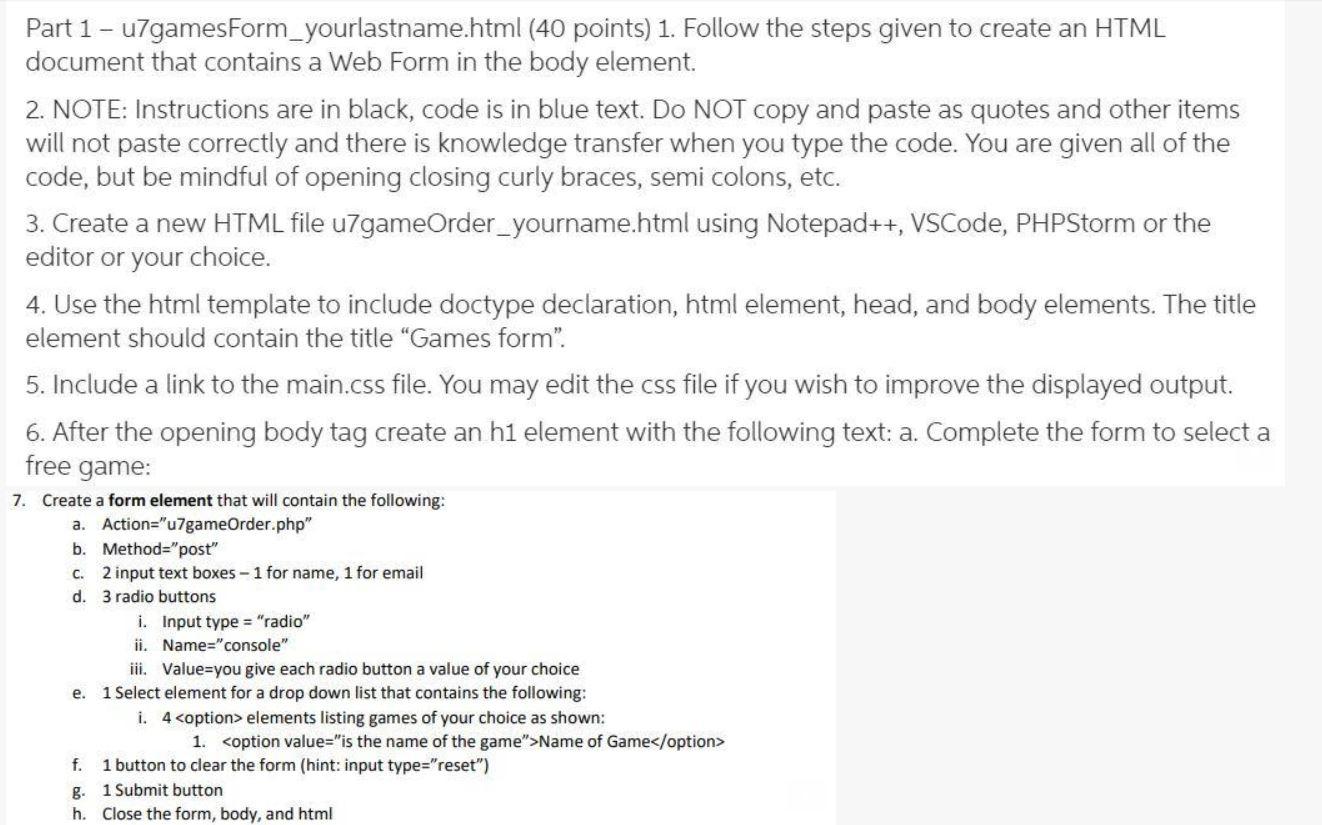
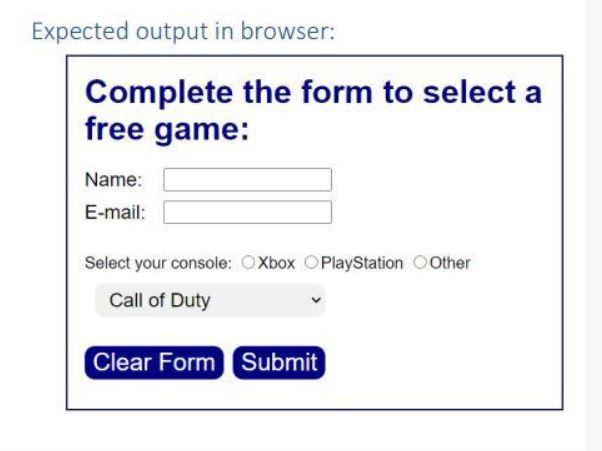
body { font-family: Arial, Helvetica, sans-serif; } main { display: block; width: 450px; margin: 0 auto; padding: 1em; background: white; border: 2px solid navy; } h1 { margin-top: 0; color: navy; } label { width: 4em; float: left; padding-bottom: .5em; font-size: 1.2em; } #buttons input { margin-bottom: .5em; } .button{ background-color: navy; color: white; font-size: 1.5em; border: 2px solid navy; border-radius: 10px; } br { clear: left; } select { width: 50%; margin: 10px; padding: 5px 10px; border: none; border-radius: 10px; background-color: #f1f1f1; font-size: 1.2em; }Part 1 - u7gamesForm_yourlastname.html (40 points) 1. Follow the steps given to create an HTML document that contains a Web Form in the body element. 2. NOTE: Instructions are in black, code is in blue text. Do NOT copy and paste as quotes and other items will not paste correctly and there is knowledge transfer when you type the code. You are given all of the code, but be mindful of opening closing curly braces, semi colons, etc. 3. Create a new HTML file u7gameOrder_yourname.html using Notepad++, VSCode, PHPStorm or the editor or your choice. 4. Use the html template to include doctype declaration, html element, head, and body elements. The title element should contain the title "Games form. 5. Include a link to the main.css file. You may edit the css file if you wish to improve the displayed output. 6. After the opening body tag create an h1 element with the following text: a. Complete the form to select a free game: 7. Create a form element that will contain the following: a. Action="u7gameOrder.php" b. Method="post" C. 2 input text boxes - 1 for name, 1 for email d. 3 radio buttons i. Input type="radio" ii. Name="console" iii. Value=you give each radio button a value of your choice e. 1 Select element for a drop down list that contains the following: i. 4 f. 1 button to clear the form (hint:input type="reset") 8 1 Submit button h. Close the form, body, and html Expected output in browser: Complete the form to select a free game: Name: E-mail: Select your console: Xbox O PlayStation Other Call of Duty Clear Form Submit
Step by Step Solution
There are 3 Steps involved in it
To create the u7gameOrderyournamehtml file and link the maincss separately follow these s... View full answer

Get step-by-step solutions from verified subject matter experts
 Study Help