







Question: The Matlab work I do not know how to write the 'candy.CandyRank = ' %% Script to check your PickCandy function % Change the CHANGE
The Matlab work
I do not know how to write the 'candy.CandyRank = '
%% Script to check your PickCandy function
% Change the "CHANGE HERE" bits
%
% Key matlab concepts
% Structs - how to save data in one "variable"
% Optimization - how to iteratively improve on something
% More practice with functions, program flow
clear
clc
clf
% Read in and setup candy
% CHANGE HERE: Make sure this is your function and your data file
candy = MyPickCandy('CandyData.txt');
% CHANGE HERE: Put your code to calculate rank scores here
candy.CandyRank = 7;
%% The code to do the checking
% Basically, call your function many, many times and see if it creates the
% same probability/rank values
candyPicked = zeros( size( candy.CandyRank ) );
for k = 1:100000
%% CHANGE HERE: change the function MyPickCandy
% See instructions in MyPickCandy
picked = MyPickCandy( candy.CandyRank );
% Record which one was picked
candyPicked( picked ) = candyPicked( picked ) + 1;
end
% Normalize and set to same range of values as rank
candyPicked = sum( candy.CandyRank ) * candyPicked / sum( candyPicked );
%% CHECK HERE: The current version of MyPickCandy should
% produce roughly equal numbers (i.e., something like 3.1 2.9 3.05)
% Once MyPickCandy is correct these two arrays should be
% fairly similar (i.e., something like 3 2 4 and 3.10 1.9 4.1)
disp( candy.CandyRank );
disp( candyPicked );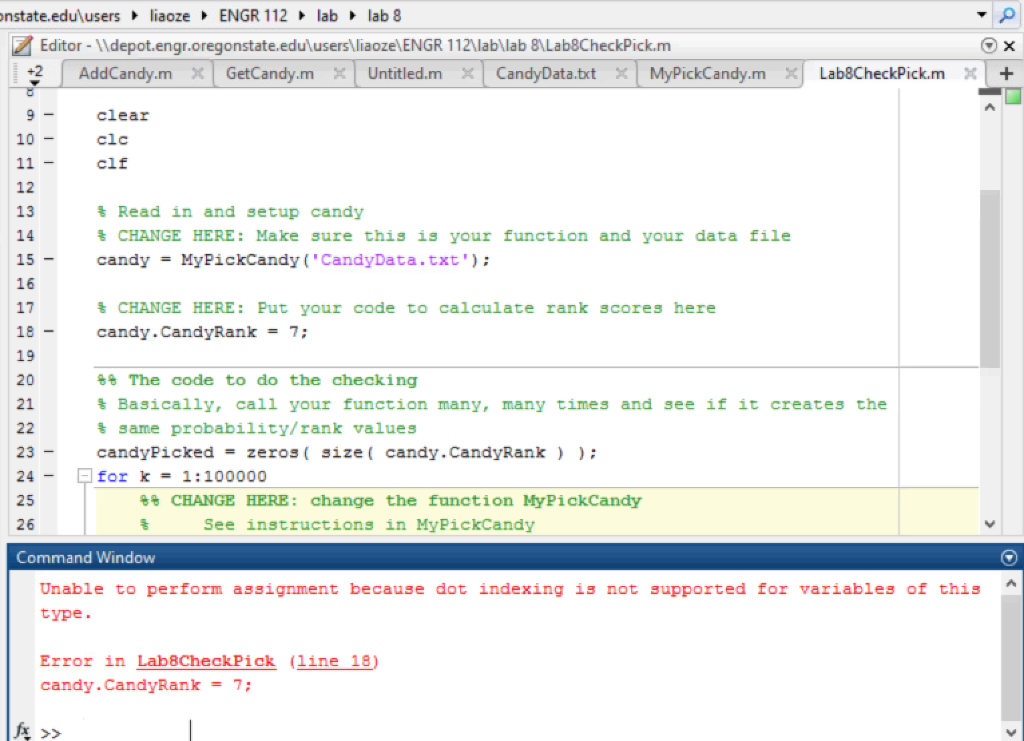
CandyName: {'Rock candy' 'Gum' 'Lollipop' 'Taffy' 'rainble'} CandyCost: [32 15 10 3 5] CandyAmount: [0 0 0 0 0] CandyGoodness: [0 3 1 1 4] numCandyTypes: 5
The CandyData.txt is
Rock candy, Gum, Lollipop, Taffy, rainble
32, 15, 10, 3, 5
0, 3, 1, 1, 4
6, 1, 1, 7, 3
function [ tryCandy ] = MyPickCandy( rankCandy )
%PickCandy Pick one randomly based on the rank values
% Throw a die and see what bin it lies in
% See lecture notes
% Generate a number between 1 and the number of candies
% Lab TODO: Change to be the sum of rankCandy
pickVal = rand(1) * length(rankCandy);
% Make sure we set this to the first item before we start,
% i.e., pickVal is in the first bin
tryCandy = 1;
% Lab TODO: Change this variable to keep track of the
% current rankCandy sum, instead of the index
sumCandy = 1;
% Loop through the bins in order until you get to the one
% that contains your number
while sumCandy
% Lab TODO: Change this so that it keeps track of the
% rank values instead of the index
sumCandy = sumCandy + 1;
tryCandy = tryCandy+1;
end
end
nstate.edurusers 1iaoze ENGR 1 1 2 1ab 1ab 8 Editor-ldepot.engr.oregonstate.edulusers liaozelENGR 112 labllab 8)Lab8CheckPick.m 9 10 clear clc clf 12 13 14 15 16 17 Read in and setup candy CHANGE HERE: Make sure this is your function and your data file candyMyPickCandy "CandyData.txt') CHANGE HERE: put your c de to calculate rank scores here candy.CandyRank7 19 20 21 %% The code to do the checking % Basically, call your function many, many times and see if it creates the % same probability/ rank values candyPickedzerossize( candy. CandyRank for k1:100000 23 24 25 26 Command Window CHANGE HERE: change the function MyPickCandy See instructions in MyPickCandy Unable to perform assignment because dot indexing is not supported for variables of this type Error in Lab8CheckPick (line 18) candy. CandyRank 7; nstate.edurusers 1iaoze ENGR 1 1 2 1ab 1ab 8 Editor-ldepot.engr.oregonstate.edulusers liaozelENGR 112 labllab 8)Lab8CheckPick.m 9 10 clear clc clf 12 13 14 15 16 17 Read in and setup candy CHANGE HERE: Make sure this is your function and your data file candyMyPickCandy "CandyData.txt') CHANGE HERE: put your c de to calculate rank scores here candy.CandyRank7 19 20 21 %% The code to do the checking % Basically, call your function many, many times and see if it creates the % same probability/ rank values candyPickedzerossize( candy. CandyRank for k1:100000 23 24 25 26 Command Window CHANGE HERE: change the function MyPickCandy See instructions in MyPickCandy Unable to perform assignment because dot indexing is not supported for variables of this type Error in Lab8CheckPick (line 18) candy. CandyRank 7
Step by Step Solution
There are 3 Steps involved in it

Get step-by-step solutions from verified subject matter experts
 Study Help