



Question: The PC connected to labsw2 should be connected to the first available interface The PC connected to labsw1 must use the console port on the
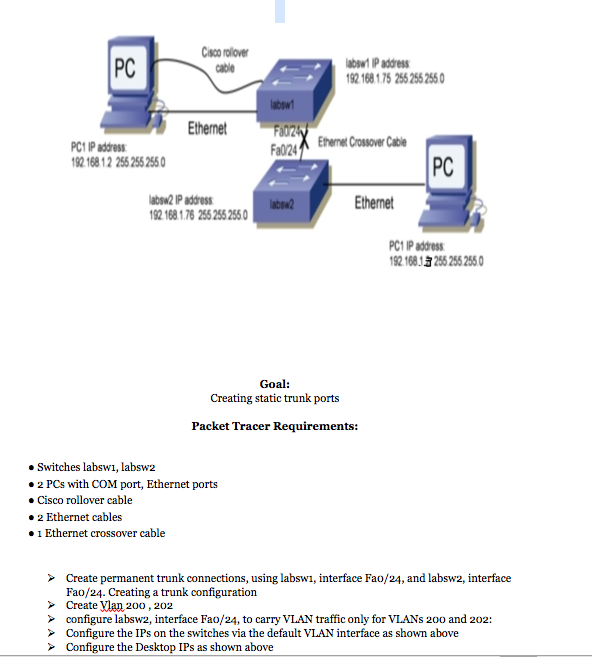
The PC connected to labsw2 should be connected to the first available interface
The PC connected to labsw1 must use the console port on the switch with roll over cable.
Use the correct cabling as diagram shows for all devices.
PCs should ping each other
Make sure that PCs are on the same LAN NOTE USE CISCO packet
PC Cisco rolover cable absw1 IP address 92 168 1.75 255 255 2550 absw Ethernet PC1 IP address 92 168 12 255 255 255 04EeCssowe Cle PC absw2 IP addres 92 168 1.76 255 255 255 thernet absa2 PC1 IP address 92 16813 256 255 2550 Goal: Creating static trunk ports Packet Tracer Requirements: Switches labswi, labsw2 #2 PCs with COM port, Ethernet ports eCisco rollover cable #2 Ethernet cables #1 Ethernet crossover cable Create permanent trunk connections, using labswi, interface Fao/24, and labsw2, interface Fao/24. Creating a trunk configuration Create VMan 200, 202 configure labsw2, interface Fao/24, to carry VLAN traffic only for VLANs 200 and 202: Configure the IPs on the switches via the default VLAN interface as shown above Configure the Desktop IPs as shown above
Step by Step Solution
There are 3 Steps involved in it

Get step-by-step solutions from verified subject matter experts