







Question: The program always crash, and even when it works, the answer is wrong. I need to write a simple code using both Excel VBA and
The program always crash, and even when it works, the answer is wrong.
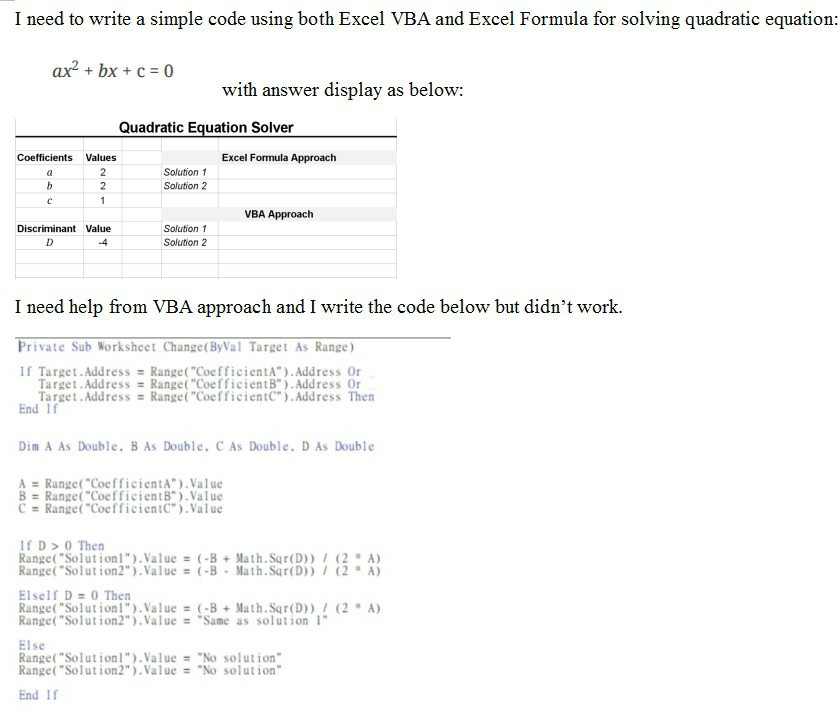
I need to write a simple code using both Excel VBA and Excel Formula for solving quadratic equation: ax? + bx + c = 0 with answer display as below: Quadratic Equation Solver Coefficients Values Excel Formula Approach Solution 1 Solution 2 VBA Approach Discriminant Value D Solution 1 Solution 2 I need help from VBA approach and I write the code below but didn't work. Private Sub Worksheet Change(ByVal Target As Range) If Target. Address = Range("CoefficientA"). Address Or Target. Address = Range("CoefficientB"). Address Or Target. Address = Range("Coefficient"). Address Then End If Dim A As Double, B As Double. C As Double. D As Double A = Range("CoefficientA").Value B = Range("CoefficientB").Value C = Range("CoefficientC").Value ID > 0 Then Range("Solution l").Value = (-B + Math.Sqr(D) / (2. A) Range("Solution2").Value = (-B . Math. Sqr(D) / ( 2 A ) ElseIf D = 0 Then Range("Solutionl").Value = (-B + Math.Sqr(D) / (2. A) Range("Solution2").Value = "Same as solution 1 Else Range("Solutionl").Value = "No solution" Range("Solution2").Value = "No solution" End If
Step by Step Solution
There are 3 Steps involved in it

Get step-by-step solutions from verified subject matter experts
 Study Help