







Question: The programming language is Fortran 90. Please use the coding from lab 3 to start lab 4. Thank you. LAB04 Use of Dynamic Array Modify
The programming language is Fortran 90. Please use the coding from lab 3 to start lab 4. Thank you. 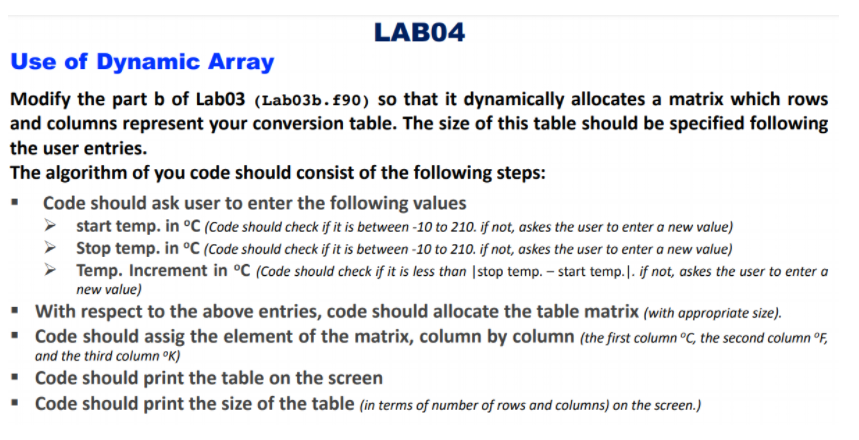
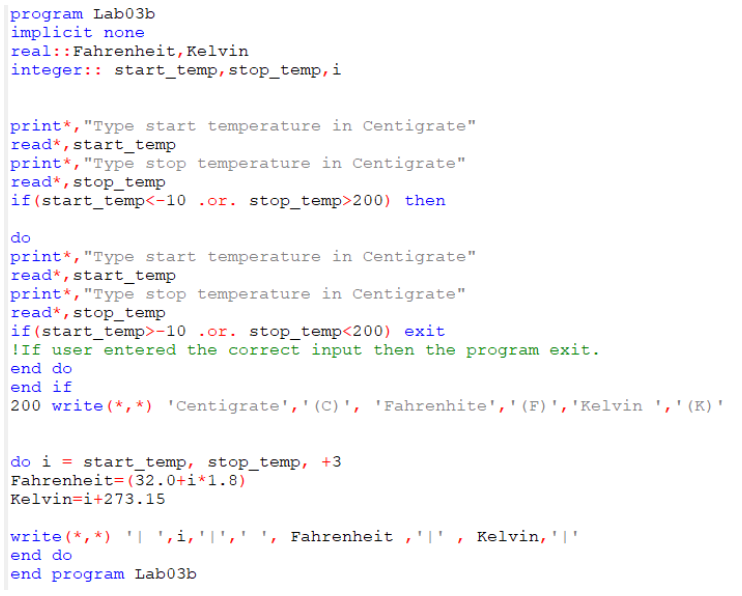
LAB04 Use of Dynamic Array Modify the part b of Labo3 (Labo3b.f90) so that it dynamically allocates a matrix which rows and columns represent your conversion table. The size of this table should be specified following the user entries. The algorithm of you code should consist of the following steps: Code should ask user to enter the following values start temp. in C (Code should check if it is between -10 to 210. if not, askes the user to enter a new value) Stop temp. in C (Code should check if it is between -10 to 210. if not, askes the user to enter a new value) Temp. Increment in C (Code should check if it is less than stop temp. - start temp.). if not, askes the user to enter a new value) With respect to the above entries, code should allocate the table matrix (with appropriate size). Code should assig the element of the matrix, column by column (the first column C, the second column F, and the third columnK) Code should print the table on the screen Code should print the size of the table (in terms of number of rows and columns) on the screen.) program Lab03b implicit none real:: Fahrenheit, Kelvin integer:: start_temp, stop_temp, i print*,"Type start temperature in Centigrate" read*, start_temp print*, "Type stop temperature in Centigrate" read*, stop_temp if (start_temp200) then do print*, "Type start temperature in Centigrate" read*, start_temp print*, "Type stop temperature in Centigrate" read*, stop_temp if (start_temp>-10 .or. stop_temp
Step by Step Solution
There are 3 Steps involved in it

Get step-by-step solutions from verified subject matter experts
 Study Help