







Question: The purpose behind the project is to develop a web solution between teachers and parents to support better education at elementary schools. Please use HTML,
The purpose behind the project is to develop a web solution between teachers and parents to support better education at elementary schools. Please use HTML, CSS, PHP or Javascript if needed.
USE CASES:
LOGIN TAB: Entering login info will allow identification of the user. Identifying user will display correct classroom and user information upon validation.
Typical flow of events:
1.The use case begins when a user enters the credentials
2.Browser sends the credentials to the web server
3.Web servers checks credentials 4.Web server confirms credentials
5.Browser displays Main Menu
6. The use case ends
Alternative flow of events:
1.The use case begins when a user enters the credentials
2.Browser sends the credentials to the web server
3.Web servers checks credentials 4.Web server rejects credentials
5.Browser displays login site with a message invalid login
6.The use case ends
MESSAGE BOARD TAB: User updates and/or displays messages .
Typical flow of events:
1. The use case begins when a user clicks on messages tab
2. The system displays messages page with current messages
3. User may enter a new message and click on send button
4. The system displays messages page with updated messages
HOMEWORK TAB: Teacher(s) assign homework and parents display. Teacher and parents can display list of homework (including historical data)
Typical flow of events:
1.The use case begins when a user clicks on homework tab
2.The system displays the list of homework including historical data
3. Teacher may enter a homework description including due date and click on send
button
4. The system displays updated list of homework in descending order
TO-DO LIST TAB:
Teacher(s) assign(s) tasks and parents display list. Teacher and parents can display to-do list
Typical flow of events:
1. The use case begins when a user clicks on to-do list tab 2. The system displays to do list without historical data 3. Teacher may enter a new task including due date and click on send button
4.The system displays updated to-do list
WISH LIST TAB: Teacher(s) display Wishlists. Parents can sign up and display wish list
Typical flow of events:
1. The use case begins when a user clicks on wish list tab
2. The system displays wish list
3. Teacher may enter a new wish list and click on send button
4. The system displays and parents can sign up for the wish list
Implementation Constraints and Specifications:
Webserver and MySql Server should be running
.
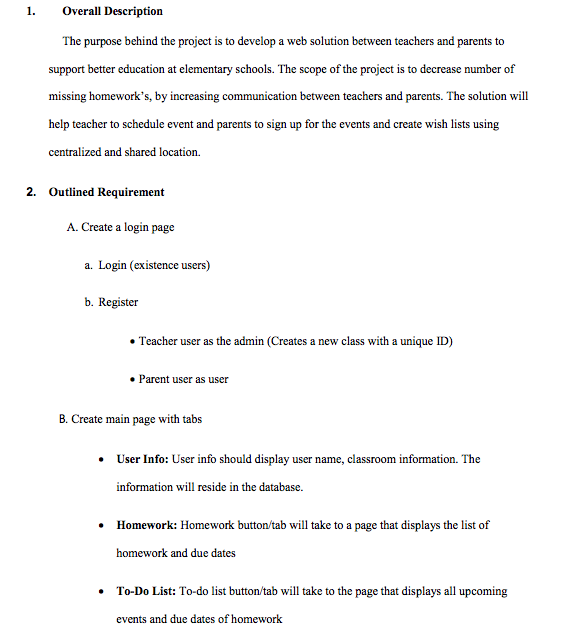
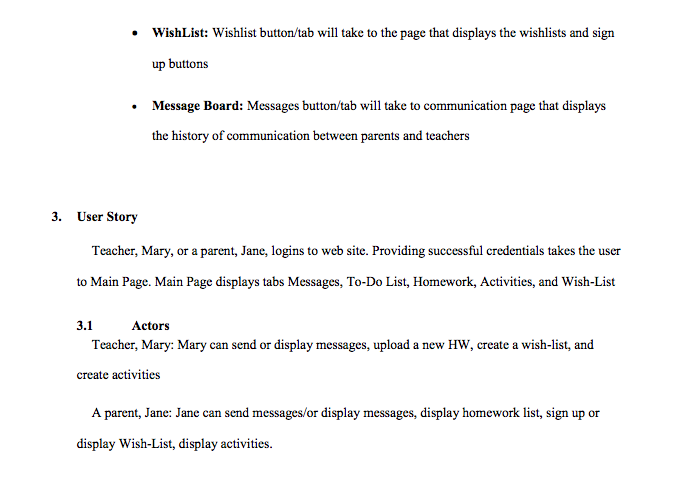
1. Overall Description The purpose behind the project is to develop a web solution between teachers and parents to support better education at elementary schools. The scope of the project is to decrease number of missing homework's, by increasing communication between teachers and parents. The solution will help teacher to schedule event and parents to sign up for the events and create wish lists using centralized and shared location. 2. Outlined Requirement A. Create a login page a. Login (existence users) b. Register Teacher user as the admin (Creates a new class with a unique ID) Parent user as user B. Create main page with tabs User Info: User info should display user name, classroom information. The information will reside in the database. Homework: Homework button/tab will take to a page that displays the list of homework and due dates .To-Do List: To-do list button/tab will take to the page that displays all upcoming events and due dates of homework 1. Overall Description The purpose behind the project is to develop a web solution between teachers and parents to support better education at elementary schools. The scope of the project is to decrease number of missing homework's, by increasing communication between teachers and parents. The solution will help teacher to schedule event and parents to sign up for the events and create wish lists using centralized and shared location. 2. Outlined Requirement A. Create a login page a. Login (existence users) b. Register Teacher user as the admin (Creates a new class with a unique ID) Parent user as user B. Create main page with tabs User Info: User info should display user name, classroom information. The information will reside in the database. Homework: Homework button/tab will take to a page that displays the list of homework and due dates .To-Do List: To-do list button/tab will take to the page that displays all upcoming events and due dates of
Step by Step Solution
There are 3 Steps involved in it

Get step-by-step solutions from verified subject matter experts
 Study Help