







Question: The Python code provided to start: import csv import sys FILENAME = movies.csv def exit_program(): print(Terminating program.) sys.exit() def read_movies(): try: movies = [] with
The Python code provided to start:
import csv import sys
FILENAME = "movies.csv"
def exit_program(): print("Terminating program.") sys.exit()
def read_movies(): try: movies = [] with open(FILENAME, newline="") as file: reader = csv.reader(file) for row in reader: movies.append(row) return movies except FileNotFoundError as e: print(f"Could not find {FILENAME} file.") exit_program() except Exception as e: print(type(e), e) exit_program()
def write_movies(movies): try: with open(FILENAME, "w", newline="") as file: writer = csv.writer(file) writer.writerows(movies) except Exception as e: print(type(e), e) exit_program()
def list_movies(movies): for i, movie in enumerate(movies, start=1): print(f"{i}. {movie[0]} ({movie[1]})") print() def add_movie(movies): name = input("Name: ") year = input("Year: ") movie = [name, year] movies.append(movie) write_movies(movies) print(f"{name} was added. ")
def delete_movie(movies): while True: try: number = int(input("Number: ")) except ValueError: print("Invalid integer. Please try again.") continue if number len(movies): print("There is no movie with that number. Please try again.") else: break movie = movies.pop(number - 1) write_movies(movies) print(f"{movie[0]} was deleted. ")
def display_menu(): print("The Movie List program") print() print("COMMAND MENU") print("list - List all movies") print("add - Add a movie") print("del - Delete a movie") print("exit - Exit program") print()
def main(): display_menu() movies = read_movies() while True: command = input("Command: ") if command.lower() == "list": list_movies(movies) elif command.lower() == "add": add_movie(movies) elif command.lower() == "del": delete_movie(movies) elif command.lower() == "exit": break else: print("Not a valid command. Please try again. ") print("Bye!")
if __name__ == "__main__": main()
!["movies.csv" def exit_program(): print("Terminating program.") sys.exit() def read_movies(): try: movies = []](https://dsd5zvtm8ll6.cloudfront.net/si.experts.images/questions/2024/10/6704011191c43_66567040111192bf.jpg)
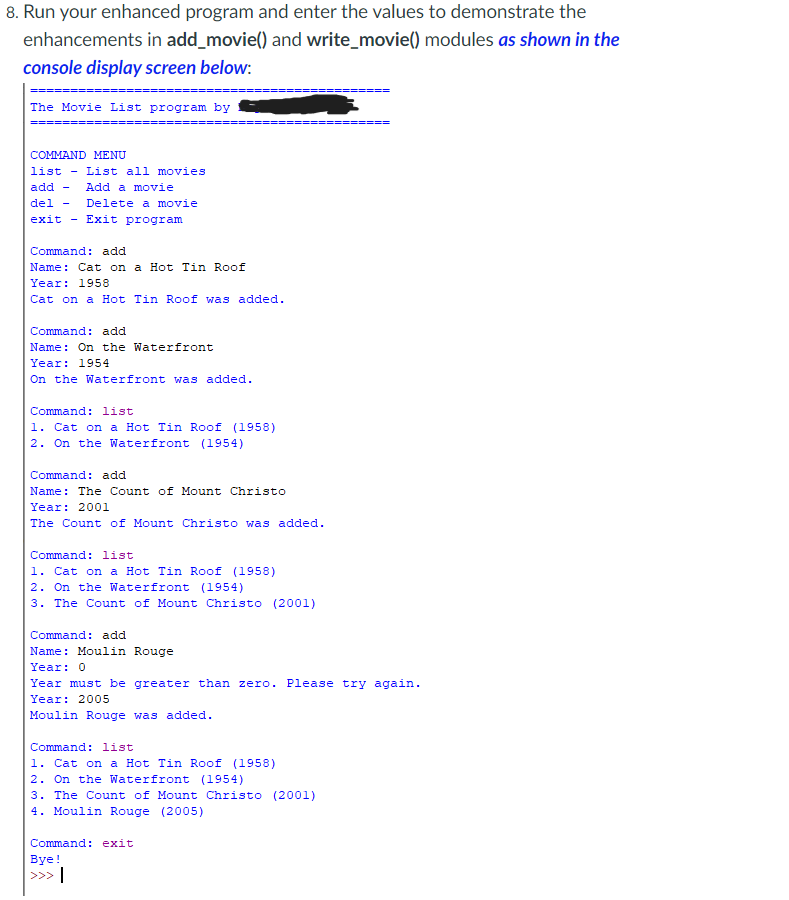
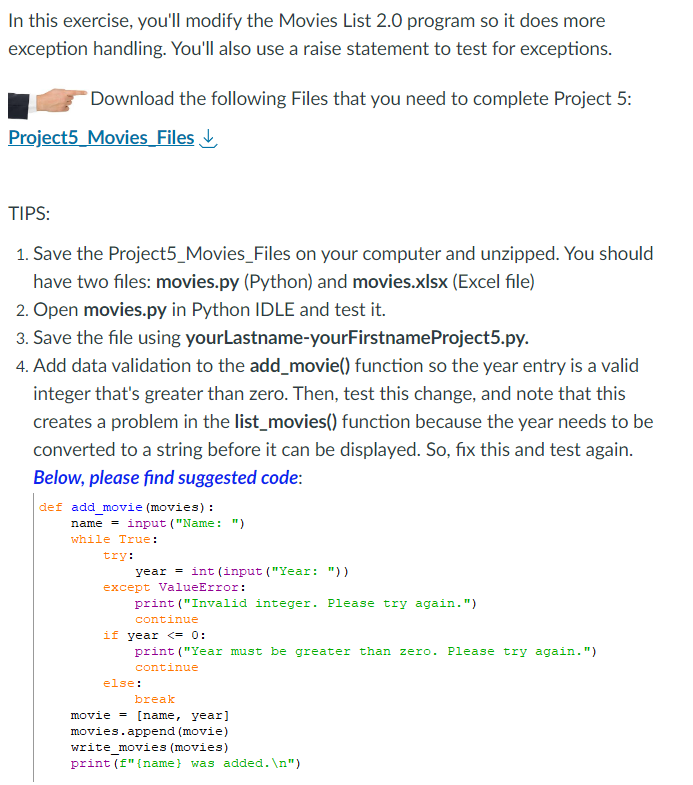
In this exercise, you'll modify the Movies List 2.0 program so it does more exception handling. You'll also use a raise statement to test for exceptions. Download the following Files that you need to complete Project 5: Project5 Movies Files TIPS: 1. Save the Project5_Movies_Files on your computer and unzipped. You should have two files: movies.py (Python) and movies.xlsx (Excel file) 2. Open movies.py in Python IDLE and test it. 3. Save the file using yourLastname-yourFirstnameProject5.py. 4. Add data validation to the add_movie() function so the year entry is a valid integer that's greater than zero. Then, test this change, and note that this creates a problem in the list_movies() function because the year needs to be converted to a string before it can be displayed. So, fix this and test again. Below, please find suggested code: def add movie (movies): name = input("Name: ") while True: try: year = int (input ("Year: ")) except ValueError: print ("Invalid integer. Please try again.") continue if year s= 0: print("Year must be greater than zero. Please try again.") continue else: break [novie = 5. Modify the write_movies() function so it also handles any OSError exceptions by displaying the class name and error message of the exception object and exiting the program. Below, please find suggested code: def write_movies(movies): try: with open(FILENAME, "W", newline="") as file: raise BlockingIOError("Error raised for testing.") writer = csv.writer(file) writer.writerows (movies) except OSError as e: print(type(e), e) exit_program() except Exception as e: print(type(e), e) exit_program() 6. Test this by using a raise statement in the try block that raises a BlockinglOError. This is one of the child classes of the OSError. Then, comment out the raise statement. 7. In the read_movies() function, comment out the two statements in the except clause for the FileNotFoundError. Instead, use this except clause to return the empty movies list that's initialized in the try block. This should cause the program to continue if the file can't be found by allowing the program to create a new file for the movies that the user adds. Run your enhanced program and enter the values to demonstrate the enhancements in add_movie() and write_movie() modules as shown in the console display screen below
Step by Step Solution
There are 3 Steps involved in it

Get step-by-step solutions from verified subject matter experts
 Study Help