







Question: The question I have is, how do i print a word that is not in the list of word from the dictionary, and how do
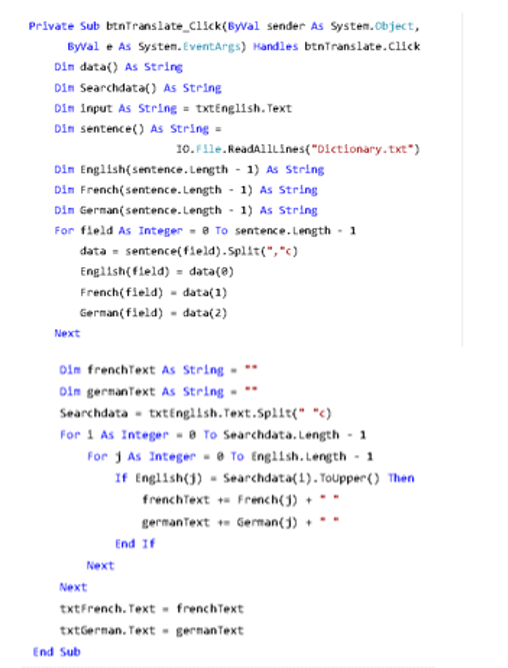
The question I have is, how do i print a word that is not in the list of word from the dictionary, and how do i write the code for that in visual basic?
Private Sub btnTranslate Click(ByWal sender As System.Object, Byl eAs System.EventArgs) Handles btnTranslate.click Din data) As String Din Searchdata) As String Din input As Stringtxt English. Text Din sentence() As String = O.File.ReadAlllines("Dictionary.txt Din Engiish(sentence.Length 1) As String Din French(sentence. Length 1) As String Din German( sentence. Length 1) As String For field As Integer-8 To sentence.Length 1 data-sentence(feld).Split(","c) English(feld) data() French(field)data(1) German(field)-data(2) Next im frenchText As String oin gernanText As String Searchdata txtEnglish.Text.Spllt(") For 1 AsInteger-8 To Searchdata.Length- For j As IntegerTo English,Length-1 If English(j) Searchdata(1). Topper() Then frenchTextFrench(j) germanTextGerman()' End If Next Next txtFrench. Text -frenchText txtGernan. Text gernanText End Sub Private Sub btnTranslate Click(ByWal sender As System.Object, Byl eAs System.EventArgs) Handles btnTranslate.click Din data) As String Din Searchdata) As String Din input As Stringtxt English. Text Din sentence() As String = O.File.ReadAlllines("Dictionary.txt Din Engiish(sentence.Length 1) As String Din French(sentence. Length 1) As String Din German( sentence. Length 1) As String For field As Integer-8 To sentence.Length 1 data-sentence(feld).Split(","c) English(feld) data() French(field)data(1) German(field)-data(2) Next im frenchText As String oin gernanText As String Searchdata txtEnglish.Text.Spllt(") For 1 AsInteger-8 To Searchdata.Length- For j As IntegerTo English,Length-1 If English(j) Searchdata(1). Topper() Then frenchTextFrench(j) germanTextGerman()' End If Next Next txtFrench. Text -frenchText txtGernan. Text gernanText End Sub
Step by Step Solution
There are 3 Steps involved in it

Get step-by-step solutions from verified subject matter experts
 Study Help