







Question: the question is : create a schematic prototype for mobile application which is called H&F with Gymo using the sample below : a sample for
the question is : create a schematic prototype for mobile application which is called H&F with Gymo using the sample below :
a sample for a schematic prototype is here :
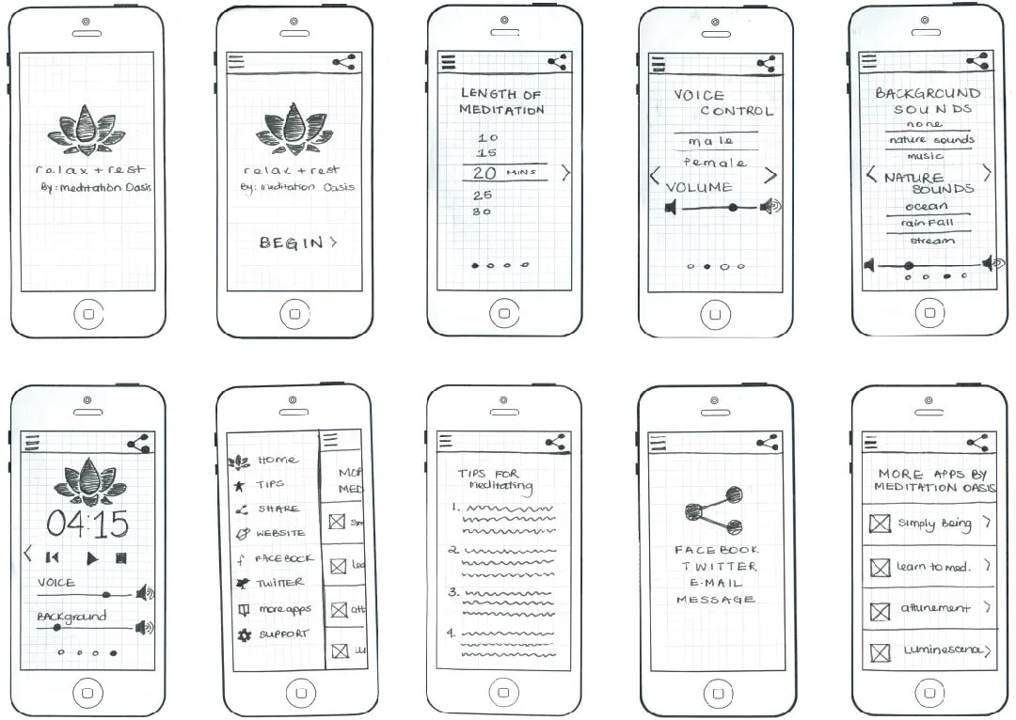
but don't do the same just use it to understand what is the prototype and I want a diagram or graph (as the sample I provided it to you ) as answer not text
more information to help you :
- Home Screen:
- Welcome screen with Gymo Co. logo and branding.
- Options for logging in or creating a new account.
2. User Registration:
- Registration form to create a new account.
- Fields for personal information like name, email, and phone number.
- Option to link existing gym membership or sign up for a new membership.
3. Dashboard:
- Overview of the user's fitness progress, including steps, calories burned, exercise duration, and metrics like heart rate and weight.
- Graphs and charts to visually display the progress over time.
- Personalized goal setting and tracking features.
4. Class Booking:
- Schedule of available classes and courses.
- Option to filter classes by location, type, or instructor.
- Ability to view class details, including time, duration, and capacity.
- Easy booking and cancellation of classes.
5. Payments and Memberships:
- Membership platform to view and manage membership details.
- Payment integration for secure transactions.
- Automatic reminders for upcoming payments or membership renewals.
- Exclusive offers and personalized discounts for members.
Explanation:
- Home Screen:
- Welcome message and Gym Co. branding.
- Quick access buttons to key features.
2. Progress Tracking:
- Step counter displaying the number of steps taken.
- Calorie tracker showing calories burned.
- Exercise log to record and track workout sessions.
- Metrics section to input and visualize heart rate and weight data.
- Progress charts and graphs to visually display member's progress over time.
3. Notifications:
- Push notifications for class updates, schedule changes, reminders, exclusive offers, and personalized discounts
- Real-time alerts for any important announcements or updates from Gym Co.
4. Booking and Payments:
- Class booking feature to allow members to reserve their spots.
- Course enrollment option for signing up for specific programs.
- Secure payment processing for membership fees and additional services
5. Membership Platform:
- Membership plan details and options
- Ability to view and update personal information.
- Access to membership payment history and invoices
6. Wearable Integration:
- Integration with wearable devices like Jawbone or Android Wear.
- Synchronization of fitness data from wearables to track progress seamlessly.
- Real-time updates and notifications based on wearable data.
7. Communication and Notifications:
- Push notifications for class updates, schedule changes, exclusive offers, and personalized messages.
- In-app messaging for easy communication between gym staff and members.
- Option to set preferences for notification frequency and content.
8. Content and Resources:
- Access to valuable content such as blogs, nutrition tips, podcasts, and exercise videos.
- Personalized recommendations based on user's fitness goals and preferences.
- Search functionality to find specific content.
9. Settings:
- User profile management, including personal information and preferences.
- Privacy settings for data sharing and notifications.
Explanation:
6. Wearable Integration:
- Sync with wearable devices (e.g., Jawbone, Android Wear) to track fitness data seamlessly.
- Integration with wearable's data for comprehensive health tracking and goal monitoring.
7. Content Hub:
- Valuable content section including blogs, nutrition tips, podcasts, and exercise videos.
- Search and filter options for specific topics of interest
- Ability to save favorite content for future reference.
8. Settings:
- Personalization options such as theme selection and notification preferences
- Privacy and security settings to manage data sharing and account access.
- Help and support section with FAQs and contact information.
Step by Step Solution
There are 3 Steps involved in it

Get step-by-step solutions from verified subject matter experts
 Study Help