







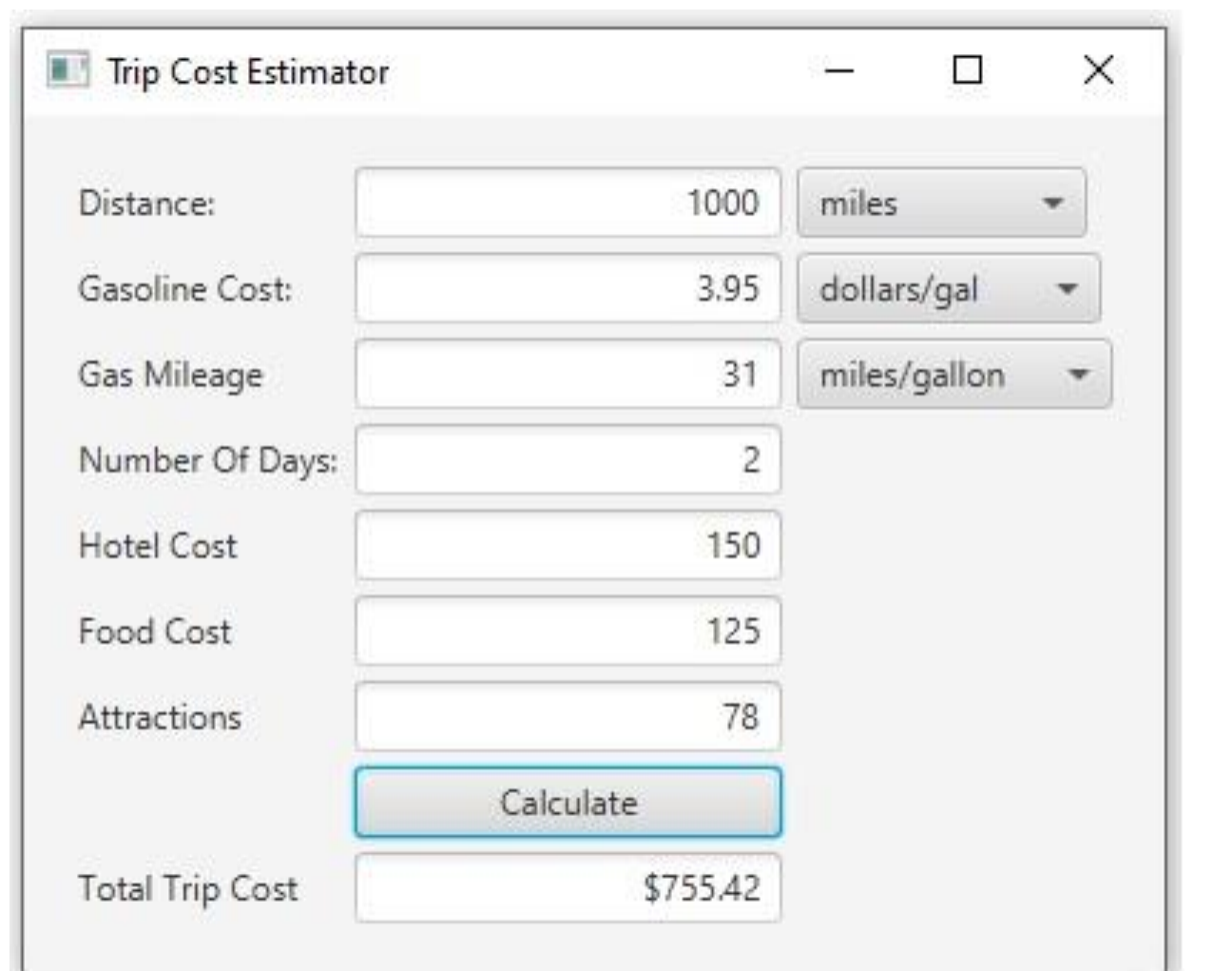
Question: The text fields above the Calculate button are the input fields and the one below is the output field. The output field should not be
The text fields above the Calculate button are the input fields and the one below is the output field. The output field should not be editable. Three of the input fields have combo boxes to their right, which allows the user to input the data as described below: The distance can be entered in either miles or kilometers and represents the total mileage coverage for the duration of the trip, ie it would correspond to the odometer reading at the end of the trip on the vehicles trip meter. The gasoline cost can be input in either dollars per gallon or dollars per liter. The gas mileage can be input as either miles per gallon or kilometers per liter. The user can enter any combination of units for these input fields. Some of the necessary calculations are as follows: gasoline cost gasoline cost total trip cost gasoline cost hotel cost food cost number of days attractions Use these constants for your unit conversion calculations. Be sure to declare them properly as constants rather than embedding the numbers themselves inside your algorithm: KILOMETERSPERMILE LITERSPERGALLON Your program must consist of two classes. The first class Project should define the GUI illustrated above. The second class TripCost should be an immutable class that has at a minimum a constructor that creates a trip cost object and a method that computes and returns the total trip cost. Again, your solution needs to be able to handle all combinations of unit system choices selected from the combo boxes by the user. Some additional examples are shown below, but they are not exhaustive. Your test plan needs to consider ALL combinations and include test runs for each potential choice. Hint: A useful approach is to gather all the unit selections the user makes from the combo boxes and convert each one as necessary to one of the unit systems. Then pass the resulting values to the TripCost constructor.
Step by Step Solution
There are 3 Steps involved in it
1 Expert Approved Answer
Step: 1 Unlock

Question Has Been Solved by an Expert!
Get step-by-step solutions from verified subject matter experts
Step: 2 Unlock
Step: 3 Unlock
 Study Help