







Question: the total marks. Record a macro to create a column that shows the total. - Table always locate at the leftmost position of the Excel
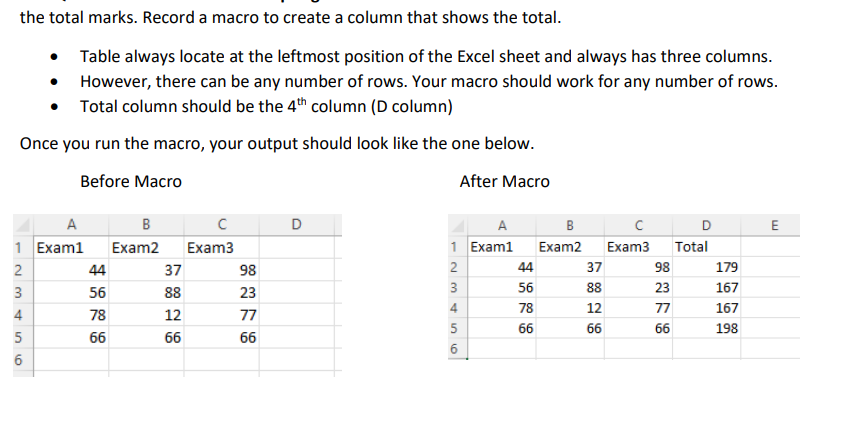
the total marks. Record a macro to create a column that shows the total. - Table always locate at the leftmost position of the Excel sheet and always has three columns. - However, there can be any number of rows. Your macro should work for any number of rows. - Total column should be the 4th column (D column) Once you run the macro, your output should look like the one below. Before Macro After Macro the total marks. Record a macro to create a column that shows the total. - Table always locate at the leftmost position of the Excel sheet and always has three columns. - However, there can be any number of rows. Your macro should work for any number of rows. - Total column should be the 4th column (D column) Once you run the macro, your output should look like the one below. Before Macro After Macro
Step by Step Solution
There are 3 Steps involved in it

Get step-by-step solutions from verified subject matter experts
 Study Help