







Question: The Windows Operating System and applications are event-driven. Describe how a Windows application is decoding event messages in its main message procedure WndProc. How does
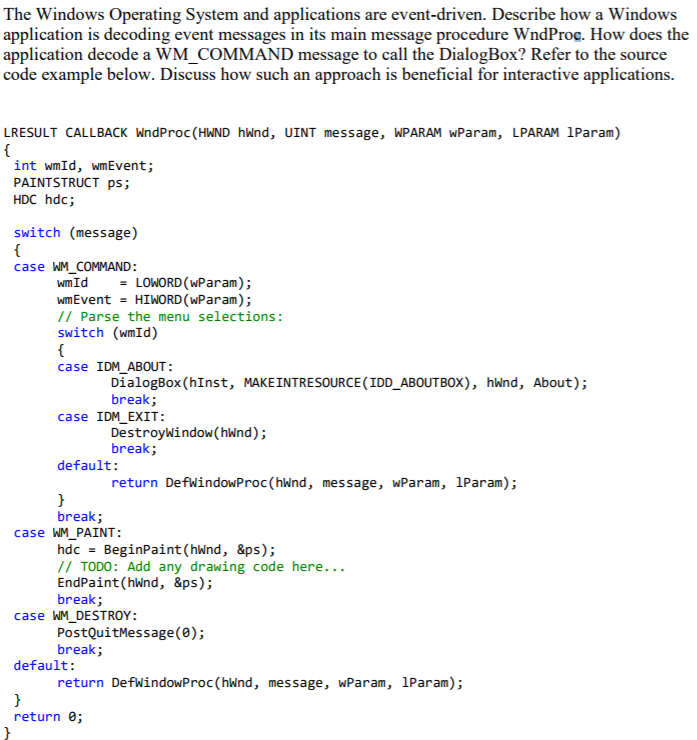
The Windows Operating System and applications are event-driven. Describe how a Windows application is decoding event messages in its main message procedure WndProc. How does the application decode a WM COMMAND message to call the DialogBox? Refer to the source code example below. Discuss how such an approach is beneficial for interactive applications. LRESULT CALLBACK WndProc (HWND hwnd, UINT message, WPARAM wParam, LPARAM 1Param) int wmId, wmEvent; PAINTSTRUCT ps; HDC hdc; switch (message) case WM COMMAND wmId LOWORD (wParam); wmEvent HIWORD (wParam); // Parse the menu selections: switch (wmId) case IDM_ABOUT DialogBox (hInst, MAKEINTRESOURCE (IDD_ABOUTBOX), hwnd, About); break case IDM_EXIT Destroywindow(hwnd) break; default: return DefwindowProc (hWnd, message, wParam, lParam); break; case WM PAINT hdc-BeginPaint (hWnd, &ps); // TODO: Add any drawing code here... EndPaint (hWnd, &ps); break; case WM_DESTROY PostQuitMessage(0); break default: return DefWindowProc (hWnd, message, wParam, 1Param); return 0; The Windows Operating System and applications are event-driven. Describe how a Windows application is decoding event messages in its main message procedure WndProc. How does the application decode a WM COMMAND message to call the DialogBox? Refer to the source code example below. Discuss how such an approach is beneficial for interactive applications. LRESULT CALLBACK WndProc (HWND hwnd, UINT message, WPARAM wParam, LPARAM 1Param) int wmId, wmEvent; PAINTSTRUCT ps; HDC hdc; switch (message) case WM COMMAND wmId LOWORD (wParam); wmEvent HIWORD (wParam); // Parse the menu selections: switch (wmId) case IDM_ABOUT DialogBox (hInst, MAKEINTRESOURCE (IDD_ABOUTBOX), hwnd, About); break case IDM_EXIT Destroywindow(hwnd) break; default: return DefwindowProc (hWnd, message, wParam, lParam); break; case WM PAINT hdc-BeginPaint (hWnd, &ps); // TODO: Add any drawing code here... EndPaint (hWnd, &ps); break; case WM_DESTROY PostQuitMessage(0); break default: return DefWindowProc (hWnd, message, wParam, 1Param); return 0
Step by Step Solution
There are 3 Steps involved in it

Get step-by-step solutions from verified subject matter experts
 Study Help