







Question: The Windows Operating System and applications are event-driven. Describe how a Windows application is decoding a WM COMMAND event message to call a Dialog Box
The Windows Operating System and applications are event-driven. Describe how a Windows application is decoding a WM COMMAND event message to call a Dialog Box from its main message procedure WndProc. You also need to describe the role of the parameters. Refer to the source code example below. Discuss how event-driven systems are beneficial for interactive applications. 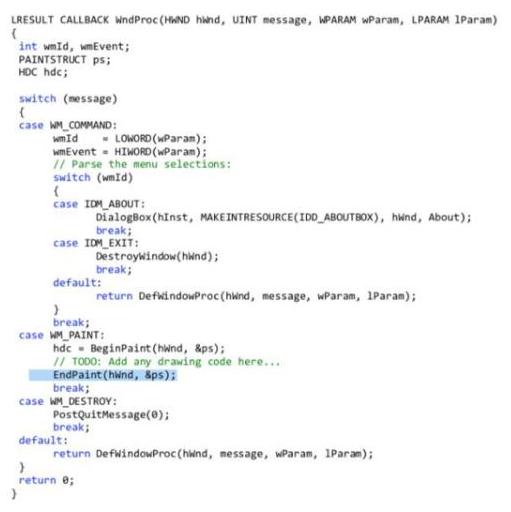
LRESULT CALLBACK WwndProc (HAND hand, UINT message, WPARAM WParam, LPARAM 1Param) int wmId, wmEvent; PAINTSTRUCT ps; HDC hdc; switch (nessage) case WM_COMMAND: wmId - LOWORD (wParam); wmEvent - HIWORD (WParam); I/ Parse the menu selections: switch (wmId) case IDM ABOUT: DialogBox (hinst, MAKEINTRESOURCE(IDD_ABOUTBOX), hind, About); break; case IDM_EXIT: Destroywindow(hiwnd); break; default: return DefwindowProc(hind, message, wParam, 1Param); break; case WM PAINT: hdc - BeginPaint (hwnd, &ps); 1/ TODO: Add any drawing code here... EndPaint (hwnd, Sps): break; case WM_DESTROY: PostQuitMessage(0); break; default: return DefwindowProc (hind, message, wParam, IParam); return e;
Step by Step Solution
3.50 Rating (153 Votes )
There are 3 Steps involved in it
Decoding a WMCOMMAND Event in a Windows Application In a Windows application messages are used to inform an application of events like user interactio... View full answer

Get step-by-step solutions from verified subject matter experts
 Study Help