





Question: the xml file E-Commerce Tools and Applications Assignment2 Use assignment_2xls file to answer the following questions. Q1: Create a new code module, rename the code
the xml file E-Commerce Tools and Applications
the xml file
the xml file E-Commerce Tools and Applications
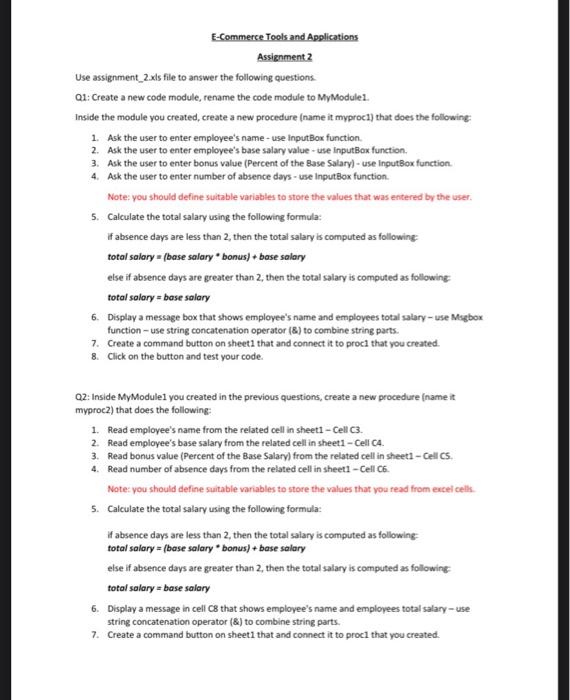
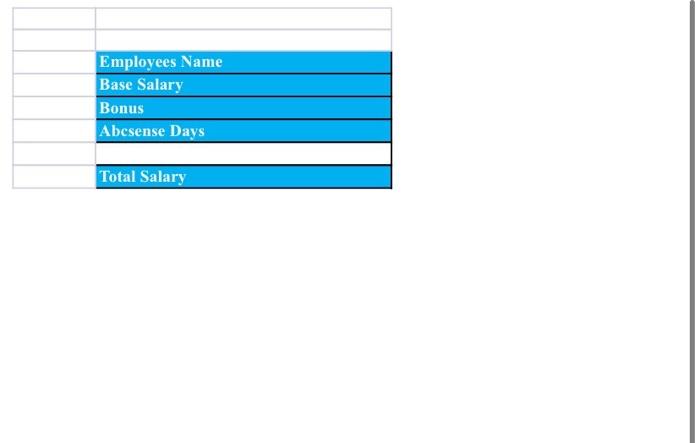
E-Commerce Tools and Applications Assignment2 Use assignment_2xls file to answer the following questions. Q1: Create a new code module, rename the code module to MyModule1. Inside the module you created, create a new procedure (name it myproc1) that does the following: 1. Ask the user to enter employee's name - use inputBox function. 2. Ask the user to enter employee's base salary value - use inputiox function. 3. Ask the user to enter bonus value (Percent of the Base Salary) - use ingutBox function. 4. Ask the user to enter number of absence days - use inputbox function. Note: you should define suitable variables to store the values that was entered by the user. 5. Calculate the total salary using the following formula: If absence days are less than 2 , then the total salary is computed as following: total salary = (base salary * bonus )+ base salary else if absence days are greater than 2, then the total salary is computed as following total salary = base salary 6. Display a message box that shows employee's name and employees total salary - use Migbox function - use string concatenation operator (8) to combine string parts. 7. Create a command button on sheet1 that and connect it to proc1 that you created. 8. Click on the button and test your code. Q2: Inside MyModulel you created in the previous questions, create a new procedure (name it myproc2) that does the following: 1. Read employee's name from the related cell in sheet1 - Cell C3. 2. Read employee's base salary from the related cell in sheet1 - Cell ca. 3. Read bonus value (Percent of the Base Salary) from the related cell in sheet1 - Cell cs. 4. Read number of absence days from the related cell in sheet1 - Cell c6. Note: you should define suitable variables to store the values that you read from excel cells. 5. Calculate the total salary using the following formula: If absence days are less than 2 , then the total salary is computed as following:- total salary = (base salary * bonus) + base salary else if absence days are greater than 2 , then the total salary is computed as following total salary = base salary 6. Display a message in cell C8 that shows employee's name and employees total salary-use string concatenation operator (8) to combine string parts. 7. Create a command button on sheet1 that and connect it to proc1 that you created. \begin{tabular}{|l|l|} \hline & \\ \hline Employees Name \\ \hline Base Salary \\ \hline Bonus \\ \hline Abcsense Days \\ \hline & \\ \hline Total Salary \\ \hline \end{tabular} E-Commerce Tools and Applications Assignment2 Use assignment_2xls file to answer the following questions. Q1: Create a new code module, rename the code module to MyModule1. Inside the module you created, create a new procedure (name it myproc1) that does the following: 1. Ask the user to enter employee's name - use inputBox function. 2. Ask the user to enter employee's base salary value - use inputiox function. 3. Ask the user to enter bonus value (Percent of the Base Salary) - use ingutBox function. 4. Ask the user to enter number of absence days - use inputbox function. Note: you should define suitable variables to store the values that was entered by the user. 5. Calculate the total salary using the following formula: If absence days are less than 2 , then the total salary is computed as following: total salary = (base salary * bonus )+ base salary else if absence days are greater than 2, then the total salary is computed as following total salary = base salary 6. Display a message box that shows employee's name and employees total salary - use Migbox function - use string concatenation operator (8) to combine string parts. 7. Create a command button on sheet1 that and connect it to proc1 that you created. 8. Click on the button and test your code. Q2: Inside MyModulel you created in the previous questions, create a new procedure (name it myproc2) that does the following: 1. Read employee's name from the related cell in sheet1 - Cell C3. 2. Read employee's base salary from the related cell in sheet1 - Cell ca. 3. Read bonus value (Percent of the Base Salary) from the related cell in sheet1 - Cell cs. 4. Read number of absence days from the related cell in sheet1 - Cell c6. Note: you should define suitable variables to store the values that you read from excel cells. 5. Calculate the total salary using the following formula: If absence days are less than 2 , then the total salary is computed as following:- total salary = (base salary * bonus) + base salary else if absence days are greater than 2 , then the total salary is computed as following total salary = base salary 6. Display a message in cell C8 that shows employee's name and employees total salary-use string concatenation operator (8) to combine string parts. 7. Create a command button on sheet1 that and connect it to proc1 that you created. \begin{tabular}{|l|l|} \hline & \\ \hline Employees Name \\ \hline Base Salary \\ \hline Bonus \\ \hline Abcsense Days \\ \hline & \\ \hline Total Salary \\ \hline \end{tabular}

Step by Step Solution

There are 3 Steps involved in it

1 Expert Approved Answer
Step: 1 Unlock blur-text-image

Question Has Been Solved by an Expert!

Get step-by-step solutions from verified subject matter experts

Step: 2 Unlock
Step: 3 Unlock

Students Have Also Explored These Related General Management Questions!