







Question: -The XML files (all.xml , dotnet.xml , howto.xml , javaccpp.xml , simply.xml ) used in the book-cover catalog example (Fig. 16.8) also store the titles
-The XML files (all.xml , dotnet.xml
 , howto.xml
 , javaccpp.xml
 , simply.xml
 ) used in the book-cover catalog example (Fig. 16.8) also store the titles of the books in a title attribute of each cover node.
-Modify the source code from http://test.deitel.com/iw3htp5/ch16/fig16_08/PullImagesOntoPage.html (Links to an external site.) so that every time the mouse hovers over an image, the books title is displayed below the image.
>THE XML FILES AND THE SOURCE CODE FOR THE LINK ARE BELOW!!
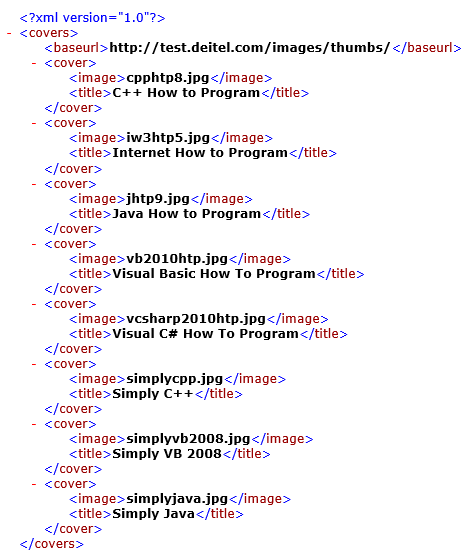
all.xml:
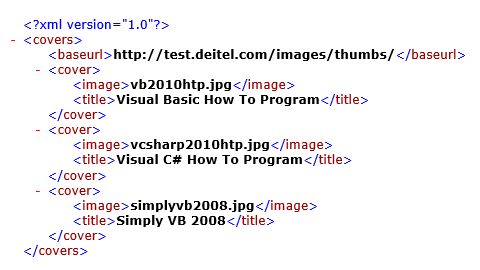
dotnet.xml:
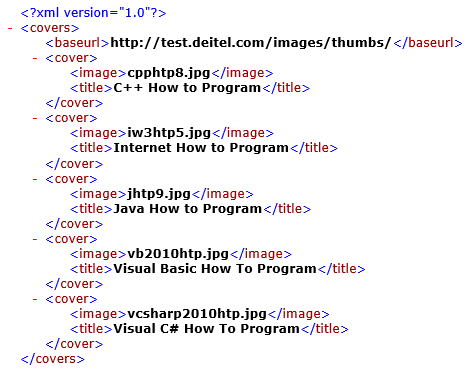
howto.xml:
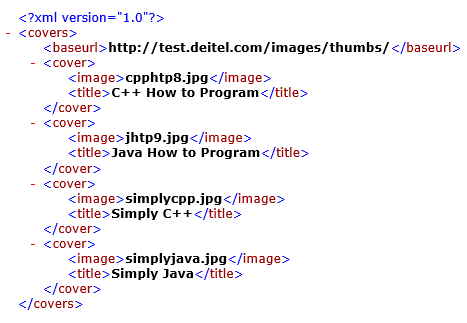
javaccpp.xml
simply.xml:
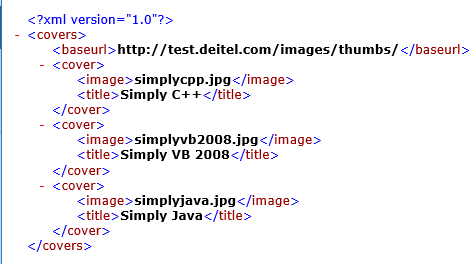
|
| |
| li { display: inline-block; padding: 4px; width: 120px; } | |
| img { border: 1px solid black } | |
| var asyncRequest; // variable to hold XMLHttpRequest object | |
| // set up and send the asynchronous request to get the XML file | |
| function getImages( url ) | |
| { | |
| // attempt to create XMLHttpRequest object and make the request | |
| try | |
| { | |
| asyncRequest = new XMLHttpRequest(); // create request object | |
| // register event handler | |
| asyncRequest.addEventListener( | |
| "readystatechange", processResponse, false); | |
| asyncRequest.open( "GET", url, true ); // prepare the request | |
| asyncRequest.send( null ); // send the request | |
| } // end try | |
| catch ( exception ) | |
| { | |
| alert( "Request Failed" ); | |
| } // end catch | |
| } // end function getImages | |
| // parses the XML response; dynamically creates an undordered list and | |
| // populates it with the response data; displays the list on the page | |
| function processResponse() | |
| { | |
| // if request completed successfully and responseXML is non-null | |
| if ( asyncRequest.readyState == 4 && asyncRequest.status == 200 && | |
| asyncRequest.responseXML ) | |
| { | |
| clearImages(); // prepare to display a new set of images | |
| // get the covers from the responseXML | |
| var covers = asyncRequest.responseXML.getElementsByTagName( | |
| "cover" ) | |
| // get base URL for the images | |
| var baseUrl = asyncRequest.responseXML.getElementsByTagName( | |
| "baseurl" ).item( 0 ).firstChild.nodeValue; | |
| // get the placeholder div element named covers | |
| var output = document.getElementById( "covers" ); | |
| // create an unordered list to display the images | |
| var imagesUL = document.createElement( "ul" ); | |
| // place images in unordered list | |
| for ( var i = 0; i | |
| { | |
| var cover = covers.item( i ); // get a cover from covers array | |
| // get the image filename | |
| var image = cover.getElementsByTagName( "image" ). | |
| item( 0 ).firstChild.nodeValue; | |
| // create li and img element to display the image | |
| var imageLI = document.createElement( "li" ); | |
| var imageTag = document.createElement( "img" ); | |
| // set img element's src attribute | |
| imageTag.setAttribute( "src", baseUrl + escape( image ) ); | |
| imageLI.appendChild( imageTag ); // place img in li | |
| imagesUL.appendChild( imageLI ); // place li in ul | |
| } // end for statement | |
| output.appendChild( imagesUL ); // append ul to covers div | |
| } // end if | |
| } // end function processResponse | |
| // clears the covers div | |
| function clearImages() | |
| { | |
| document.getElementById( "covers" ).innerHTML = ""; | |
| } // end function clearImages | |
| // register event listeners | |
| function registerListeners() | |
| { | |
| document.getElementById( "all" ).addEventListener( | |
| "click", function() { getImages( "all.xml" ); }, false ); | |
| document.getElementById( "simply" ).addEventListener( | |
| "click", function() { getImages( "simply.xml" ); }, false ); | |
| document.getElementById( "howto" ).addEventListener( | |
| "click", function() { getImages( "howto.xml" ); }, false ); | |
| document.getElementById( "dotnet" ).addEventListener( | |
| "click", function() { getImages( "dotnet.xml" ); }, false ); | |
| document.getElementById( "javaccpp" ).addEventListener( | |
| "click", function() { getImages( "javaccpp.xml" ); }, false ); | |
| document.getElementById( "none" ).addEventListener( | |
| "click", clearImages, false ); | |
| } // end function registerListeners | |
| window.addEventListener( "load", registerListeners, false ); | |
| id = "all"> All Books | |
| id = "simply"> Simply Books | |
| id = "howto"> How to Program Books | |
| id = "dotnet"> .NET Books | |
| id = "javaccpp"> Java/C/C++ Books | |
| id = "none"> None | |
Step by Step Solution
There are 3 Steps involved in it
1 Expert Approved Answer
Step: 1 Unlock

Question Has Been Solved by an Expert!
Get step-by-step solutions from verified subject matter experts
Step: 2 Unlock
Step: 3 Unlock
 Study Help