







Question: There are errors in the following code. Find any 6 errors. All errors are typos or spelling errors. Copy the table below into the text
There are errors in the following code. Find any 6 errors. All errors are typos or spelling errors. Copy the table below into the text box. Identify the line number of the error and write the line number under the 'Line' column and write the corrected syntax in the right under the column 'Corrected Code'.
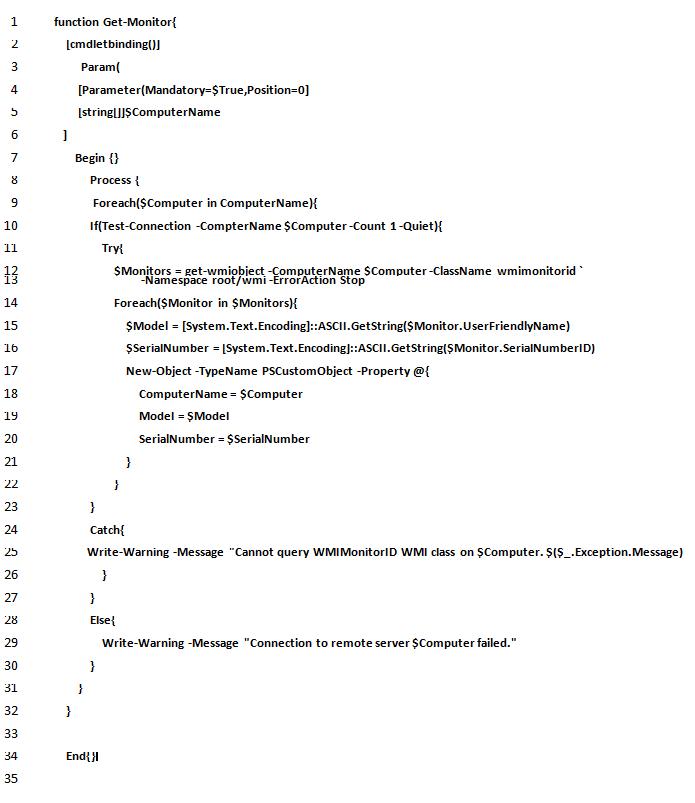
1 function Get-Monitor{ 2 3 4 5 5.0 6 7 8 9 10 11 13 14 15 16 17 18 19 20 21 22 23 24 25 26 27 28 29 30 31 32 33 34 35 [cmdletbinding()] Param( ] } [Parameter(Mandatory-$True,Position=0] [string[]]$ComputerName Begin {} } Process { Foreach($Computer in ComputerName){ If(Test-Connection -CompterName $Computer-Count 1-Quiet){ Try{ } $Monitors = get-wmiobiect -ComputerName $Computer-ClassName wmimonitorid -Namespace root/wmi-ErrorAction Stop Foreach($Monitor in $Monitors){ $Model = [System.Text.Encoding]::ASCII.GetString($Monitor.UserFriendlyName) $SerialNumber = [System.Text.Encoding]::ASCII.GetString($Monitor.SerialNumberID) New-Object -TypeName PSCustomObject -Property @{ ComputerName = $Computer Model = $Model SerialNumber = $SerialNumber End{}l } } Catch{ Write-Warning -Message "Cannot query WMIMonitorID WMI class on $Computer. $($_.Exception. Message) } } Else{ } Write-Warning -Message "Connection to remote server $Computer failed."
Step by Step Solution
3.41 Rating (157 Votes )
There are 3 Steps involved in it
Here are the identified errors in the provided code Line Corrected Code 4 Par... View full answer

Get step-by-step solutions from verified subject matter experts
 Study Help