







Question: There is a problem in this class as you can see in the picture can you fix that please: Here is the code for all
There is a problem in this class as you can see in the picture can you fix that please:
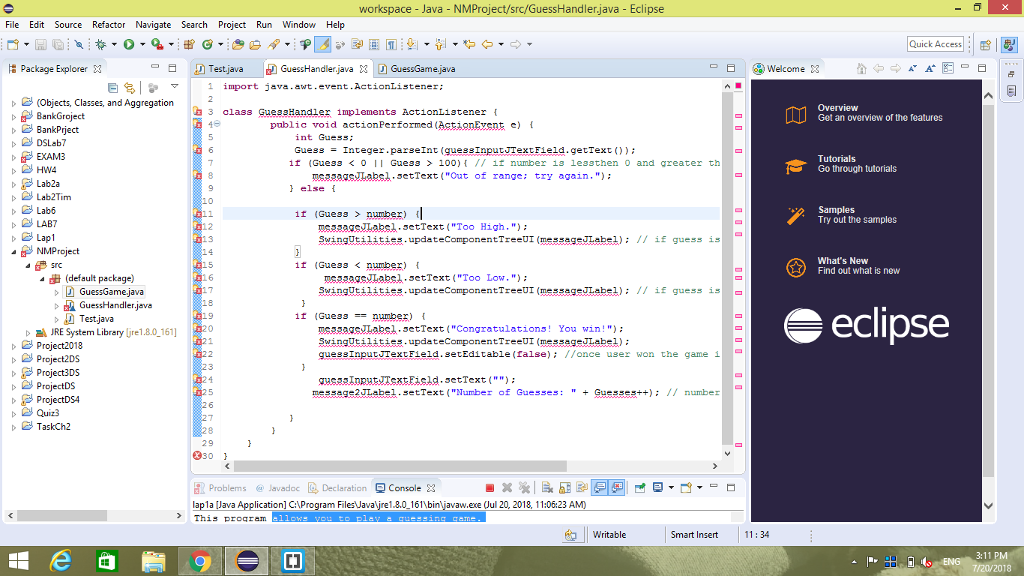
Here is the code for all the project:
import java.awt.event.ActionListener;
class GuessHandler implements ActionListener { public void actionPerformed(ActionEvent e) { int Guess; Guess = Integer.parseInt(guessInputJTextField.getText()); if (Guess 100){ // if number is lessthen 0 and greater than 100 then have to re-enter number messageJLabel.setText("Out of range; try again."); } else { if (Guess > number) { messageJLabel.setText("Too High."); SwingUtilities.updateComponentTreeUI(messageJLabel); // if guess is high } if (Guess
___________________
import javax.swing.JFrame;
public class GuessGame { public static void main(String args[]) throws Exception { Test guessgame = new Test(); guessgame.setDefaultCloseOperation(JFrame.EXIT_ON_CLOSE); guessgame.setSize(550, 160); guessgame.setVisible(true); } }
_____________________
import java.awt.Color; import java.awt.FlowLayout; import java.awt.event.ActionListener; import java.awt.event.ActionEvent; import java.util.Random; import javax.swing.JFrame; import javax.swing.JTextField; import javax.swing.JLabel; import javax.swing.JButton; import javax.swing.SwingUtilities; public class Test extends JFrame { private int Guesses = 1; //guess variable initialization private int oldnumber; private int number; // will store random number that generated by random function private JTextField guessInputJTextField; private JLabel prompt1JLabel; // for label printing on the gui private JLabel prompt2JLabel; private JLabel messageJLabel; // for message printing on the gui private JLabel message2JLabel; private JLabel random1 = new JLabel(""); //random no private JButton newGameJButton; //for button private Color background; // for color the background public Test() { //test class super("Guessing Game"); prompt1JLabel = new JLabel("This program allows you to play a guessing game."); add(prompt1JLabel); prompt1JLabel = new JLabel("I will think of a number between 1 and 100"); add(prompt1JLabel); prompt1JLabel = new JLabel("and will allow you to guess until you get it."); // all just label printing add(prompt1JLabel); prompt1JLabel = new JLabel("For each guess, I will tell you whether the right"); add(prompt1JLabel); prompt1JLabel = new JLabel("answer is higher or lower than your guess."); add(prompt1JLabel); setLayout(new FlowLayout()); background = Color.LIGHT_GRAY; // background color set prompt1JLabel = new JLabel("I have a number between 1 and 100."); // for taking number from user between 1 to 100 add(prompt1JLabel); prompt2JLabel = new JLabel("Enter your Guess:"); // enter guesses add(prompt2JLabel); guessInputJTextField = new JTextField(5); guessInputJTextField.addActionListener(new GuessHandler()); add(guessInputJTextField); messageJLabel = new JLabel(""); add(messageJLabel); message2JLabel = new JLabel(""); add(message2JLabel); newGameJButton = new JButton("New Game"); // if user dont want to play then create new game anytime add(newGameJButton); Random generator = new Random(); // random number generator number = generator.nextInt(100); // generator is between 0 to 99 newGameJButton.addActionListener( new ActionListener() { public void actionPerformed(ActionEvent e) { guessInputJTextField.setText(""); // clear the input text box at init stage Random generator = new Random(); //generate number number = generator.nextInt(100); // between 0 and 100 random1.setText("" + number); SwingUtilities.updateComponentTreeUI(random1); messageJLabel.setText(""); guessInputJTextField.setEditable(true); // set input guess textbox enable Guesses = 0; message2JLabel.setText("Number of Guesses: " + Guesses); Guesses++; } } ); theGame(); } public void theGame() { } }
_____________________________
import java.util.*;
public class lap1a {
public static void main(String[] args) {
giveIntro();
Scanner console = new Scanner(System.in);
char choice;
// pick a random number from 0 to 99 inclusive
Random rand = new Random();
do{ // iterates until user wants to quit
int given = rand.nextInt(100);
// get first guess
int guess = getGuess(console);
// give hints until correct guess is reached
while (guess != given) {
int numMatches = matches(given, guess);
if(numMatches
System.out.println("It's lower");
}
else if(numMatches > 0){ // if numMatches is greater than 0, then the number is higher
System.out.println("It's higher");
}
guess = getGuess(console);
}
System.out.println("Congratulations! You win!");
System.out.print("Do you want to play again?" );
choice = console.next().charAt(0);
System.out.println();
}while(choice == 'y' || choice == 'Y');
}
// method to give introduction
public static void giveIntro() {
System.out.println("This program allows you to play a guessing game.");
System.out.println("I will think of a number between 1 and 100");
System.out.println("and will allow you to guess until you get it.");
System.out.println("For each guess, I will tell you whether the right");
System.out.println("answer is higher or lower than your guess.");
System.out.println();
}
// Returns -1 if number is less than guess, 1 if number is greater, 0 if equal
public static int matches(int given, int guess) {
int numMatches = 0;
if(given > guess){
numMatches = 1;
}
else if(given
numMatches = -1;
}
return numMatches;
}
// Re-prompts until a number in the proper range is entered.
// post: guess is between 0 and 99
public static int getGuess(Scanner console) {
int guess = getInt(console, "Your guess? ");
while (guess = 100) {
System.out.println("Out of range; try again.");
guess = getInt(console, "Your guess? ");
}
return guess;
}
// Re-prompts until a number is entered.
public static int getInt(Scanner console, String prompt) {
System.out.print(prompt);
while (!console.hasNextInt()) {
console.next();
System.out.println("Not an integer; try again.");
System.out.print(prompt);
}
return console.nextInt();
}
}
workspace -Java - NMProject/src/GuessHandler,java - Eclipse File Edit Source Refactor Navigate Search Project Run Window Help Quick Access| . | A Test.java-pGuessHandlerjava X E]e I :- | 1 import java.avt.event.ActionListene r ; package Explorer X -a GuessGamejava B ) Welcome X (Objects, Classes, and Aggregation BankGrojedt 2 3 class GuessHandler Implements ActionListener { Get an overview of the features t Bankprject public void actionPerformed (AstienEvsnt c) int Guess: DSLab7 EXAM3 Guess = Integer.parseInt (guessinputJTextField.getText()); Tutorials Go through tutorials i1 (Guess0 Il Gues3 100)if number 1s lessthen o and greater th a58asabs sctText ("Out of range: try again."): Lab2a Lab2Tim Lab6 LAB7 l else f 1r (Gues3> number) Try out the samples asabs.setText ("Too High." SwingUtilitiss.updateComponentTreeUI (messageLabel): I/ if guess is Lapl NIMProject 4src What's New Find out what is new 1f (Gue33
Step by Step Solution
There are 3 Steps involved in it

Get step-by-step solutions from verified subject matter experts
 Study Help