







Question: There's the image Your program will display a window containing 30 squares of random size, color, and location. All squares should be unfilled, except for
There's the image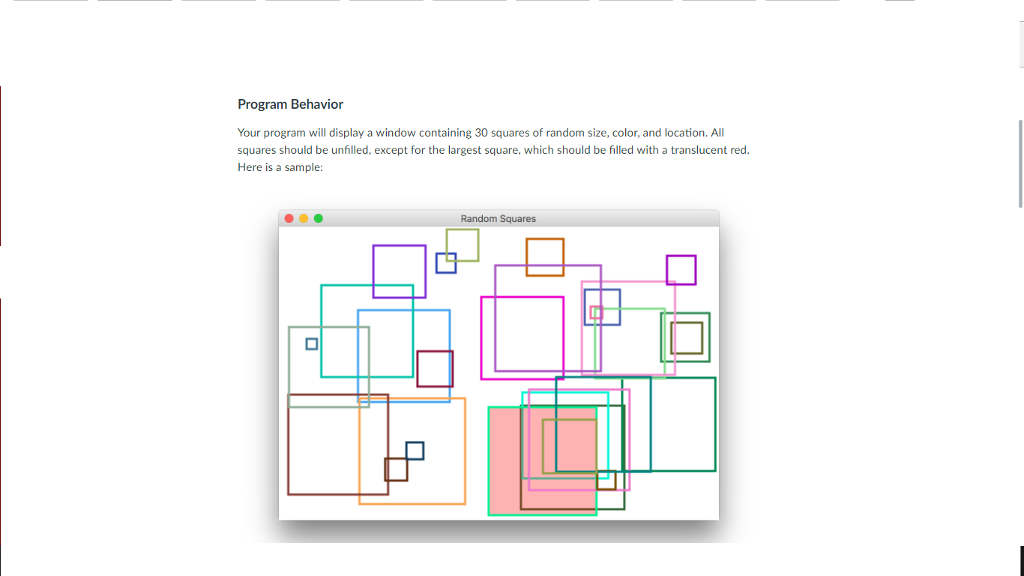 Your program will display a window containing 30 squares of random size, color, and location. All squares should be unfilled, except for the largest square, which should be filled with a translucent red. Here is a sample:

Set Up
Create a new BlueJ project called Project2 and inside that create a class called RandomSquares that extends the JavaFX Application class. Add a main method to the class that launches the application. Then add a start method with the classic scaffolding for a JavaFX program (group, scene, stage).
Use a scene size that is 600 pixels wide and 400 pixels high.
Add another method called getRandomColor that returns a Color object. This method should NOT be static because it will be called from the start method, which is not static.
Add JavaDoc comments for the class, and all methods. Update them accordingly as you refine your program.
Remember to include the extra line of code to avoid the BlueJ bug as the last line in your start method:
primaryStage.setOnCloseRequest(e -> System.exit(0));
A variable declared at the class level (not inside a method) is visible in all methods without passing it as a parameter. For this project, declare and create a Random object at the class level so that both the startmethod and the getRandomColor method can make use of it. That variable should be the only one declared at the class level for this project.
Square Details
There is no specific class that represents a square in JavaFX, but, of course, a square is just a rectangle with equal sides.
The side of each square should be at least 10 and no larger than 150 pixels. Use a stroke width of 3 for all squares.
The location of each square should be within the visible scene. That is, each square should be entirely visible in the scene without having to resize the window. However, the positioning should be no more restrictive than that. It should be possible for a square to be adjacent to any of the four edges of the scene.
The stroke color of each square should be determined by a call to your getRandomColor method. That method should create a Color object using a call to the Color.rgb method, passing in three random values in the range 0 to 255.
Instead of passing shapes to the Group constructor (since you won't have created them yet), create an empty group and add the squares one at a time like this:
root.getChildren().add(square);
As the squares are created, keep track of the square with the largest side. After all squares have been created, fill the largest square with a translucent red color with 30% opacity. Only one square should be filled -- if multiple squares have the same (largest) size, it doesn't matter which one is filled.
Here is another sample run of the program:

Development Suggestions
It's always a good idea to develop your program in stages, compiling and testing as you go. For instance, you might:
First produce 30 squares with a fixed size and color, randomly positioned but without initially worrying about keeping them entirely within the visible window.
Then give each one a random size. Test and fix as needed until that seems to be working.
Then ensure that each square is drawn within the visible window. Test some more.
Then complete the getRandomColor method and give each square a random color. Test.
Then keep track of the largest square and fill it with red. Test.
To keep track of the largest square, use a separate Rectangle reference variable that always points to the biggest square created so far. You may want to initialize this variable to a rectangle that has a size of 0. You can get the size of a square (rectangle) using the getWidth method.
Program Behavior Your program will display a window containing 30 squares of random size, color, and location. All squares should be unfilled, except for the largest square, which should be filled with a translucent red Here is a sample: Random Squares
Step by Step Solution
There are 3 Steps involved in it

Get step-by-step solutions from verified subject matter experts
 Study Help