







Question: these are the 3 codes that i wrote implement Digital Stopwatch Design a stopwatch that can measure time in seconds and milliseconds. Include start, stop,
these are the codes that i wrote implement Digital Stopwatch
Design a stopwatch that can measure time in seconds and milliseconds. Include start, stop, and reset functionalities. ### plz let me know it there's any modification to let them work properly on the seven segment desplay on the fpga delite board.Projects must include a graphical representation of the design, such as a State Machine SMchart or a State Graph.
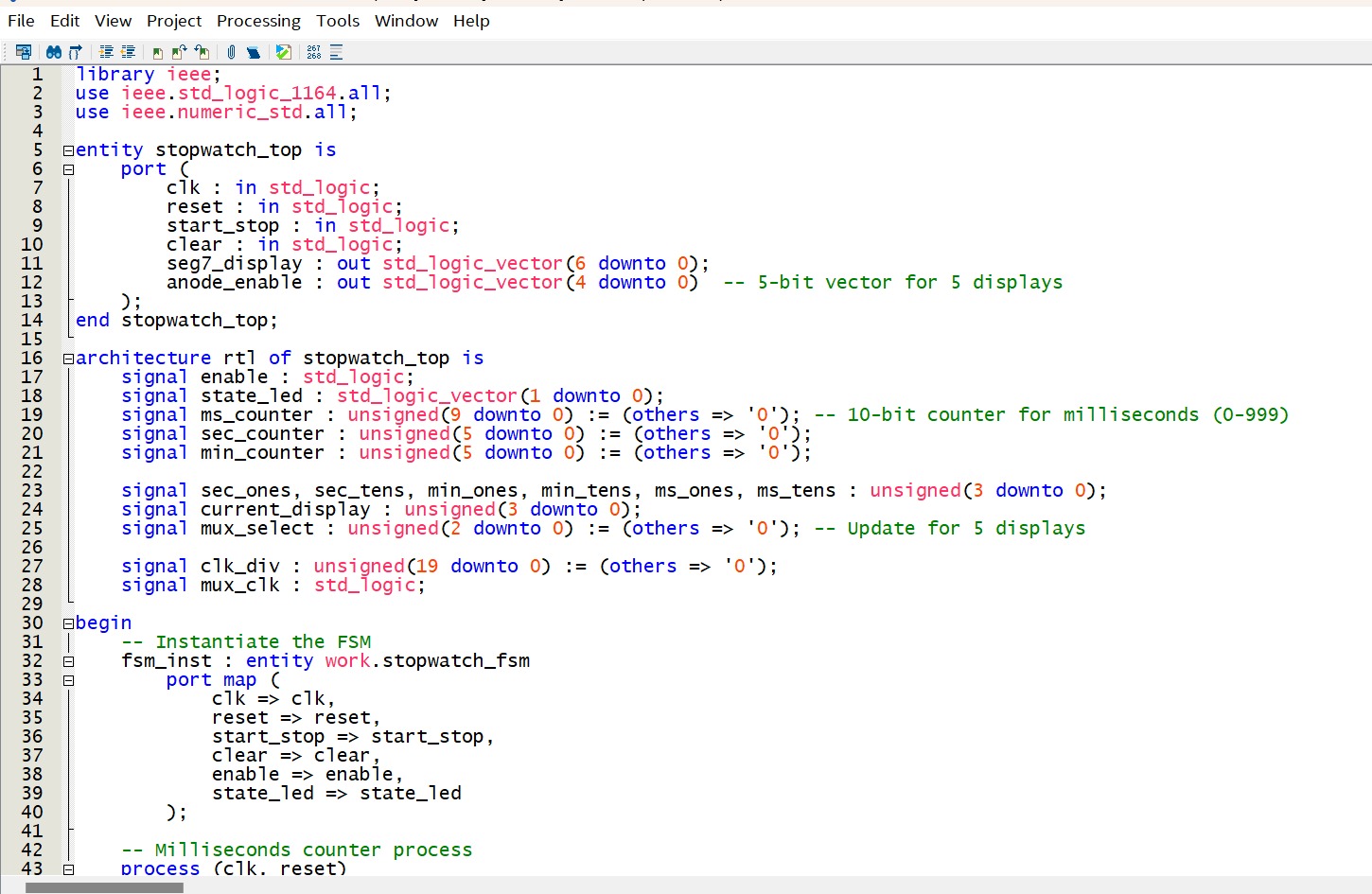
library ieee;
use ieee.stdlogica;
use ieee.numericstda;
entity stopwatchtop is
port
clk : in stdlogic;
reset : in stdlogic;
startstop : in stdlogic;
clear : in stdlogic;
segdisplay : out stdlogicvector downto ;
anodeenable : out stdlogicvector downto bit vector for displays
;
end stopwatchtop;
garchitecture rtl of stopwatchtop is
signal enable : stdlogic;
signal stateled : stdlogicvector downto ;
signal mscounter : unsigned downto :others ; bit counter for milliseconds
signal seccounter : unsigned downto :others ;
signal mincounter : unsigned downto :others ;
signal secones, sectens, minones, mintens, msones, mstens : unsigned downto ;
signal currentdisplay : unsigned downto ;
signal muxselect : unsigned downto :others ; Update for displays
signal clkdiv : unsigned downto :others ;
signal muxclk : stdlogic;
@begin
Instantiate the FSM
fsminst : entity work.stopwatchfsm
port map
clk clk
reset reset,
startstop startstop,
clear clear,
enable enabe
stateled stateled
;
Milliseconds counter process
process clk reset
end process;
muxclk clkdiv; Adjust based on your clock frequency
Multiplexing control
process muxclk reset
begin
if reset then
muxselect others ;
elsif risingedgemuxclk then
muxselect muxselect ;
end if;
end process;
Current display value selection
process muxselect, secones, sectens, minones, mintens, msones, mstens
begin
case muxselect is
when currentdisplay msones; Milliseconds, ones place
when currentdisplay mstens; Milliseconds, tens place
when currentdisplay secones; Seconds, ones place
when currentdisplay sectens; Seconds, tens place
when currentdisplay minones; Minutes, ones place
when currentdisplay mintens; Minutes, tens place
when others currentdisplay others ;
end case;
end process;
Instantiate the segment display module
seginst : entity work.seg
port map
a stdlogicvectorcurrentdisplay
en
;
q segdisplay
Anode enable for multiplexing displays
anodeenable when muxselect else For display ms ones
when muxselect else For display ms tens
when muxselect else For display sec ones
when muxselect else For display sec tens
; For display min ones, assuming th display
end rtl;
library ieee;
use ieee.stdlogical;
use ieee.numericstdali;
Entity
gentity seg is
port
a : in stdlogicvector downto ;
en : in stoverlinedlogic;
end ;
Architecture
@architecture rtl of seg is
type rom is array to of stdlogicvector downto ;
constant segtable : rom :
;
@begin
process a en
begin
if en then
if a then
else
q ;
q segtabletointegerunsigneda;
end if;
else
q;
end if;
end process;
end rtl;
File Edit View Project Processing Tools Window Help
library ieee;
use ieee.stdlogica;
use ieee.numericstda;
entity stopwatchfsm is
port
clk : in stdlogic;
reset : in stdlogic;
startstop : in stdlogic; Input to toggle startstop
clear : in stdlogic; Input to reset the stopwatch
enable: out stdlogic; Output to enable the counters
stateled : out stdlogicvector downto State indicator optiona
end stopwatchfsm;
@architecture behavioral of stopwatchfsm is
Define the states
type statetype is IDLE RUNNING, PAUSED;
signa currentstate, nextstate : statetype;
Internal signals
signal startstopedge : stdlogic :;
signal laststartstop : stdlogic :;
begin
State LED output optional for debugging
stateled stdlogicvector'tounsignedstatetype'poscurrentstate;
Edge detection for the startstop button
process clk
begin
if risingedgeclk then
startstopedge startstop and not laststartstop;
laststartstop startstop;
end if;
end process;
State t
Step by Step Solution
There are 3 Steps involved in it
1 Expert Approved Answer
Step: 1 Unlock

Question Has Been Solved by an Expert!
Get step-by-step solutions from verified subject matter experts
Step: 2 Unlock
Step: 3 Unlock
 Study Help