







Question: This assignment needs to be dumb down as possible. This is a intro class and we are on functions. Before we were on loops and
This assignment needs to be dumb down as possible. This is a intro class and we are on functions. Before we were on loops and for loops of course. Thank you to whomever helps.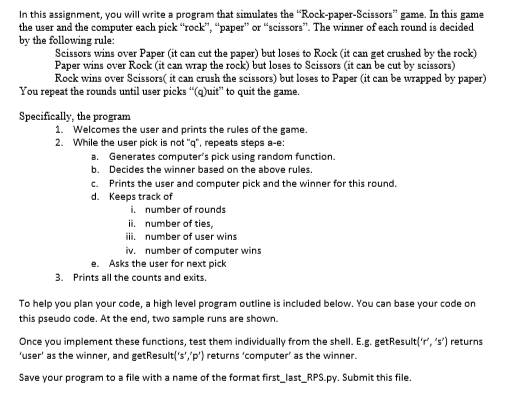
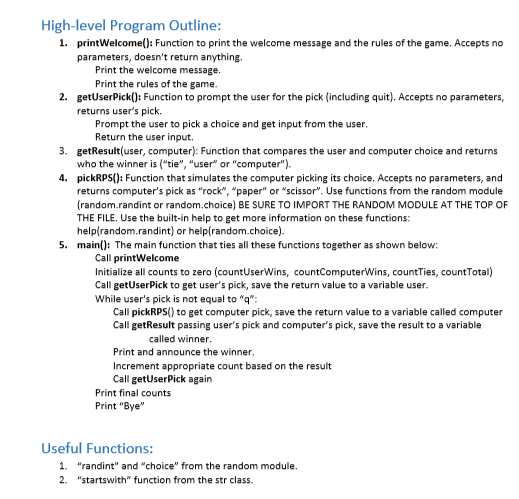
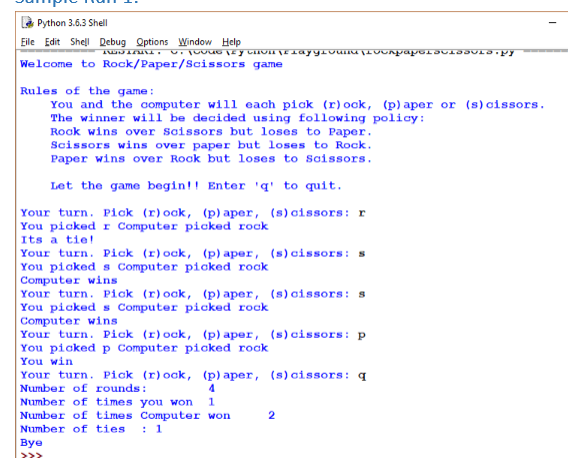
In this assignment, you will write a program that simulates the "Rock-paper-Scissors" game. In this game the user and the computer each pick "Tock", "paper" or "scissors". The winner of each round is decided by the following rule: Scissors wins over Paper (it can cut the paper) but loses to Rock (it can get crushed by the rock) aper wins over Rock (it can wrap the rock) but loses to Scissors ( Rock wins over Scissors it can crush the scissors) but loses to Paper (it can be wrapped by paper) it can be cut by scissors) You repeat the rounds until user picks "(uit" to quit the game. Specifically, the program . 2. Welcomes the user and prints the rules of the game. While the user pick is not "q", repeats steps a-e: a. b. c. d. Generates computer's pick using random function. Decides the winner based on the above rules. Prints the user and computer pick and the winner for this round. Keeps track of i. ii. iii. iv. number of rounds number of ties, number of user wins number of computer wins e. Asks the user for next pick 3. Prints all the counts and exits. To help you plan your code, a high level program outline is included below. You can base your code on this pseudo code. At the end, two sample runs are shown. Once you implement these functions, test them individually from the shell. E.g. getResultr, 's') returns user' as the winner, and getResult's','p') returns'computer' as the winner Save your program to a file with a name of the format first last_RPS.py. Submit this file. High-level Program Outline: printWelcome(): Function to print the welcome message and the rules of the game. Accepts no parameters, doesn't return anything. 1. Print the welcome message Print the rules of the game. 2. getUserPick(): Function to prompt the user for the pick (including quit). Accepts no parameters, returns user's pick Prompt the user to pick a choice and get input from the user Return the user input. getResult(user, computer): Function that compares the user and computer choice and returns who the winner is ("tie", "user or "computer"). pickRPS(): Function that simulates the computer picking its choice. Accepts no parameters, and returns computer's pick as "rock", "paper" or "scissor. Use functions from the random module (random.randint or random.choice) BE SURE TO IMPORT THE RANDOM MODULE AT THE TOP OF THE FILE. Use the built-in help to get more information on these functions hel 3. 4. Iplrandom.randint) or helpfrandom.choice). main(): The main function that ties all these functions together as shown below: 5. Call printWelcome Initialize all counts to zero (countUserWins, countComputerWins, countTies, countTotal) Call getUserPick to get user's pick, save the return value to a variable user While user's pick is not equal to "q Call pickRPS) to get computer pick, save the return value to a variable called computer Call getResult passing user's pick and computer's pick, save the result to a variable aed inner Print and announce the winner Increment appropriate count based on the result Call getUserPick again Print final counts Print "Bye" Useful Functions: 1. "randint" and "choice" from the random module. 2. "startswith" function from the str class Python 3.6.3 Shell ile Edit Shell Debug Qptions Window Help Welcome to Rock/Paper/Scissors game Rules of the game: You and the computer will each piok (r) ock, (p) aper or (s)cissors The winner will be decided using following policy Rook wins over Soissors but loses to Paper Scissors wins over paper but loses to Rock Paper wins over Rook but loses to Saissors 2 Let the game begin Enter'q to quit Your turn. Piok (r)oak, (p) aper, (s)cissors: r You picked r Computer picked rock Its a tie Your tur. Pick ()ock, (p) aper, (s)cissors: s You picked s Computer pioked rock Computer wins Your turn. Piak (r)ook, (p) aper, (s)cissors:s You picked s Computer picked rock Computer wins Your turn. Pick ()ock, (p) aper, (s)cissors P You piaked p Computer picked rock You win Your turn. Pick (r)ock, (p) aper, (s)cissors: q Number of rounds: Number of times you won 1 Number of times Computer won Number of ties :1 2 2
Step by Step Solution
There are 3 Steps involved in it

Get step-by-step solutions from verified subject matter experts
 Study Help