







Question: This assignment you will design two buttons Grade to Score Range and Score to Grade . Each button will trigger its corresponding function which prompts
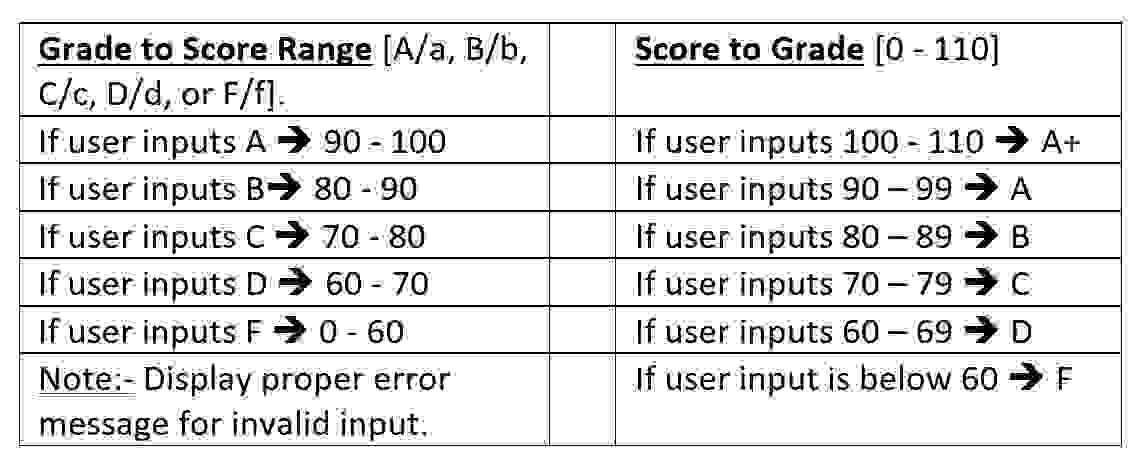
This assignment you will design two buttons Grade to Score Range and Score to Grade Each button will trigger its corresponding function which prompts the user to provide input. Then each function will display what is shown in the table provided, based on the users input. One of your functions will use a "JavaScript switch" statement, the other can use "JavaScript ifelseif statements. You are expected to handle invalid inputs and user errors properly. Click the button below to convert Score to Grade:
Click the button below to convert Grade to Score:
Convert to Score Range
If user inputs a negative number, proper error message should be displayed,
Click the button below to convert Score to Grade:
Input is invalid, grade cannot be negative
Click the button below to convert Grade to Score:
If user inputs a number above a different error message should be displayed,
tableGrade to Score Range AaBbScore to Grade CcDd or FfIf user inputs AIf user inputs AIf user inputs BIf user inputs AIf user inputs CIf user inputs BIf user inputs DIf user inputs CIf user inputs FIf user inputs DtableNote: Display proper errormessage for invalid input.If user input is below F
Step by Step Solution
There are 3 Steps involved in it
1 Expert Approved Answer
Step: 1 Unlock

Question Has Been Solved by an Expert!
Get step-by-step solutions from verified subject matter experts
Step: 2 Unlock
Step: 3 Unlock
 Study Help