







Question: This exercise demonstrates how to use nested IF-ELSE IF statement for Pattern 5 - Remove all code added between the /I Your lab exercise ...
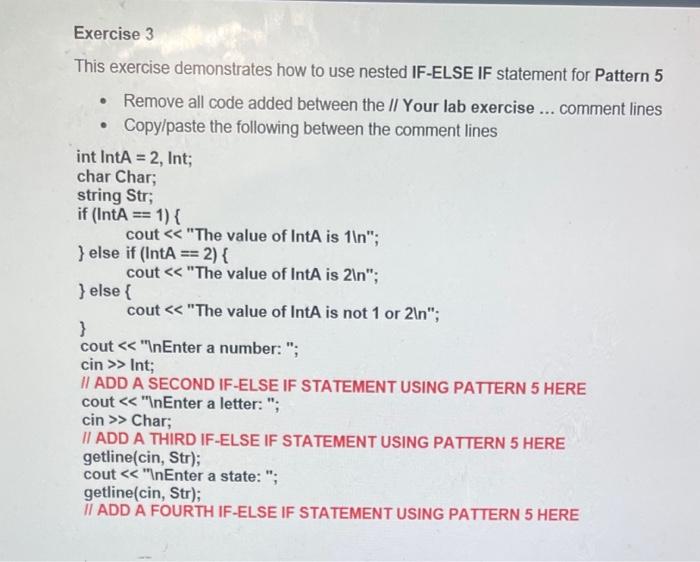
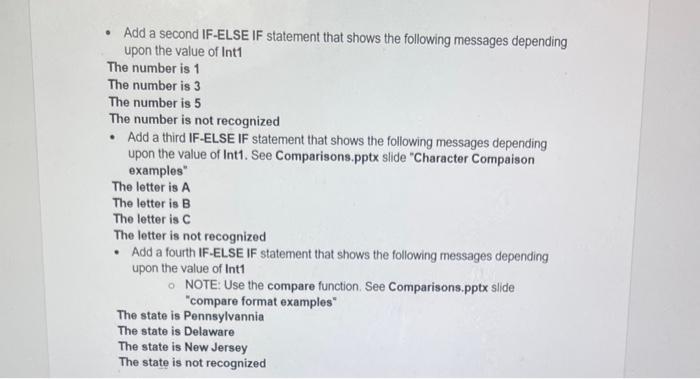
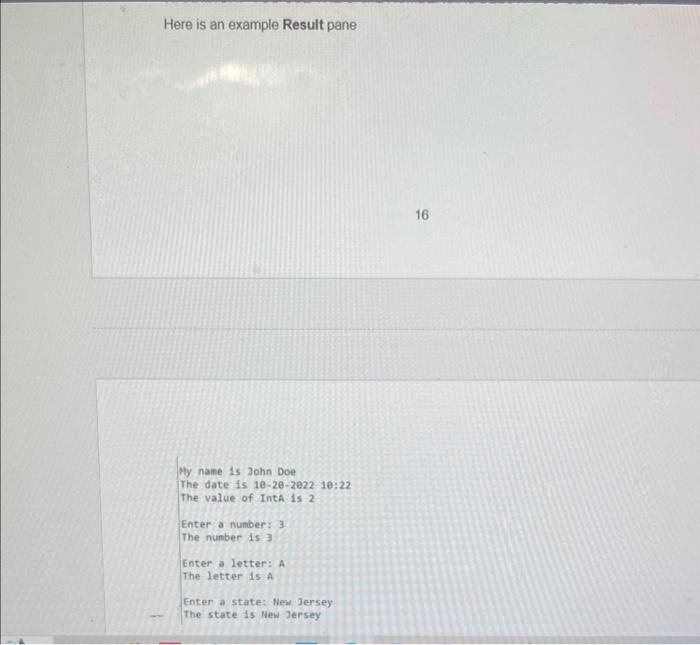
This exercise demonstrates how to use nested IF-ELSE IF statement for Pattern 5 - Remove all code added between the /I Your lab exercise ... comment lines - Copylpaste the following between the comment lines int lntA=2, Int; char Char; string Str; if (IntA==1){ cout "The value of lntA is 1ln "; \} else if (lntA=2){ cout "The value of IntA is 2ln; \} else \{ \} cout "The value of IntA is not 1 or 2ln"; cout "lnEnter a number: "; cin Int; II ADD A SECOND IF-ELSE IF STATEMENT USING PATTERN 5 HERE cout "InEnter a letter: "; cin Char; II ADD A THIRD IF-ELSE IF STATEMENT USING PATTERN 5 HERE getline(cin, Str); cout "InEnter a state: "; getline(cin, Str); II ADD A FOURTH IF-ELSE IF STATEMENT USING PATTERN 5 HERE - Add a second IF-ELSE IF statement that shows the following messages depending upon the value of Int1 The number is 1 The number is 3 The number is 5 The number is not recognized - Add a third IF-ELSE IF statement that shows the following messages depending upon the value of Int1. See Comparisons.pptx slide "Character Compaison examples" The letter is A The letter is B The letter is C The letter is not recognized - Add a fourth IF-ELSE IF statement that shows the following messages depending upon the value of Int1 NOTE: Use the compare function. See Comparisons.pptx slide "compare format examples" The state is Pennsylvannia The state is Delaware The state is New Jersey The state is not recognized Here is an example Result pane My name is John Doe The date is 10-2e-2e22 1e:22 The value of IntA is 2 Enter a number: 3 The number is. 3 Enter a letter: A The letter is A Enter a state: Nesu Jersey The state 1s New Jersey
Step by Step Solution
There are 3 Steps involved in it

Get step-by-step solutions from verified subject matter experts
 Study Help