







Question: This is a java programming assignment Objectives : Build a notepad editor with menu structure that would allow to control the appearance ofthe text in
This is a java programming assignment
Objectives: Build a notepad editor with menu structure that would allow to control the appearance ofthe text in the editor box.
The end result should look like this:
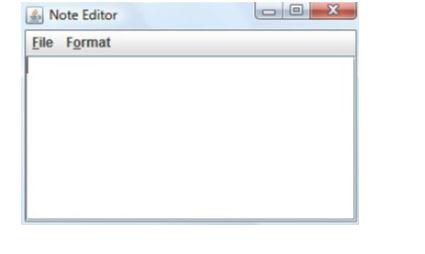
Tasks Involved:
1. Place a scroll pane and text area on the frame. You must use GridBagLayout as in:-

2. Set the properties:
a. NotePadEditor Frame: title, resizable
b. editorScrollPane : preferredSize, vewportView, gridx, gridy
c. editorAreaText : font, lineWrap, wrapStyleWord
Menu structure must display like this:
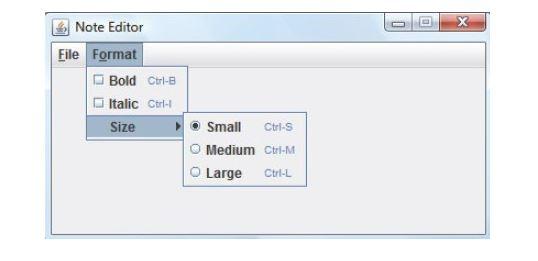
3. Name and accelerator keys for the menu bar:
| Text | Name | Accelerator |
| File | fileMenu | N/A |
| New | newMenuItem | |
| Open | openMenuItem | |
| Save | saveMenuItem | |
| Edit | editMenuItem | |
| Exit | exitMenuItem | None |
| Format | formatMenu | N/A |
| Bold | boldMenuItem (checkbox) | |
| Italic | italicMenuItem (checkbox) | |
| Size | sizeMenu | N/A |
| Small | smallMenuItem (RadioButton-sizeGroup) | |
| Medium | mediumMenuItem (RadioButton-sizeGroup) | |
| Large | largeMenuItem (RadioButton-sizeGroup) | |
4. Add the listeners and their corresponding code for event methods depending on the selection of the corresponding menu items.
Make sure to set the text area font and size routine based on the Format menu choices.
Note Editor File Format gridx = 0 editor ScrollPane gridy - 0 x Note Editor File Format Bold Ctrl- Italic Ctrl- Size Small Ctrl-S Medium Ctrl-M Large Ctrl-L Note Editor File Format gridx = 0 editor ScrollPane gridy - 0 x Note Editor File Format Bold Ctrl- Italic Ctrl- Size Small Ctrl-S Medium Ctrl-M Large Ctrl-L
Step by Step Solution
There are 3 Steps involved in it

Get step-by-step solutions from verified subject matter experts
 Study Help