







Question: This is a Python assignment. Please show screen shot of code. Part one: Create a simple number guessing game that should repeat until the user
This is a Python assignment. Please show screen shot of code.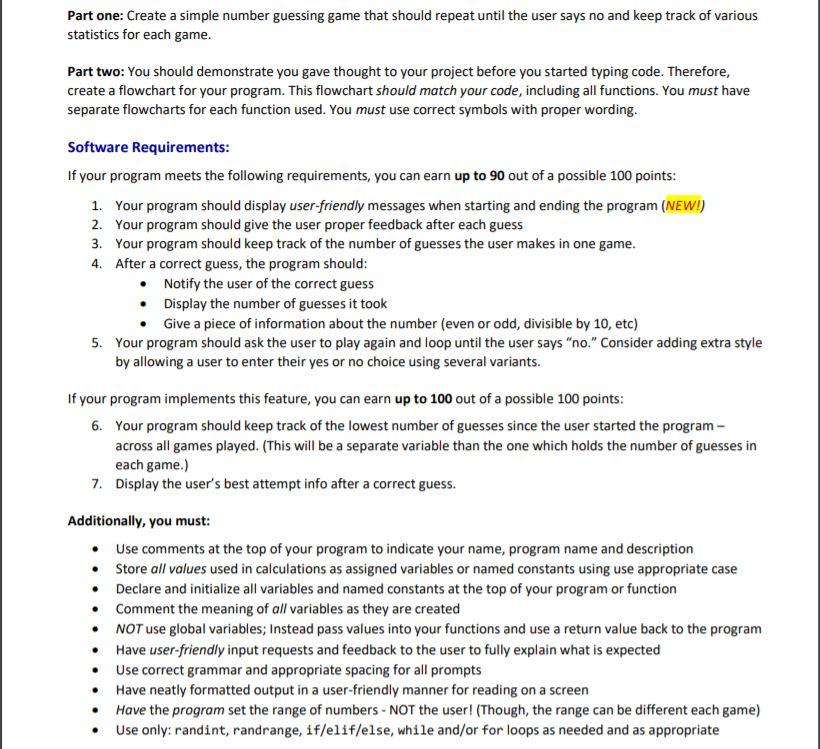
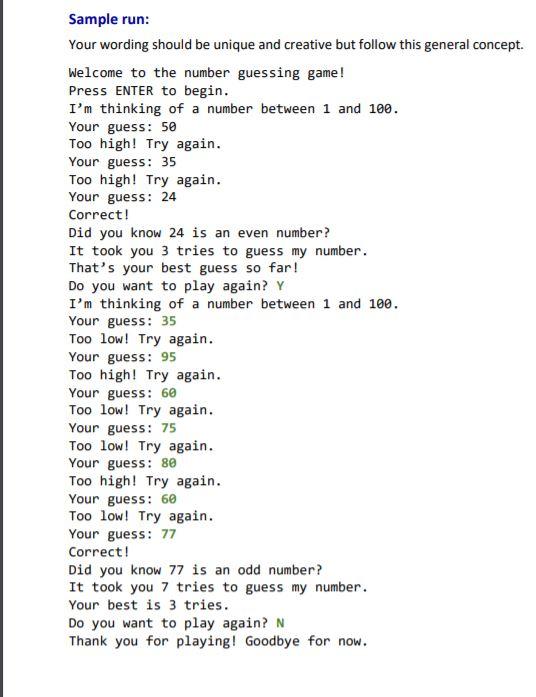
Part one: Create a simple number guessing game that should repeat until the user says no and keep track of various statistics for each game. Part two: You should demonstrate you gave thought to your project before you started typing code. Therefore, create a flowchart for your program. This flowchart should match your code, including all functions. You must have separate flowcharts for each function used. You must use correct symbols with proper wording. Software Requirements: If your program meets the following requirements, you can earn up to 90 out of a possible 100 points: 1. Your program should display user-friendly messages when starting and ending the program (NEW!) 2. Your program should give the user proper feedback after each guess 3. Your program should keep track of the number of guesses the user makes in one game. 4. After a correct guess, the program should: Notify the user of the correct guess Display the number of guesses it took Give a piece of information about the number (even or odd, divisible by 10, etc) 5. Your program should ask the user to play again and loop until the user says "no." Consider adding extra style by allowing a user to enter their yes or no choice using several variants. If your program implements this feature, you can earn up to 100 out of a possible 100 points: 6. Your program should keep track of the lowest number of guesses since the user started the program - across all games played. (This will be a separate variable than the one which holds the number of guesses in each game.) 7. Display the user's best attempt info after a correct guess. Additionally, you must: Use comments at the top of your program to indicate your name, program name and description Store all values used in calculations as assigned variables or named constants using use appropriate case Declare and initialize all variables and named constants at the top of your program or function Comment the meaning of all variables as they are created NOT use global variables; Instead pass values into your functions and use a return value back to the program Have user-friendly input requests and feedback to the user to fully explain what is expected Use correct grammar and appropriate spacing for all prompts Have neatly formatted output in a user-friendly manner for reading on a screen Have the program set the range of numbers - NOT the user! (Though, the range can be different each game) Use only: randint, randrange, if/elif/else, while and/or for loops as needed and as appropriate Sample run: Your wording should be unique and creative but follow this general concept. Welcome to the number guessing game! Press ENTER to begin. I'm thinking of a number between 1 and 100. Your guess: 50 Too high! Try again. Your guess: 35 Too high! Try again. Your guess: 24 Correct! Did you know 24 is an even number? It took you 3 tries to guess my number. That's your best guess so far! Do you want to play again? Y I'm thinking of a number between 1 and 100. Your guess: 35 Too low! Try again. Your guess: 95 Too high! Try again. Your guess: 60 Too low! Try again. Your guess: 75 Too low! Try again. Your guess: 80 Too high! Try again. Your guess: 60 Too low! Try again. Your guess: 77 Correct! Did you know 77 is an odd number? It took you 7 tries to guess my number. Your best is 3 tries. Do you want to play again? N Thank you for playing! Goodbye for now
Step by Step Solution
There are 3 Steps involved in it

Get step-by-step solutions from verified subject matter experts
 Study Help