







Question: This is about MATLAB. Thank you! Function Name: endCap Input: 1. (char) A vector of characters (string). (All lowercase) Output: 1. (double) The number of
This is about MATLAB. Thank you!
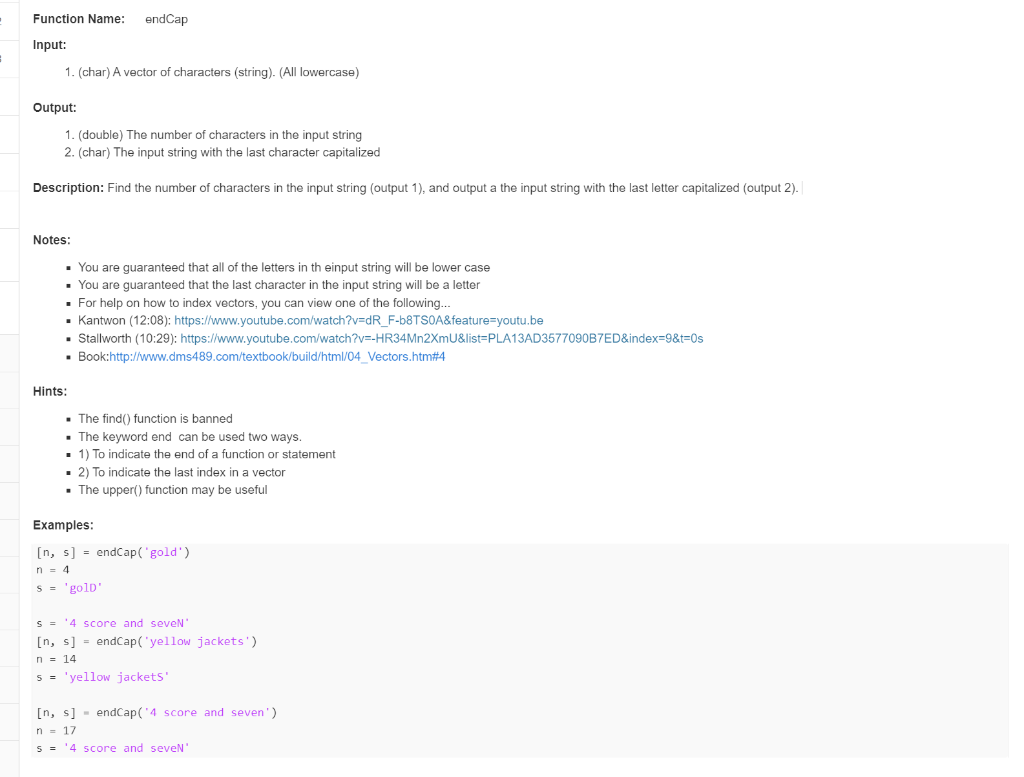
Function Name: endCap Input: 1. (char) A vector of characters (string). (All lowercase) Output: 1. (double) The number of characters in the input string 2. (char) The input string with the last character capitalized Description: Find the number of characters in the input string (output 1), and output a the input string with the last letter capitalized (output 2). Notes: - You are guaranteed that all of the letters in th einput string will be lower case - You are guaranteed that the last character in the input string will be a letter - For help on how to index vectors, you can view one of the following... - Kantwon (12:08): https://www.youtube.com/watch?v=dR_F-b8TS0A\&feature=youtu.be - Stallworth (10:29): https://www.youtube.com/watch?v=-HR34Mn2XmU\&list=PLA13AD3577090B7ED\&index=9\&t=0s - Book:http://www.dms489.com/textbook/build/html/04_Vectors.htm\#4 Hints: - The find() function is banned - The keyword end can be used two ways. - 1) To indicate the end of a function or statement - 2) To indicate the last index in a vector - The upper() function may be useful Examples: [n,s]=endCap(gold)n=4s=gold s= " 4 score and seven" [n,s] = endCap('yellow jackets') n=14 s= 'yellow jackets' [n,s] = endCap(' 4 score and seven') n=17 s= ' 4 score and seveN
Step by Step Solution
There are 3 Steps involved in it

Get step-by-step solutions from verified subject matter experts
 Study Help