







Question: This is all to be written in Java. This is something extra that might assist you. This is the Program which you will add to.
This is all to be written in Java.
 This is something extra that might assist you.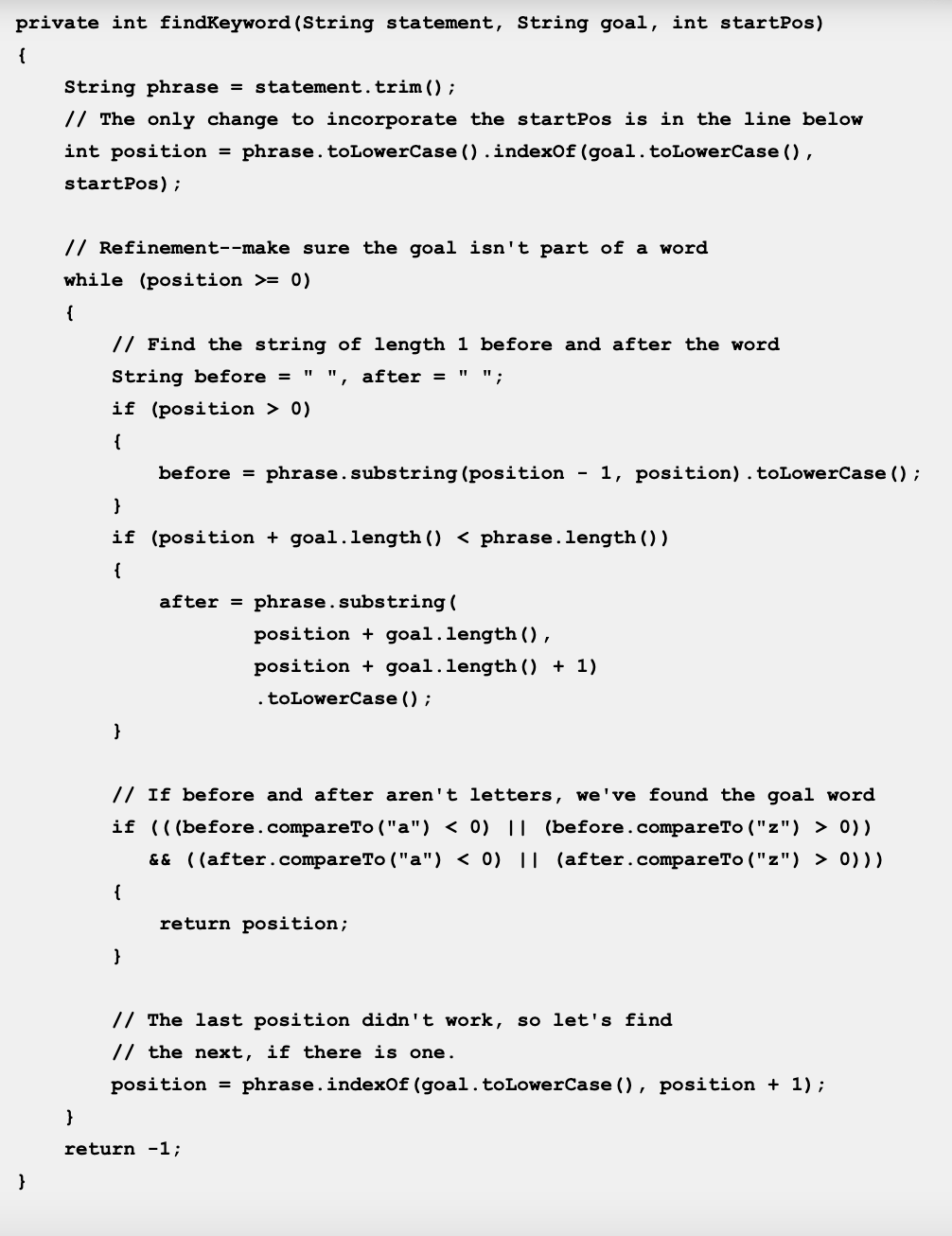
This is the Program which you will add to.
/** * A program to carry on conversations with a human user. * This is the initial version that: * - Uses indexOf to find strings * - Handles responding to simple words and phrases * This version uses a nested if to handle default responses. * * Code adapted from work by Laurie White for the College Board. * * @author (enter your name) * @version (enter today's date) */ public class Magpie2 { /** * Get a default greeting * @return a greeting */ public String getGreeting() { return "Hello, let's talk."; }
/** * Gives a response to a user statement * * @param statement * the user statement * @return a response based on the rules given */ public String getResponse(String statement) { String response = ""; if (statement.indexOf("no") >= 0) { response = "Why so negative?"; } else if (statement.indexOf("mother") >= 0 || statement.indexOf("father") >= 0 || statement.indexOf("sister") >= 0 || statement.indexOf("brother") >= 0) { response = "Tell me more about your family."; } else { response = getRandomResponse(); } return response; }
/** * Pick a default response to use if nothing else fits. * @return a non-committal string */ private String getRandomResponse() { final int NUMBER_OF_RESPONSES = 4; double r = Math.random(); int whichResponse = (int)(r * NUMBER_OF_RESPONSES); String response = "";
if (whichResponse == 0) { response = "Interesting, tell me more."; } else if (whichResponse == 1) { response = "Hmmm."; } else if (whichResponse == 2) { response = "Do you really think so?"; } else if (whichResponse == 3) { response = "You don't say."; }
return response; }
/** * Search for one word in phrase. The search is not case * sensitive. This method will check that the given goal * is not a substring of a longer string (so, for * example, "I know" does not contain "no"). * * @param statement * the string to search * @param goal * the string to search for * @param startPos * the character of the string to begin the * search at * @return the index of the first occurrence of goal in * statement or -1 if it's not found */ private int findKeyword(String statement, String goal, int startPos) { String phrase = statement.trim(); // The only change to incorporate the startPos is in the line below int position = phrase.toLowerCase().indexOf(goal.toLowerCase(), startPos);
// Refinement--make sure the goal isn't part of a word while (position >= 0) { // Find the string of length 1 before and after the word String before = " ", after = " "; if (position > 0) { before = phrase.substring(position - 1, position).toLowerCase(); } if (position + goal.length()
// If before and after aren't letters, we've found the goal word if (((before.compareTo("a") 0)) // before is not a letter && ((after.compareTo("a") 0))) { return position; }
// The last position didn't work, so let's find // the next, if there is one. position = phrase.indexOf(goal.toLowerCase(), position + 1); }
return -1; }
/** * Search for one word in phrase. The search is not case * sensitive. This method will check that the given goal * is not a substring of a longer string (so, for * example, "I know" does not contain "no"). The search * begins at the beginning of the string. * * @param statement * the string to search * @param goal * the string to search for * @return the index of the first occurrence of goal in * statement or -1 if it's not found */ private int findKeyword(String statement, String goal) { return findKeyword(statement, goal, 0); }
}
This is the program runner.
import java.util.Scanner;
public class MagpieRunner2 {
/** * Create a Magpie, give it user input, and print its replies. */ public static void main(String[] args) { Magpie2 maggie = new Magpie2();
System.out.println (maggie.getGreeting()); Scanner in = new Scanner (System.in); String statement = in.nextLine();
while (!statement.equals("Bye")) { System.out.println (maggie.getResponse(statement)); statement = in.nextLine(); } }
}
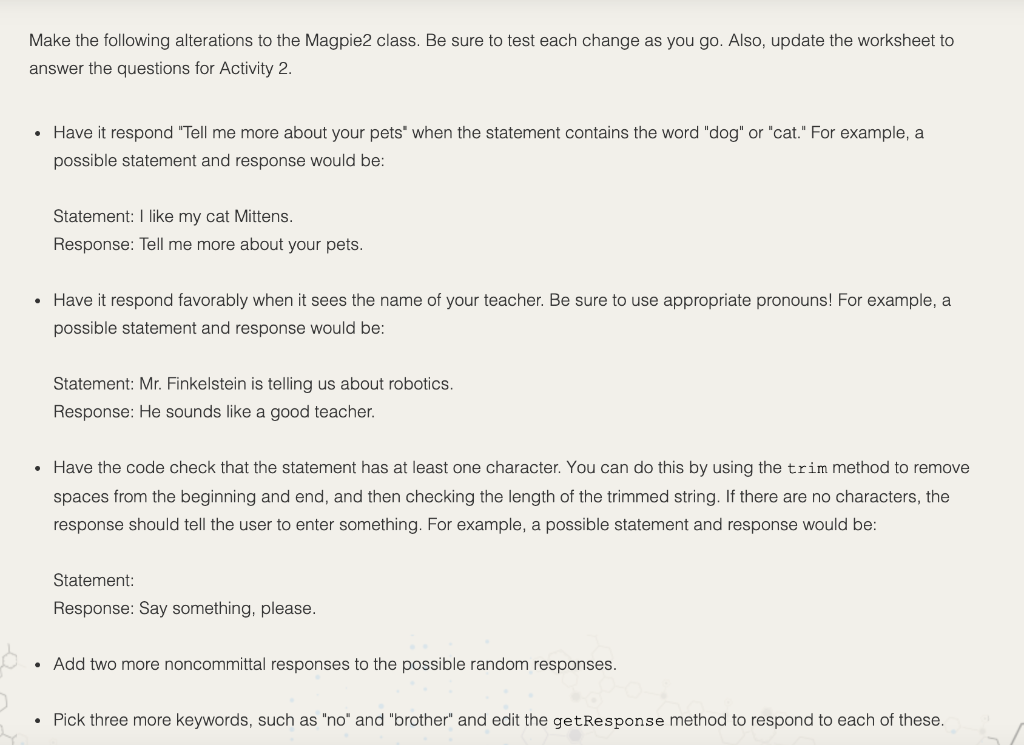
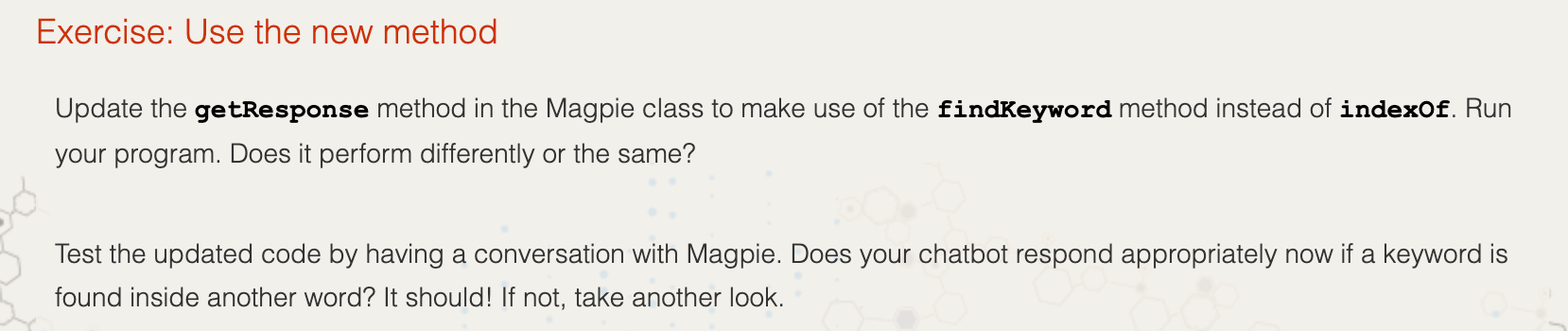
Make the following alterations to the Magpie2 class. Be sure to test each change as you go. Also, update the worksheet to answer the questions for Activity 2. Have it respond "Tell me more about your pets' when the statement contains the word "dog" or "cat." For example, a possible statement and response would be: Statement: I like my cat Mittens. Response: Tell me more about your pets. Have it respond favorably when it sees the name of your teacher. Be sure to use appropriate pronouns! For example, a possible statement and response would be: Statement: Mr. Finkelstein is telling us about robotics. Response: He sounds like a good teacher. Have the code check that the statement has at least one character. You can do this by using the trim method to remove spaces from the beginning and end, and then checking the length of the trimmed string. If there are no characters, the response should tell the user to enter something. For example, a possible statement and response would be: Statement: Response: Say something, please. . Add two more noncommittal responses to the possible random responses. . Pick three more keywords, such as "no" and "brother" and edit the getResponse method to respond to each of these. Exercise: Use the new method Update the getResponse method in the Magpie class to make use of the findKeyword method instead of indexof. Run your program. Does it perform differently or the same? Test the updated code by having a conversation with Magpie. Does your chatbot respond appropriately now if a keyword is found inside another word? It should! If not, take another look. private int findKeyword(String statement, String goal, int startPos) { String phrase = statement.trim(); // The only change to incorporate the startpos is in the line below int position = phrase. to LowerCase().indexOf(goal.toLowerCase(), startPos); // Refinement--make sure the goal isn't part of a word while (position >= 0) { // Find the string of length 1 before and after the word String before = " ", after = " "; if (position > 0) { before = phrase.substring (position - 1, position).toLowerCase(); } if (position + goal.length() 0)) && ((after.compareTo ("a") 0))) { return position; } // The last position didn't work, so let's find // the next, if there is one. position = phrase.indexOf(goal.toLowerCase(), position + 1); } return -1; }
Step by Step Solution
There are 3 Steps involved in it

Get step-by-step solutions from verified subject matter experts
 Study Help