







Question: This is an assignment to turn LC3 Language into C Language (not C++). The first question is asking to convert the instructions in the .obj
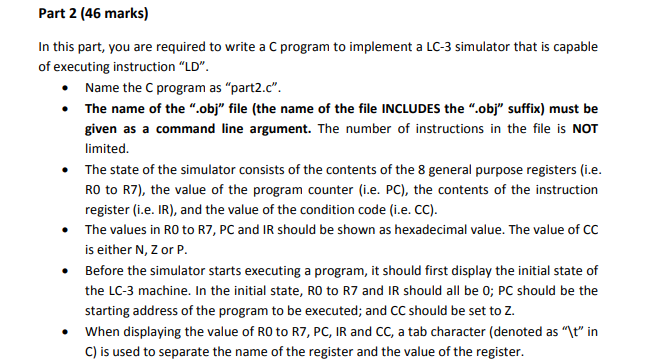
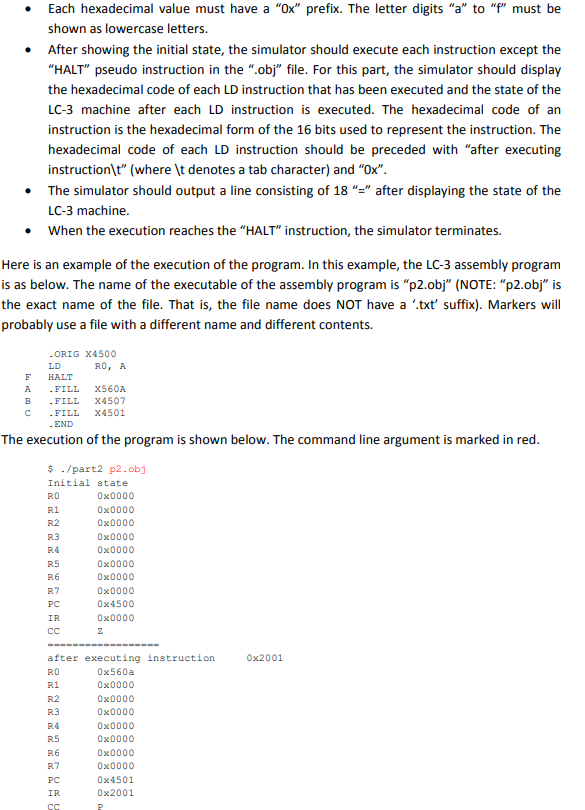
This is an assignment to turn LC3 Language into C Language (not C++). The first question is asking to convert the instructions in the .obj file into hexadecimal format. The second question is supposed to be an extension of the first question and asking us to convert the LC3 instruction of LD into C and show the starting address before the LC3 instruction is executed, and after the LC3 instruction is executed.
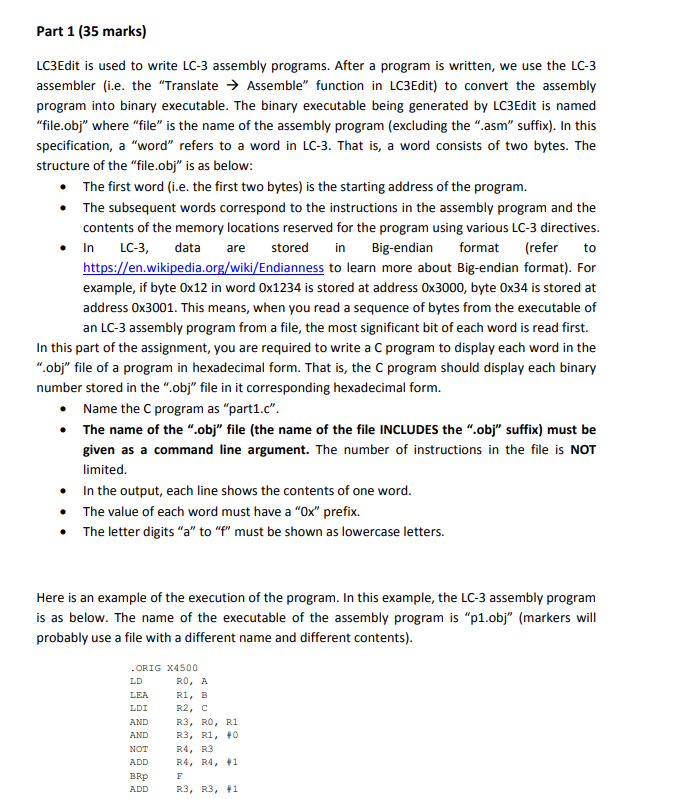
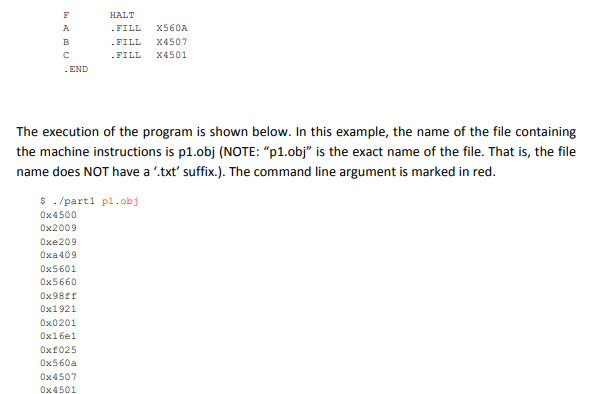
Part 1 (35 marks) LC3Edit is used to write LC-3 assembly programs. After a program is written, we use the LC-3 assembler (i.e. the "Translate Assemble" function in LC3Edit) to convert the assembly program into binary executable. The binary executable being generated by LC3Edit is named "file.obj" where "file" is the name of the assembly program (excluding the ".asm" suffix). In this specification, a "word" refers to a word in LC-3. That is, a word consists of two bytes. The structure of the "file.obj" is as below The first word (i.e. the first two bytes) is the starting address of the program. The subsequent words correspond to the instructions in the assembly program and the contents of the memory locations reserved for the program using various LC-3 directives . In LC-3 data are stored in Big-endian format (refer to iki/Endianness to learn more about Big-endian format). For example, if byte 0x12 in word 0x1234 is stored at address 0x3000, byte 0x34 is stored at address 0x3001. This means, when you read a sequence of bytes from the executable of https://en.wikipedia an LC-3 assembly program from a file, the most significant bit of each word is read first. In this part of the assignment, you are required to write a C program to display each word in the ".obj" file of a program in hexadecimal form. That is, the C program should display each binary number stored in the ".obj" file in it corresponding hexadecimal form Name the C program as "part1.c". The name of the ".obj" file (the name of the file INCLUDES the ".obj" suffix) must be given as a command line argument. The number of instructions in the file is NOT limited In the output, each line shows the contents of one word. The value of each word must have a "Ox" prefix. . The letter digits "a" to "f" must be shown as lowercase letters. Here is an example of the execution of the program. In this example, the LC-3 assembly program is as below. The name of the executable of the assembly program is "p1.obj" (markers will probably use a file with a different name and different contents) ORIG X4500 LD LEA LDI AND AND NOT ADD BRp ADD RO, A R1, B R2, ? R3, RO, R1 R3, R1, #0 R4, R3 R4, R4, 1 R3, R3, #1 Part 1 (35 marks) LC3Edit is used to write LC-3 assembly programs. After a program is written, we use the LC-3 assembler (i.e. the "Translate Assemble" function in LC3Edit) to convert the assembly program into binary executable. The binary executable being generated by LC3Edit is named "file.obj" where "file" is the name of the assembly program (excluding the ".asm" suffix). In this specification, a "word" refers to a word in LC-3. That is, a word consists of two bytes. The structure of the "file.obj" is as below The first word (i.e. the first two bytes) is the starting address of the program. The subsequent words correspond to the instructions in the assembly program and the contents of the memory locations reserved for the program using various LC-3 directives . In LC-3 data are stored in Big-endian format (refer to iki/Endianness to learn more about Big-endian format). For example, if byte 0x12 in word 0x1234 is stored at address 0x3000, byte 0x34 is stored at address 0x3001. This means, when you read a sequence of bytes from the executable of https://en.wikipedia an LC-3 assembly program from a file, the most significant bit of each word is read first. In this part of the assignment, you are required to write a C program to display each word in the ".obj" file of a program in hexadecimal form. That is, the C program should display each binary number stored in the ".obj" file in it corresponding hexadecimal form Name the C program as "part1.c". The name of the ".obj" file (the name of the file INCLUDES the ".obj" suffix) must be given as a command line argument. The number of instructions in the file is NOT limited In the output, each line shows the contents of one word. The value of each word must have a "Ox" prefix. . The letter digits "a" to "f" must be shown as lowercase letters. Here is an example of the execution of the program. In this example, the LC-3 assembly program is as below. The name of the executable of the assembly program is "p1.obj" (markers will probably use a file with a different name and different contents) ORIG X4500 LD LEA LDI AND AND NOT ADD BRp ADD RO, A R1, B R2, ? R3, RO, R1 R3, R1, #0 R4, R3 R4, R4, 1 R3, R3, #1
Step by Step Solution
There are 3 Steps involved in it

Get step-by-step solutions from verified subject matter experts
 Study Help