







Question: ! ! ! THIS IS AN COMPUTER ARCHITECTURE ( CMPE 3 6 1 : Computer Organization ) LAB ASSAIGNMENT AND WILL BE SOLVED WITH MARS,
THIS IS AN COMPUTER ARCHITECTURECMPE: Computer Organization LAB ASSAIGNMENT AND WILL BE SOLVED WITH MARS, MIPS SIMULATOR. I PUT THE THE DOCUMENTS NEEDS TO BE FILLED AND THE "task.asm" FILES AT THE END. THANK YOU IN ADVANCE!!
Introduction
In this lab, you will get introduced to MARS, the MIPS simulator, by writing and executing relatively simple assembly programs. The Mars program is a combined assembly language editor, assembler, simulator, and debugger for the MIPS processor. It was developed by Pete Sanderson and Kenneth Vollmar at Missouri State University.
Setup
Download MARS from LMS and uncompress it The package contains MARS program and a tutorial. You need Java JVM to run it Go through the tutorial to learn details about MARS.
Double clickopen the Mars file. You shall see the following screen.
Tutorial
Create a new file.
Save the file as codeasm
Copy the code from exampleasmprovided in the MARS.rar package and paste it in your codeasm
Assemble the code ie convert it into machine code by clicking assemble button on tool bar. And Execute window will be opened if there are no errors in the code.
You can control the speed of execution through speed bar, run the whole program at once or do single step execution. You can also reset all the registers and memory to initial state by pressing reset button.
Notice that initially all registers except $gp and data segment ie Data memory initially set to zero.
Press the single step button repeatedly to observe how execution of each instruction in the basicsource code affects the content of registers. Note that modified registers after each instruction are highlighted with the green color.
Assignment
For Task to Task bellow, fill the table and answer the questions given in the submitFilepdocx and submit to LMS
Task : Points
Open a new assembly file in MARS.
Save it with the name of myTaskasm.
Copy the code provided in Taskasm file in LMS to your myTaskasm.
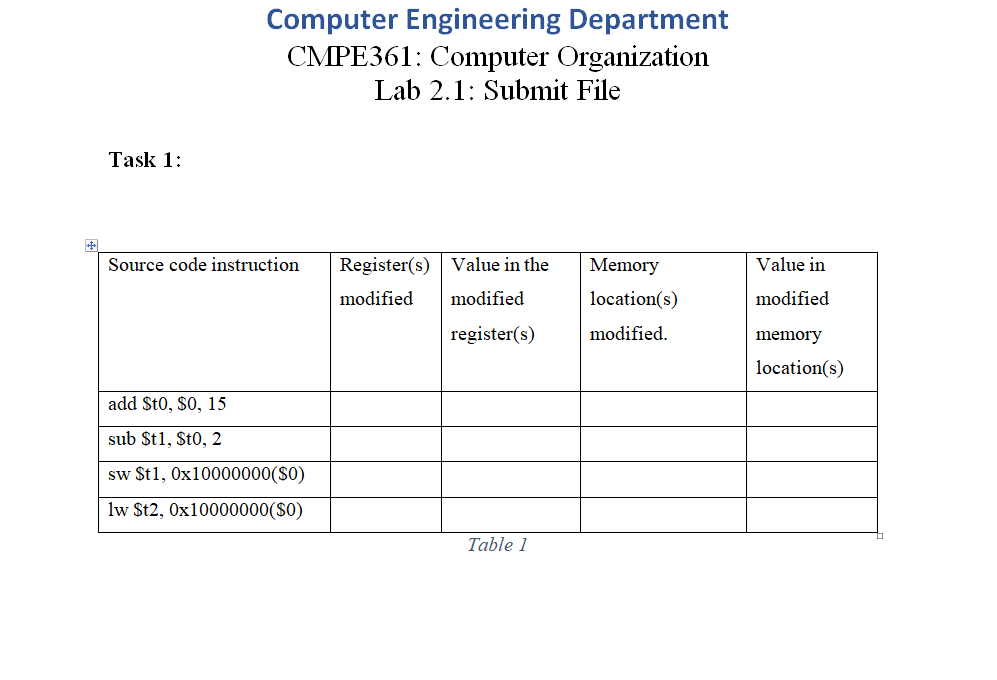
Single step through the code until it terminates and after execution of every instruction in the source code, fill the Table in submitFilepdocxgiven on LMS by writing name of registers and address of memory locations, and their values that are modified by a particular instruction.
Task : Points
Open a new assembly file in MARS.
Save it with name of myTaskasm.
Copy the code provided in Taskasm file in LMS to your myTaskasm.
Single step through the code until it terminates and after execution of every instruction in the source code, fill the Table in submitFilepdocxgiven on LMS by writing name of registers and address of memory locations, and their values, that are modified by a particular instruction.
Task : Points
Open a new assembly file in MARS.
Save it with name of myTaskasm.
Copy the code provided in Taskasm file in LMS to your myTaskasm.
Single step through the code until it terminates. The program terminates with an error. Explain the reason in submitFilepdocx
We have to submit the work for Task to Task Fill the tables and answer the questions in provided submitFilepdocx file,
TASK FILES:
taskasm:
text
add $t $
sub $t $t
sw $tx$
lw $tx$
#The code written below is used to exit the program or terminate the execution
li $v # service is print integer
add $a $t $zero # load desired value into argument register $a using pseudoop
syscall
taskasm:
text
add $t $xfb
sub $t $t
sw $tx$
lb $tx$
#The code written below is used to exit the program or terminate the execution
li $v # service is print integer
add $a $t $zero # load desired value into argument register $a using pseudoop
syscall
taskasm:
text
add $t $xffff
sw $tx$
#The code written below is used to exit the program or terminate the execution
li $v # service is print integer
add $a $t $zero # load desired value into argument register $a using pseudoop
syscall
HERE IS THE "submitFilepdocx" THAT NEEDS TO BE FILLED AND SUBMITTED:
Step by Step Solution
There are 3 Steps involved in it
1 Expert Approved Answer
Step: 1 Unlock

Question Has Been Solved by an Expert!
Get step-by-step solutions from verified subject matter experts
Step: 2 Unlock
Step: 3 Unlock
 Study Help