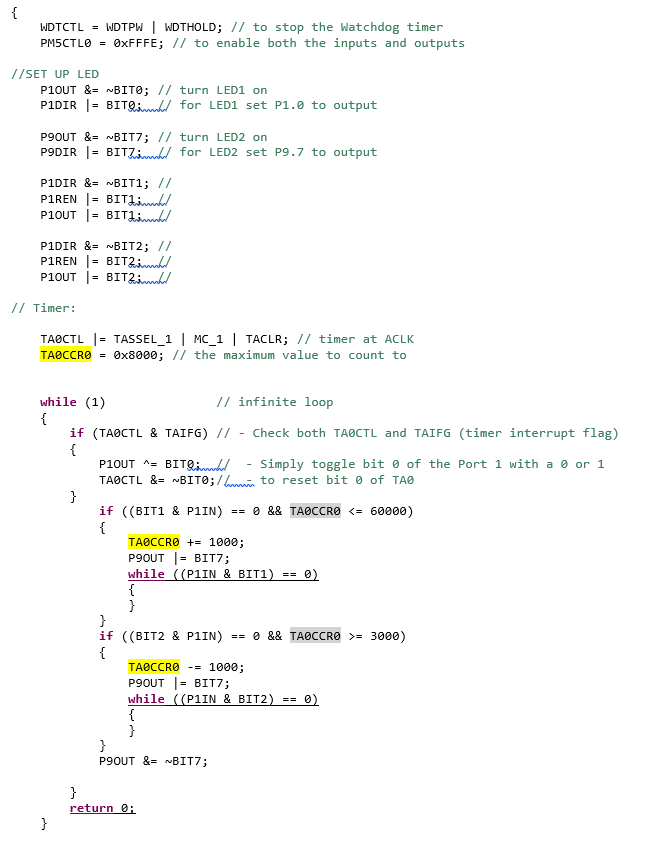
Question: This is C programs to control LEDs by a switch and modification of Timer A. can you please add comments after ; in each line.

This is C programs to control LEDs by a switch and modification of Timer A. can you please add comments after ; in each line. please do them all and explain what it does to the program.

}This is C programs to control LEDs by a switch and modificationof Timer A. can you please add comments after ; in each
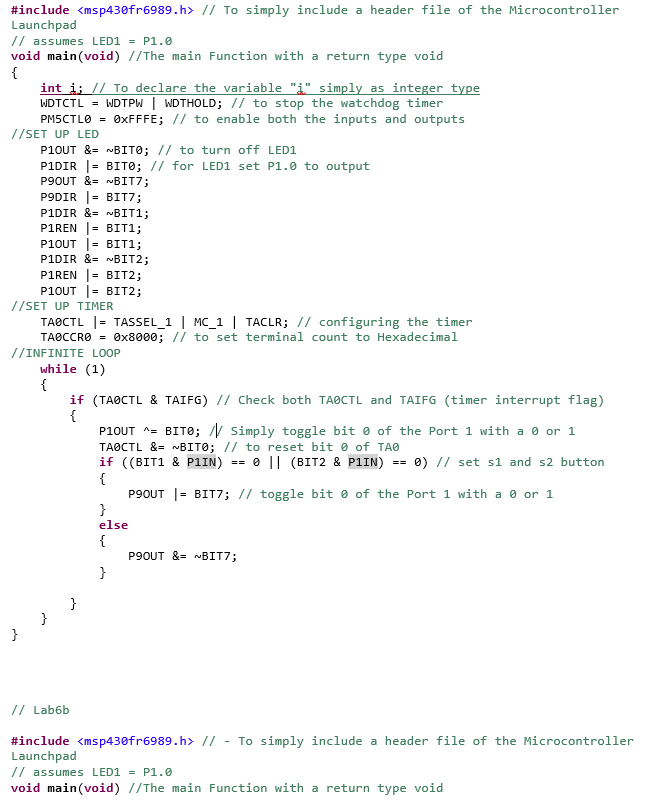
#include // To simply include a header file of the Microcontroller Launchpad // assumes LED1 = Pl.0 void main(void) //The main Function with a return type void int WDTCTLWDTPW | WDTHOLD; // to stop the watchdog timer PM5CTL0 = 0xFFFE; // to enable both the inputs and outputs To declare the variable"i" simply as integer type //SET UP LED P1OUT & ~BIT0; // to turn off LEDI P1DIR BIT0; // for LED1 set P1.0 to output P9DIR BIT7; P1RENBIT1; P1OUTBIT1; P1RENBIT2; P1OUTBIT2; /SET UP TIMER TAeCTL -TASSEL_1 | MC 1 TACLR; II configuring the timer TA0CCR0 = 0x8000; // to set terminal count to Hexadecimal /INFINITE LOOP while (1) if (TA0CTL & TAI FG) // Check both TA0CTL and TAIFG (tiner nterrupt flag) P1OUT ^= BIT0; /simply toggle bit 0 of the Port 1 with a or 1 TA0CTL &BITe; // to reset bit e of TA if ((BIT1 & PIIN) == 0 11 (BIT2 & PIIN) 0) // set s1 and s2 button P9OUT I-BIT7; // toggle bit of the Port 1 with a or 1 ellse // Lab6b #include // - To simply include a header file of the Microcontroller Launchpad // assumes LED1 = Pl.0 void main(void) //The main Function with a return type void WDTCTL WDTPW | WDTHOLD; // to stop the Watchdog timer PM5CTL0 = 0xFFFE; // to enable both the inputs and outputs //SET UP LED P1OUT &= ~BIT0; // turn LED1 on PIDIR I- BIT9wt/ for LED1 set P1.0 to output P9OUT &= nB1T7; // turn LED2 on P9DIRBITZ for LED2 set P9.7 to output PIDIR &= ~BIT1; // P1DIR &- ~BIT2; // /I Timer: TAOCTLTASSEL 1 MC 1 TACLR: I/ timer at ACLK TA0CCR0 = 0x8000; // the maximum value to count to while (1) // infinite loop if (TA0CTL & TA FG) // - Check both TA0CTL and TAI FG (tiner interrupt flag) P10UT ^ BITQndU - simply toggle bit 0 of the Port 1 with a 0 or 1 8- ~BIT0; //ww to reset bit of TAO if ((BIT! & PIIN)-0 && TA0CCRO // To simply include a header file of the Microcontroller Launchpad // assumes LED1 = Pl.0 void main(void) //The main Function with a return type void int WDTCTLWDTPW | WDTHOLD; // to stop the watchdog timer PM5CTL0 = 0xFFFE; // to enable both the inputs and outputs To declare the variable"i" simply as integer type //SET UP LED P1OUT & ~BIT0; // to turn off LEDI P1DIR BIT0; // for LED1 set P1.0 to output P9DIR BIT7; P1RENBIT1; P1OUTBIT1; P1RENBIT2; P1OUTBIT2; /SET UP TIMER TAeCTL -TASSEL_1 | MC 1 TACLR; II configuring the timer TA0CCR0 = 0x8000; // to set terminal count to Hexadecimal /INFINITE LOOP while (1) if (TA0CTL & TAI FG) // Check both TA0CTL and TAIFG (tiner nterrupt flag) P1OUT ^= BIT0; /simply toggle bit 0 of the Port 1 with a or 1 TA0CTL &BITe; // to reset bit e of TA if ((BIT1 & PIIN) == 0 11 (BIT2 & PIIN) 0) // set s1 and s2 button P9OUT I-BIT7; // toggle bit of the Port 1 with a or 1 ellse // Lab6b #include // - To simply include a header file of the Microcontroller Launchpad // assumes LED1 = Pl.0 void main(void) //The main Function with a return type void WDTCTL WDTPW | WDTHOLD; // to stop the Watchdog timer PM5CTL0 = 0xFFFE; // to enable both the inputs and outputs //SET UP LED P1OUT &= ~BIT0; // turn LED1 on PIDIR I- BIT9wt/ for LED1 set P1.0 to output P9OUT &= nB1T7; // turn LED2 on P9DIRBITZ for LED2 set P9.7 to output PIDIR &= ~BIT1; // P1DIR &- ~BIT2; // /I Timer: TAOCTLTASSEL 1 MC 1 TACLR: I/ timer at ACLK TA0CCR0 = 0x8000; // the maximum value to count to while (1) // infinite loop if (TA0CTL & TA FG) // - Check both TA0CTL and TAI FG (tiner interrupt flag) P10UT ^ BITQndU - simply toggle bit 0 of the Port 1 with a 0 or 1 8- ~BIT0; //ww to reset bit of TAO if ((BIT! & PIIN)-0 && TA0CCRO

Step by Step Solution

There are 3 Steps involved in it

1 Expert Approved Answer
Step: 1 Unlock blur-text-image
Question Has Been Solved by an Expert!

Get step-by-step solutions from verified subject matter experts

Step: 2 Unlock
Step: 3 Unlock

Students Have Also Explored These Related Databases Questions!