







Question: This is code from C. 1.) 2.) 3.) 4.) Take a look at the following code and fill in the value of y after the
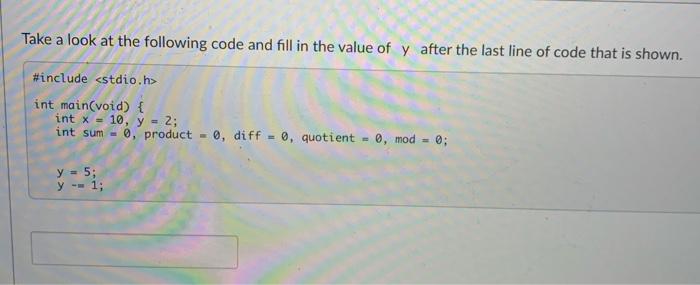
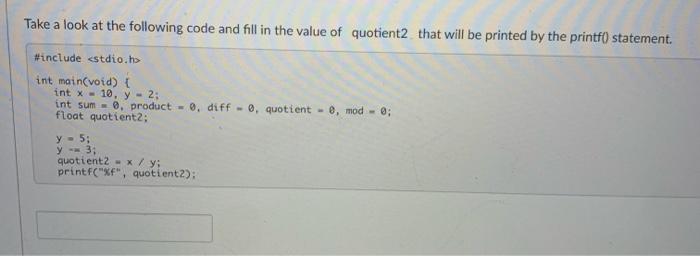
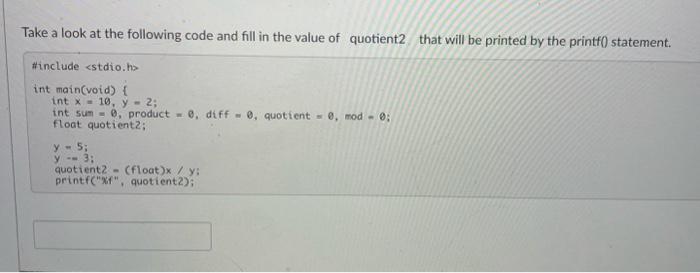
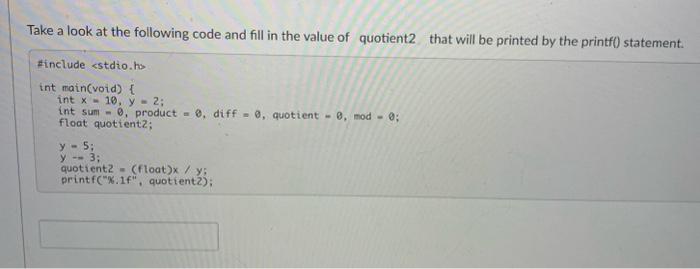
Take a look at the following code and fill in the value of y after the last line of code that is shown. \#include int main(void) \& int x=10,y=2 int sum =0, product =0, diff =0, quotient =0,mod=0; y=5y=1 Take a look at the following code and fill in the value of quotient2 that will be printed by the printf0 statement. \#include x=10,y=2 int sum =0, product =, diff =0, quotient =0, mod =0 float quotientz; y=5; y=3; quotient2 =x/y; printf("8f", quotient2): Take a look at the following code and fill in the value of quotient2 that will be printed by the printf0 statement. \#include h> int main(void) f int x=10,y=2; int 5 um =, product =, diff =, quotient =,mod=; float quotient2; y=5; y=3; quotientz = (float)x / y; printf("xf", quotient2); Take a look at the following code and fill in the value of quotient2 that will be printed by the printf) statement. Finclude estdio.hs int main(void) \{ int x=10,y=2 int sum =0, product =0,diff=0, quotient =0,mod=0 float quotientz; y=5 y=3 quotient2 = (float) /y; printf(" x.1f, quotient2)
Step by Step Solution
There are 3 Steps involved in it

Get step-by-step solutions from verified subject matter experts
 Study Help