







Question: This is for C# using visual Studio Create an app that displays a sales transaction on a form that looks like a sales receipt. The
This is for C# using visual Studio
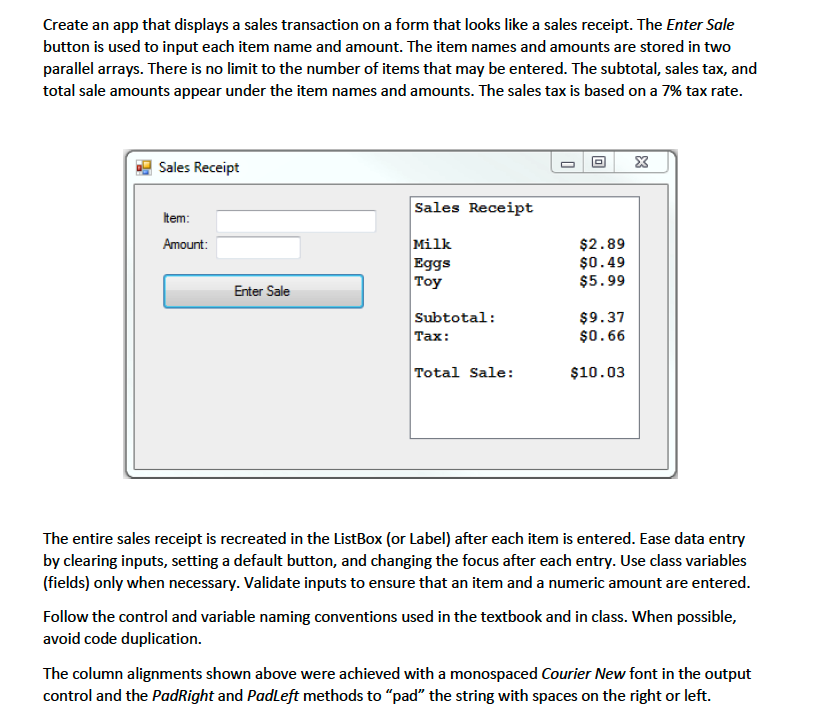
Create an app that displays a sales transaction on a form that looks like a sales receipt. The Enter Sale button is used to input each item name and amount. The item names and amounts are stored in two parallel arrays. There is no limit to the number of items that may be entered. The subtotal, sales tax, and total sale amounts appear under the item names and amounts. The sales tax is based on a tax rate.
The entire sales receipt is recreated in the ListBox or Label after each item is entered. Ease data entry by clearing inputs, setting a default button, and changing the focus after each entry. Use class variables fields only when necessary. Validate inputs to ensure that an item and a numeric amount are entered.
Follow the control and variable naming conventions used in the textbook and in class. When possible, avoid code duplication.
The column alignments shown above were achieved with a monospaced Courier New font in the output control and the PadRight and PadLeft methods to pad the string with spaces on the right or left.Create an app that displays a sales transaction on a form that looks like a sales receipt. The Enter Sale
button is used to input each item name and amount. The item names and amounts are stored in two
parallel arrays. There is no limit to the number of items that may be entered. The subtotal, sales tax, and
total sale amounts appear under the item names and amounts. The sales tax is based on a tax rate.
The entire sales receipt is recreated in the ListBox or Label after each item is entered. Ease data entry
by clearing inputs, setting a default button, and changing the focus after each entry. Use class variables
fields only when necessary. Validate inputs to ensure that an item and a numeric amount are entered.
Follow the control and variable naming conventions used in the textbook and in class. When possible,
avoid code duplication.
The column alignments shown above were achieved with a monospaced Courier New font in the output
control and the PadRight and PadLeft methods to "pad" the string with spaces on the right or left.
Step by Step Solution
There are 3 Steps involved in it
1 Expert Approved Answer
Step: 1 Unlock

Question Has Been Solved by an Expert!
Get step-by-step solutions from verified subject matter experts
Step: 2 Unlock
Step: 3 Unlock
 Study Help