







Question: This is for Python 3 1) To test your code below use: for P, use 1000, for n, use 12, fort, use 10, for r,
This is for Python 3
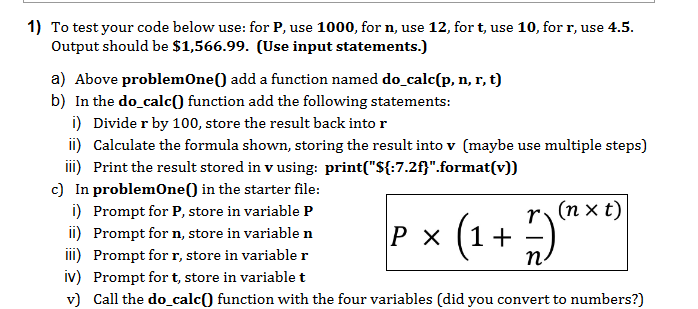
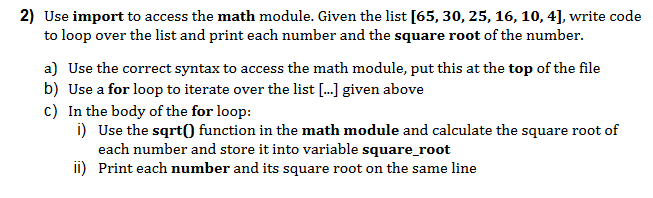
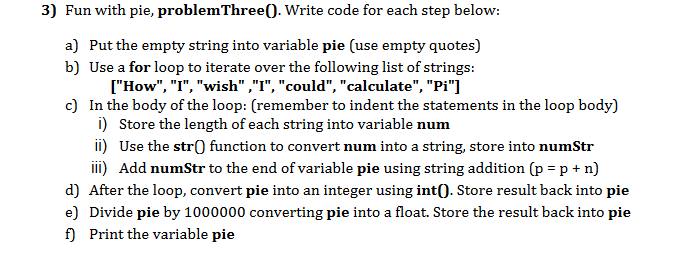
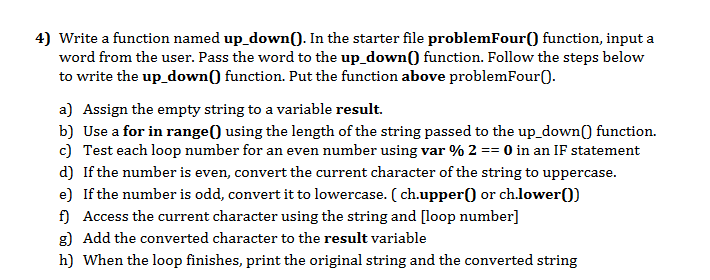
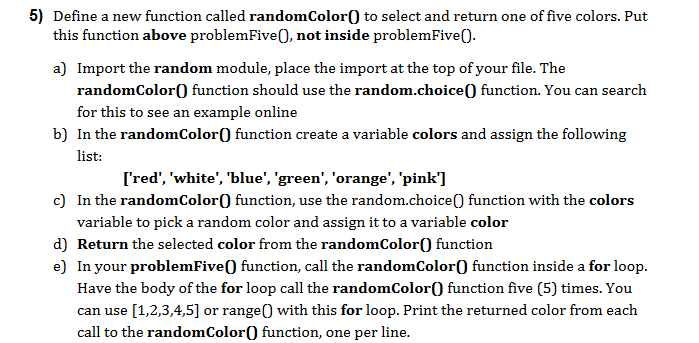
1) To test your code below use: for P, use 1000, for n, use 12, fort, use 10, for r, use 4.5. Output should be $1,566.99. (Use input statements.) a) Above problemOne() add a function named do_calc(p, n, r, t) b) In the do_calc() function add the following statements: i) Divider by 100, store the result back into r ii) Calculate the formula shown, storing the result into v (maybe use multiple steps) iii) Print the result stored in v using print("${:7.2f}".format(v)) c) In problemOne() in the starter file: i) Prompt for P, store in variable P ii) Prompt for n, store in variable n P X (1+ iii) Prompt for r, store in variabler n iv) Prompt for t, store in variablet v) Call the do_calc() function with the four variables (did you convert to numbers?) r (nxt) (1+) 2) Use import to access the math module. Given the list [65, 30, 25, 16, 10, 4], write code to loop over the list and print each number and the square root of the number. a) Use the correct syntax to access the math module, put this at the top of the file b) Use a for loop to iterate over the list [...] given above c) In the body of the for loop: i) Use the sqrt() function in the math module and calculate the square root of each number and store it into variable square_root ii) Print each number and its square root on the same line 3) Fun with pie, problem Three(). Write code for each step below: a) Put the empty string into variable pie (use empty quotes) b) Use a for loop to iterate over the following list of strings: ["How", "I", "wish","I", "could", "calculate", "Pi"] c) In the body of the loop: (remember to indent the statements in the loop body) i) Store the length of each string into variable num ii) Use the str() function to convert num into a string, store into numStr iii) Add numStr to the end of variable pie using string addition (p = p + n) d) After the loop, convert pie into an integer using int(). Store result back into pie e) Divide pie by 1000000 converting pie into a float. Store the result back into pie f) Print the variable pie 4) Write a function named up_down(). In the starter file problemFour() function, input a word from the user. Pass the word to the up_down() function. Follow the steps below to write the up_down() function. Put the function above problemFour(. a) Assign the empty string to a variable result. b) Use a for in range() using the length of the string passed to the up_down() function. c) Test each loop number for an even number using var % 2 == 0 in an IF statement d) If the number is even convert the current character of the string to uppercase. e) If the number is odd, convert it to lowercase. (ch.upper() or ch.lower()) f) Access the current character using the string and loop number] g) Add the converted character to the result variable h) When the loop finishes, print the original string and the converted string 5) Define a new function called randomColor() to select and return one of five colors. Put this function above problemFive(), not inside problemFive(). a) Import the random module, place the import at the top of your file. The randomColor() function should use the random.choice() function. You can search for this to see an example online b) In the randomColor() function create a variable colors and assign the following list: ['red', 'white', 'blue', 'green', 'orange', 'pink'] c) In the randomColor() function, use the random.choice() function with the colors variable to pick a random color and assign it to a variable color d) Return the selected color from the randomColor() function e) In your problemFive() function, call the randomColor() function inside a for loop. Have the body of the for loop call the randomColor() function five (5) times. You can use [1,2,3,4,5] or range() with this for loop. Print the returned color from each call to the randomColor() function, one per line
Step by Step Solution
There are 3 Steps involved in it

Get step-by-step solutions from verified subject matter experts
 Study Help