







Question: THIS IS FOR SQL: Project 1 50 points Requirements You will be creating a database for a theme park. You must create a SQL Script
THIS IS FOR SQL:
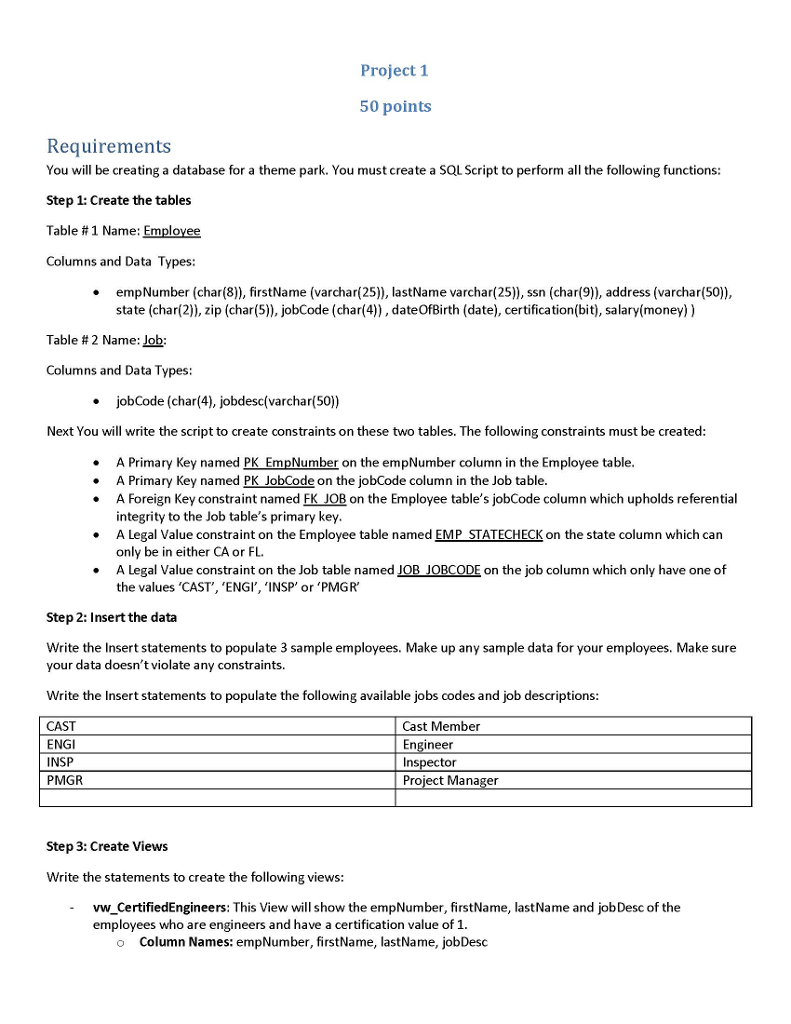
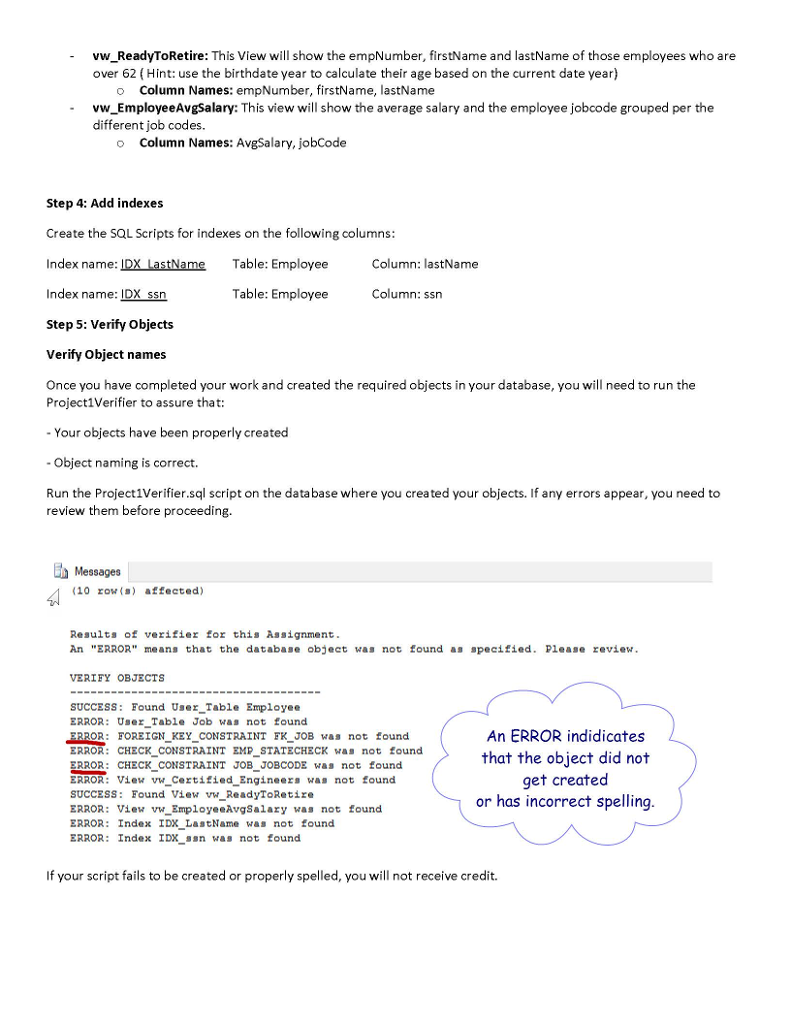
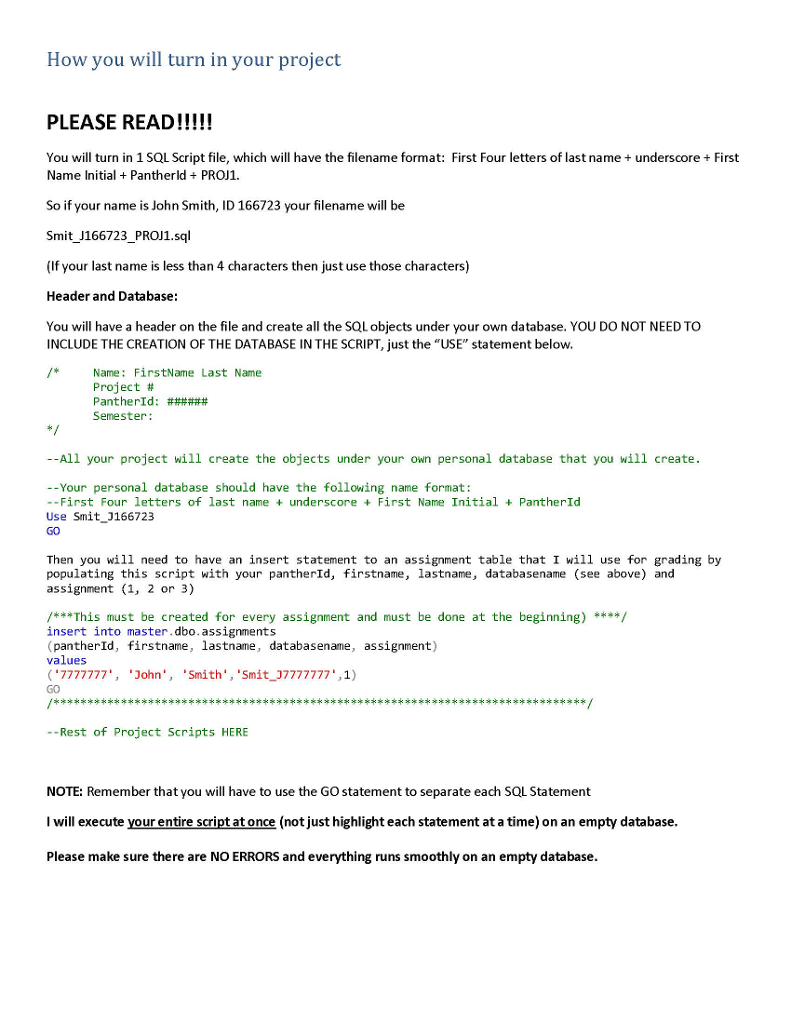
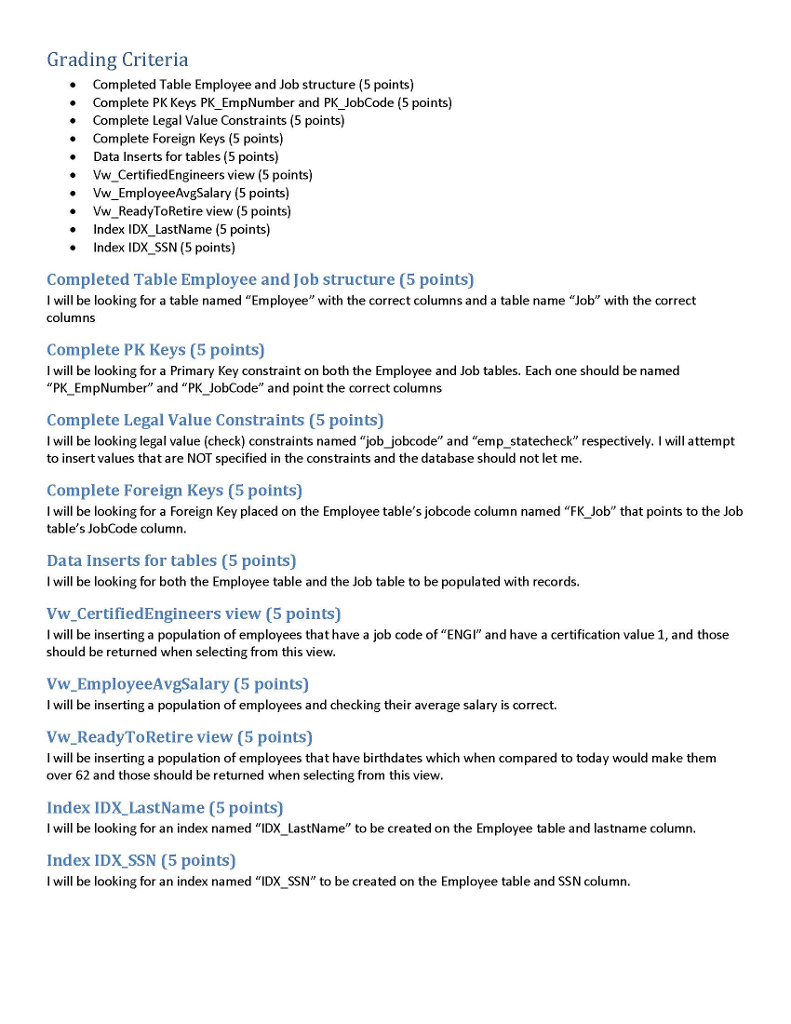
Project 1 50 points Requirements You will be creating a database for a theme park. You must create a SQL Script to perform all the following functions Step 1: Create the tables Table # 1 Name: Employee Columns and Data Types empNumber (char(8)), firstName (varchar(25)), lastName varchar(25)), ssn (char(9)), address (varchar(50)), state (char(2)), zip (char(5)), jobCode (char(4)), dateOfBirth (date), certification bit), salary(money)) Table # 2 Name: Job: Columns and Data Types jobCode (char(4), jobdesc(varchar(50)) Next You will write the script to create constraints on these two tables. The following constraints must be created A Primary Key named PK EmpNumber on the empNumber column in the Employee table A Primary Key named PK JobCode on the jobCode column in the Job table A Foreign Key constraint named FK JOB on the Employee table's jobCode column which upholds referential integrity to the Job table's primary key A Legal Value constraint on the Employee table named EMP STATECHECK on the state column which can only be in either CA or FlL A Legal Value constraint on the Job table named JOB JOBCODE on the job column which only have one of the values 'CAST', ,ENGI,, ,INSP, or ,PMGR, Step 2: Insert the data Write the Insert statements to populate 3 sample employees. Make up any sample data for your employees. Make sure your data doesn't violate any constraints. Write the Insert statements to populate the following available jobs codes and job descriptions CAST ENGI INSP PMGR Cast Member Engineer Inspector Project Manager Step 3: Create Views Write the statements to create the following views vw CertifiedEngineers: This View will show the empNumber, firstName, last Name and jobDesc of the employees who are engineers and have a certification value of 1 - o Column Names: empNumber, firstName, lastName, jobDesc Project 1 50 points Requirements You will be creating a database for a theme park. You must create a SQL Script to perform all the following functions Step 1: Create the tables Table # 1 Name: Employee Columns and Data Types empNumber (char(8)), firstName (varchar(25)), lastName varchar(25)), ssn (char(9)), address (varchar(50)), state (char(2)), zip (char(5)), jobCode (char(4)), dateOfBirth (date), certification bit), salary(money)) Table # 2 Name: Job: Columns and Data Types jobCode (char(4), jobdesc(varchar(50)) Next You will write the script to create constraints on these two tables. The following constraints must be created A Primary Key named PK EmpNumber on the empNumber column in the Employee table A Primary Key named PK JobCode on the jobCode column in the Job table A Foreign Key constraint named FK JOB on the Employee table's jobCode column which upholds referential integrity to the Job table's primary key A Legal Value constraint on the Employee table named EMP STATECHECK on the state column which can only be in either CA or FlL A Legal Value constraint on the Job table named JOB JOBCODE on the job column which only have one of the values 'CAST', ,ENGI,, ,INSP, or ,PMGR, Step 2: Insert the data Write the Insert statements to populate 3 sample employees. Make up any sample data for your employees. Make sure your data doesn't violate any constraints. Write the Insert statements to populate the following available jobs codes and job descriptions CAST ENGI INSP PMGR Cast Member Engineer Inspector Project Manager Step 3: Create Views Write the statements to create the following views vw CertifiedEngineers: This View will show the empNumber, firstName, last Name and jobDesc of the employees who are engineers and have a certification value of 1 - o Column Names: empNumber, firstName, lastName, jobDesc
Step by Step Solution
There are 3 Steps involved in it

Get step-by-step solutions from verified subject matter experts
 Study Help